

Use these steps to work with NozomuNoto PDF planners and notebooks on Supernote. E-readers are best for calm writing, reading, bookmarks, page review, and light annotation, so this guide keeps the setup simple and points out where a tablet app may still be better.
Before you start
- Use page overview for navigation first. Prepare page copies, removals, reordering, or cover changes before transfer; only use built-in page actions after testing on a copied file.
- If the product arrives in a ZIP, extract it first, then transfer the PDF file your e-reader can open.
- After the first step, test one Index link, one writing mark, and one page action before setting up the whole planner.
Reference links
Use these for current app or device help, downloads, updates, vendor support, and manual references.
Use Supernote page actions safely
- Use the NozomuNoto PDF as a Document when contents, bookmarks, annotations, and PDF reading are the important parts.
- As of June 13, 2026, Supernote note-page commands are not the same as rebuilding an imported NozomuNoto PDF planner document.
- For extra template copies, removed pages, reordered pages, or a different cover, prepare a new PDF before transferring it to Supernote. You can use iLovePDF Organize PDF to add, sort, or delete pages for a new working copy.
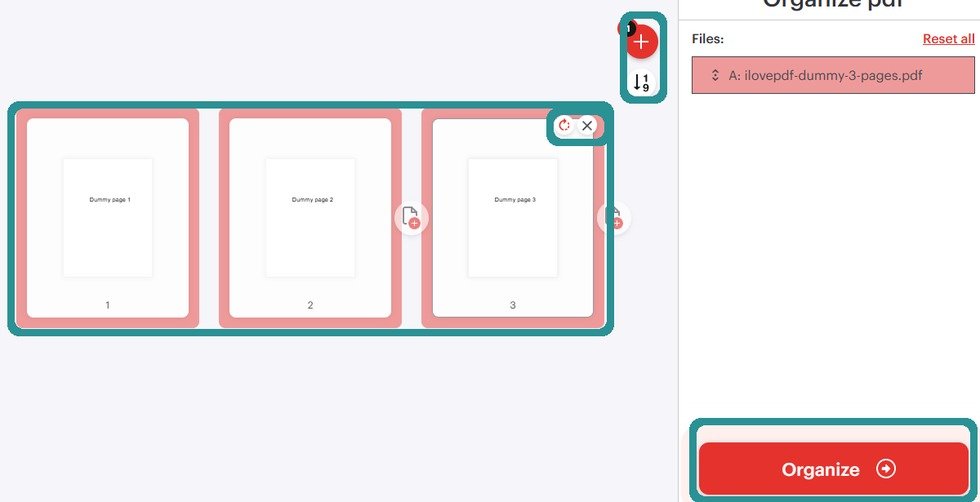
Organize before transferPrepare imported PDF planner page order and extra copies before transfer unless your Supernote document workflow gives an exact safe method. - Use Supernote note-page actions such as add, insert, copy, paste, or delete only inside a regular Supernote notebook or a copied test file.
- After transferring an edited PDF, reopen it as a document and test Contents, Bookmarks, annotations, writing, and the NozomuNoto Index before daily use.
Supernote document boundary
Supernote has strong tools for notes and strong tools for PDF documents, but they are not the same workflow. Keep the NozomuNoto planner as a document unless you intentionally prepared a new PDF copy outside Supernote.