

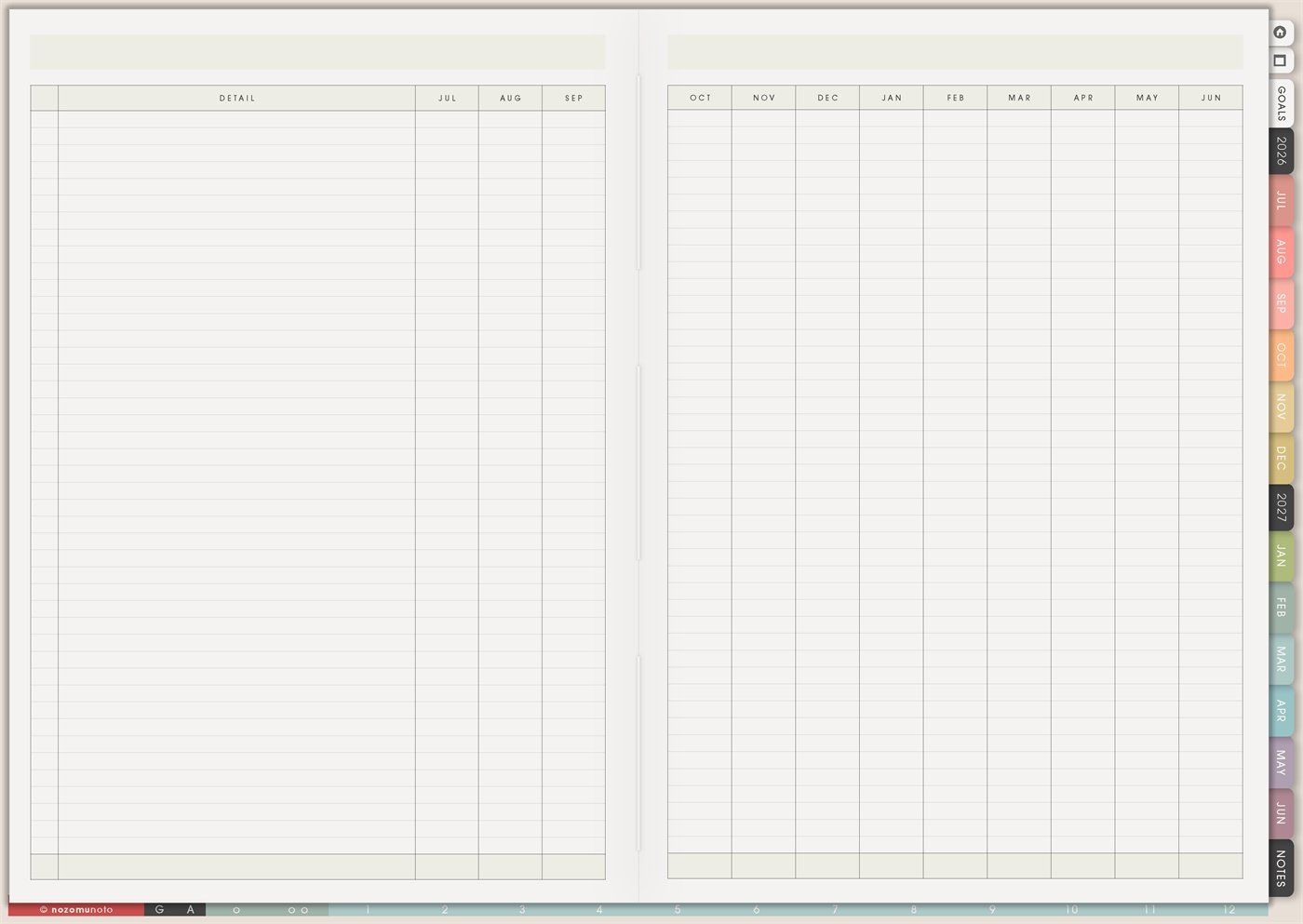
The Yume Techo Yearly Spread is a reusable template for seeing one whole academic year across the months. I use it for plans that are bigger than one week but too practical to leave in my head: bills, renewals, school terms, product launches, appointments, projects, yearly goals, home tasks, and progress I want to notice month by month.
This page is not a replacement for Monthly, Weekly, or Daily pages. I treat it like a yearly control table: one row for the thing I need to remember, then the month columns show when it starts, happens, needs a check-in, or becomes complete.
How to get to this page
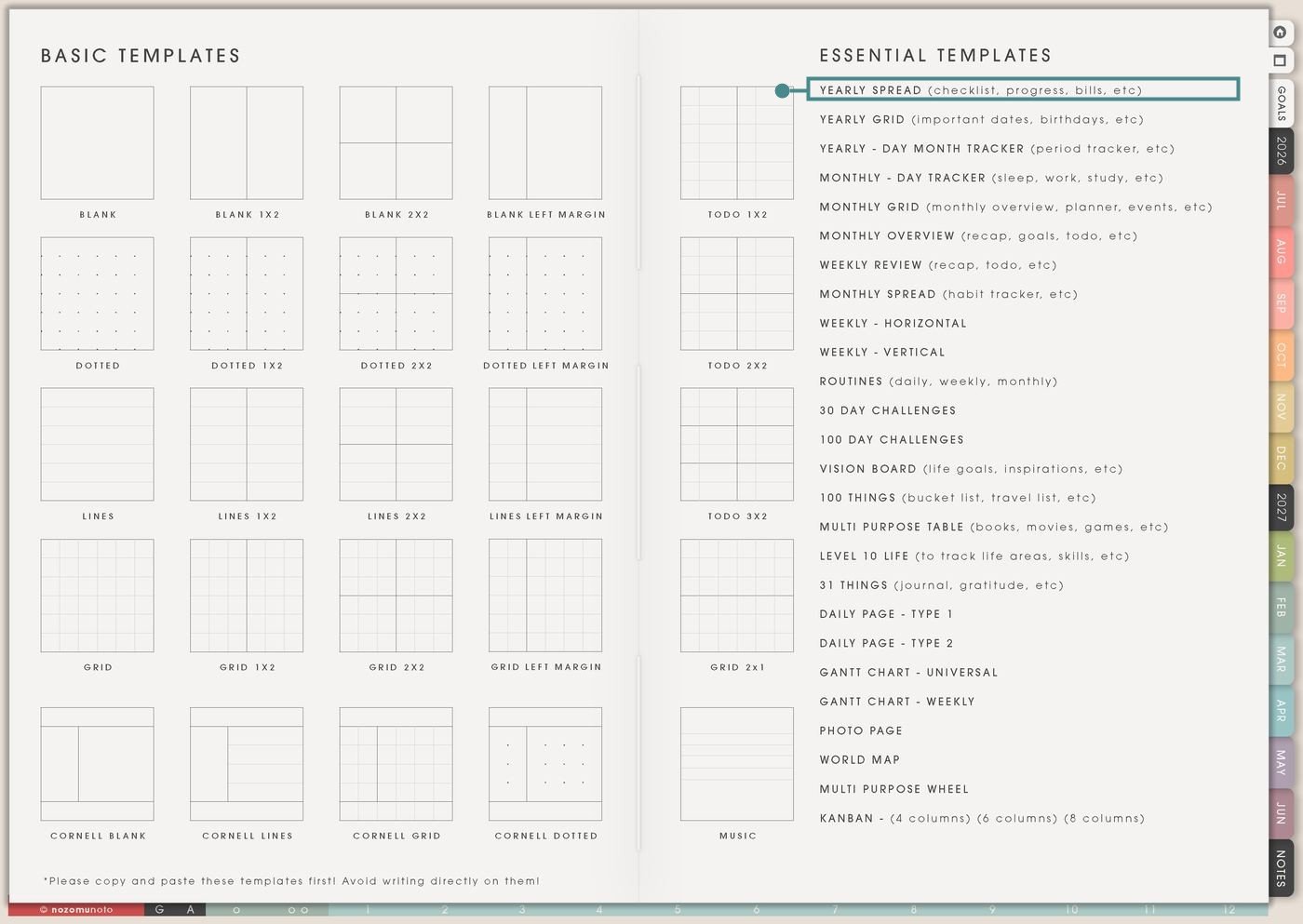
- Open the main Index page: use the planner Index if you feel lost.
- Tap the Template Pages icon: this opens the Template Index, where the reusable clean pages live.
- Tap Yearly Spread: it is the first item under Essential Templates on the right side of the Template Index.
- Copy the page before writing: Yearly Spread is a clean template master. Duplicate it first, then write on the copy.
Before you write: copy the clean Yearly Spread first
Yearly Spread is a reusable template, so keep the original clean. Make one copy for each big purpose, then name or bookmark the copy if your app has that option.
- Open Yearly Spread from Template Index.
- Duplicate or copy the page in your app. Use the page overview, thumbnail view, page manager, or page actions menu.
- Move the copy near the section where it belongs. Put an academic copy near Study pages, a money copy near Finance, a family copy near Home, or a project copy near Work.
- Give the copy a plain name. Helpful names are 2026-2027 School Admin, Annual Bills, Product Launch Year, Health Checkups, or Family Year Plan.
- Then write on the copy. Tiny rule, big relief!
Ways to use this page
1. Academic year and semester planning
Use the Detail column for each class, school form, exam season, tuition deadline, assignment type, club event, or semester task. Use the month columns to mark when each item starts, happens, needs prep, or needs follow-up.
2. Bills, subscriptions, renewals, and yearly admin
This page is very useful for things that repeat outside a weekly rhythm: domain renewals, software subscriptions, insurance, school fees, taxes, membership renewals, medical checkups, car service, or annual family documents.
3. Long projects that move across several months
Use one row for each big project and treat the month boxes as phases. This is easier than hiding a six-month project inside one weekly page.
4. Goal milestones without turning goals into pressure
Use Yearly Spread for goals that need repeated monthly check-ins. Instead of writing one huge goal and hoping motivation survives, give the goal a few small places to return during the year.
5. Home and family maintenance
Use the rows for household tasks that are easy to forget because they are not daily: air filter, emergency bag, seasonal clothes, school supplies, holiday prep, pantry cleanout, birthdays, documents, repairs, and deep cleaning.
6. Health appointments and body-care patterns
Use Yearly Spread for appointments, refills, follow-ups, dental visits, eye checks, therapy review months, lab work reminders, cycle notes, migraine seasons, or energy patterns that are easier to see across months.
7. Content, shop, or small business planning
This page can become a business year map. Use the Detail column for launches, listing refreshes, photo days, email topics, seasonal campaigns, content themes, admin cleanup, or product review cycles.
8. Reading, learning, and skill practice
Use Yearly Spread when learning has a long arc: language study, exam prep, craft practice, Bible study, course modules, piano practice, book clubs, or professional development.
9. Travel and seasonal planning
Use the page for trips, school breaks, family visits, seasonal activities, passport checks, booking windows, packing deadlines, and budget reminders.
10. Memory and proof-of-progress log
Yearly Spread can also hold tiny memory marks. Use it to show when something happened, when a milestone changed, or when a small win deserves to be remembered.
What I usually use it for and how I use it
Related Tips: Template Index ideas shows where the clean Yearly Spread lives, Yearly Goal Overview ideas helps when the yearly row is a goal, Monthly Overview reset helps me review the current month, and Weekly page setup helps me move the next action into the current week.
Tips for using this template
- Give the copy one clear purpose. Make one Yearly Spread for school, one for annual bills, one for a long project, or one for health appointments. Mixing every life area can make the table harder to scan.
- Keep tiny tasks off the yearly page. Clean desk, reply to message, and buy shampoo belong on Weekly, Daily, or a list page. Yearly Spread works best for things that need month-by-month visibility.
- Use month boxes as cues. Short marks like book, pay, prep, review, renew, start, finish, or follow up are easier to read than full appointment notes.
- Add a small key. Dot means planned, check means done, arrow means moved, and star means important. A tiny key saves future confusion.
- Review the current month and next month. I scan only what is close enough to act on. The whole year can stay visible without becoming this week’s workload.
- Start with five rows. Bills, health, school or work, home, and one personal goal are enough for the first copy. Add more after the first monthly review.
Keep yearly details safe
Yearly Spread can include school deadlines, tax months, medical appointments, family documents, travel plans, bills, subscriptions, client launches, shop plans, and private goals. Keep account numbers, passwords, full client details, private family information, medical records, financial documents, addresses, and sensitive school or work files in a secure place outside the planner. In Yume Techo, use safe labels like renewal, health appointment, family document, tax prep, trip booking, launch review, or file to check.
Tips for using this page
- Choose the one part of this page that helps the current week instead of trying to fill everything at once.
- Move one small next action to Weekly or Daily so the page changes what happens next.
- Keep the page easy to return to by linking it from Index, favorites, bookmarks, or the related planner section.
Final thought
Yearly Spread is best when it gives the year a little shape without demanding a perfect plan. Copy the clean template, choose one clear purpose, fill only the rows that need a month-by-month view, and let the page become a steady yearly reminder. I hope it helps the big things appear early enough to handle!
Need exact app steps for copying pages?
If you need the exact buttons for duplicating, moving, or bookmarking this template in your app, use the Help Center app guide for your device.