

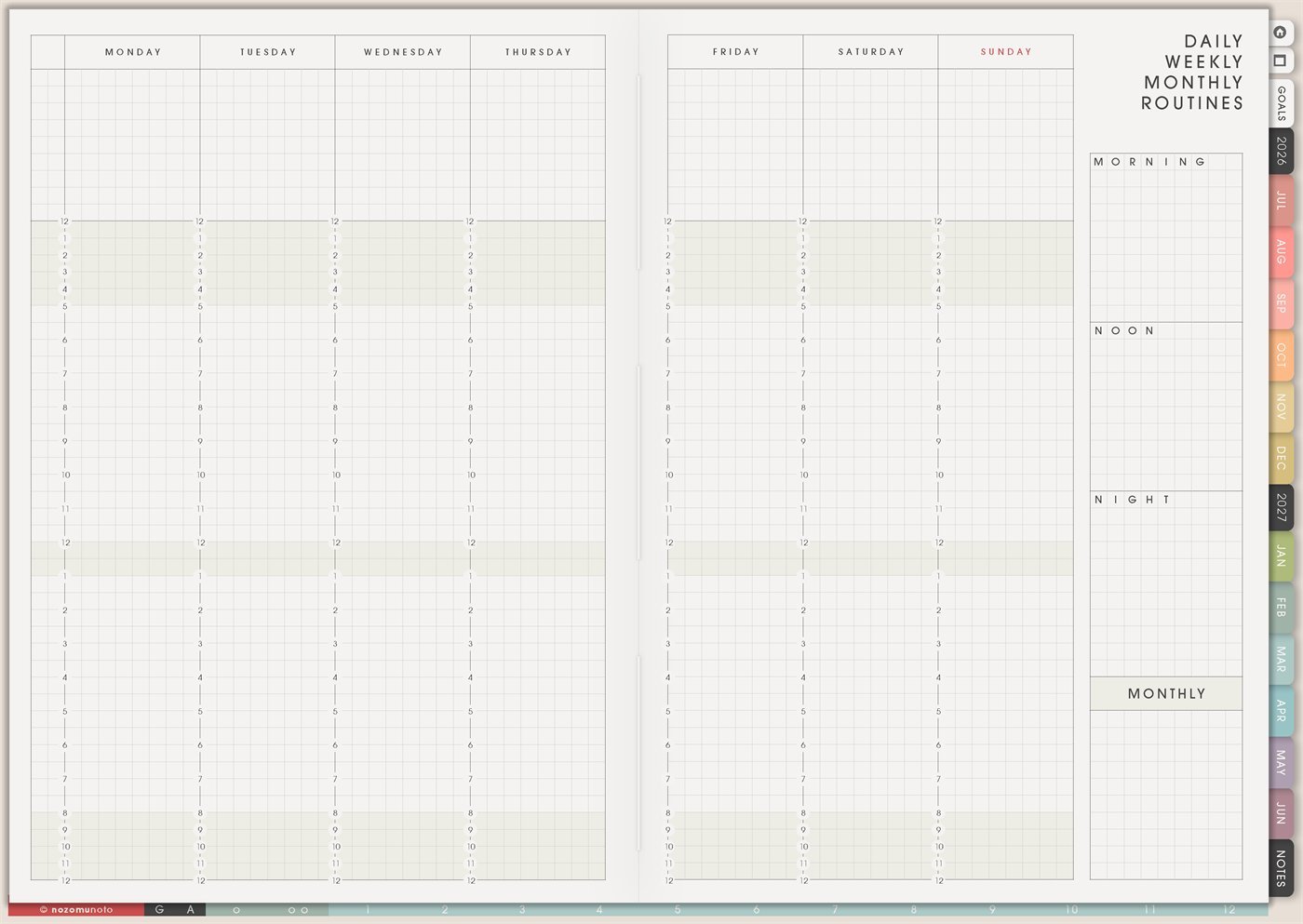
The Yume Techo Routines page is a reusable routine-building page for daily, weekly, and monthly rhythms. It has a weekly view across Monday to Sunday, plus separate boxes for Morning, Noon, Night, and Monthly routines. Use it when everyone needs a steady default plan for repeating things instead of rebuilding the same decisions every day.
This page is not only a habit tracker. It is a place to write the routines that help the week: morning start, midday reset, bedtime close, weekly home rhythm, work shutdown, study blocks, meal prep, body care, family chores, monthly admin, and low-energy backup versions.
How to get to this page
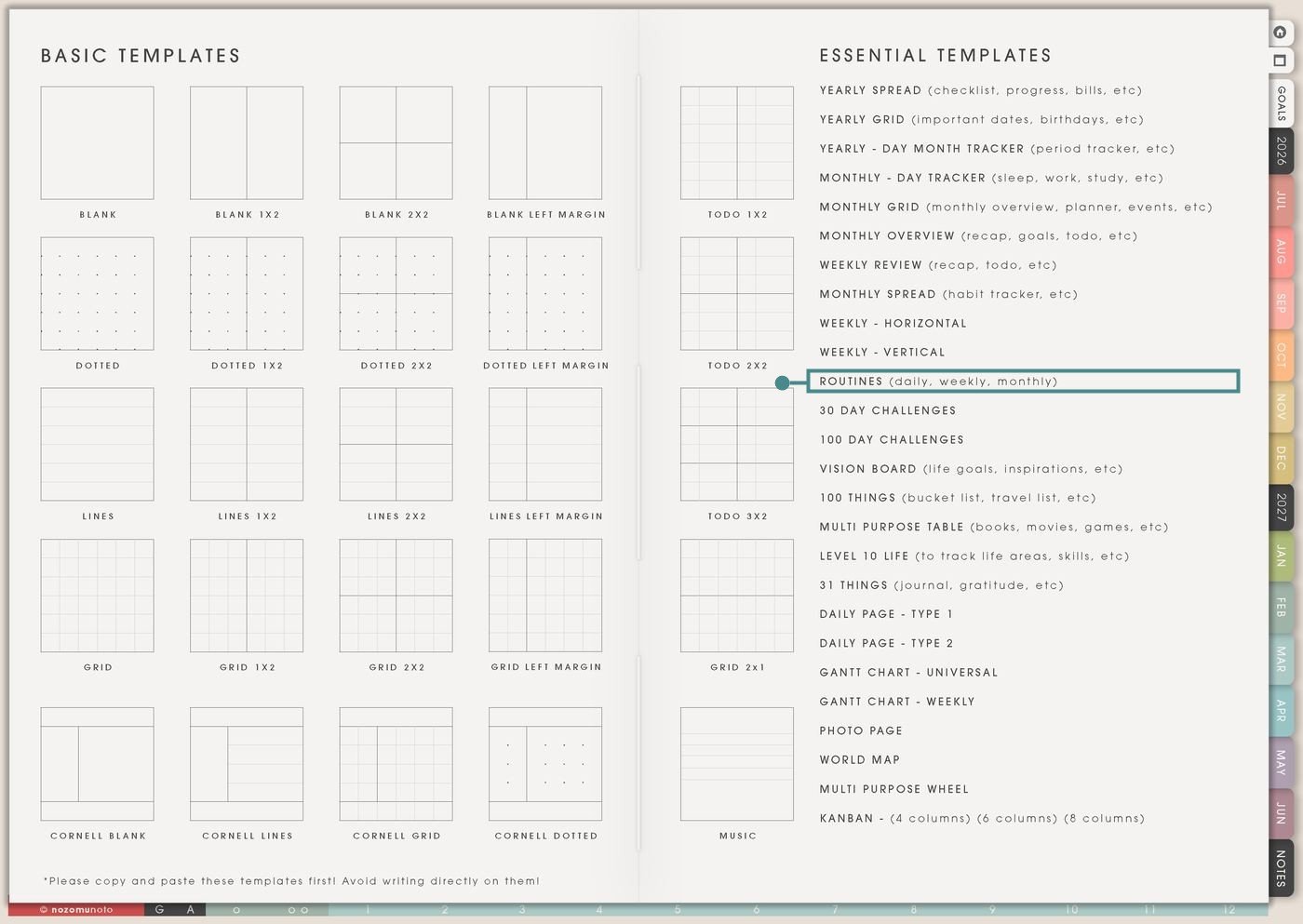
- Open the main Index page: use the planner Index if you need to return to the map.
- Tap the Template Pages icon: this opens the Template Index with reusable clean pages.
- Tap Routines: it is under Weekly – Vertical in the Essential Templates list.
- Copy the page before writing: this is a clean template master. Duplicate it first, then write on the copy.
Before you write: copy the clean Routines page first
Routines is an Essential Template Page. Keep the original clean and make a copy for the season, month, week, home rhythm, school term, work season, or reset system you want to build.
- Open Routines from Template Index.
- Duplicate or copy the page in your app. Use the page overview, thumbnail view, page manager, or page actions menu.
- Name the copy by purpose. Examples: School Morning Routine, Low-Energy Week, Home Reset, Work Shutdown, Ramadan Routine, Exam Season Routine, or Monthly Admin.
- Write the tiny version first. A routine that works on a tired day is more useful than a perfect routine that disappears.
- Connect routines to real moments. Use cues like after coffee, after lunch, before shower, after school pickup, Friday shutdown, Sunday reset, or payday.
Ways to use this page
1. Morning routine that starts the day slowly
Use the Morning box for the first few actions that make the day easier. Keep it short enough that it can happen before messages, errands, school, work, or family needs take over.
2. Noon or midday reset
Use the Noon box for a small reset that catches the day before it runs away. This works well for lunch breaks, school breaks, work-from-home days, or any day that needs a second start.
3. Night routine that helps tomorrow
Use the Night box for the routine that closes today and makes tomorrow less hard. This is especially useful for school bags, work bags, chargers, medicine, kitchen reset, clothes, and tomorrow’s first task.
4. Weekly reset routine
Use the Monday to Sunday columns for the repeated weekly rhythm. This is where you place laundry day, grocery day, planning day, review day, cleaning loop, admin hour, content day, or family reset.
5. Monthly admin routine
Use the Monthly box for repeated checks that matter outside the weekly rhythm. Monthly routines are easy to forget because they are not part of daily life.
6. Home and family routines
Use Routines for repeat home helps that carry a lot of invisible work. Write the normal version and the minimum version, especially for busy family weeks.
7. Study or school routine
Use the weekly columns for recurring study times and the routine boxes for how to start and finish each study session. This helps students who know they need to study but get stuck at the opening step.
8. Work start and work shutdown routine
Use Routines to reduce work-start friction and stop work from leaking into the rest of the day. This is helpful for home work, small business work, customer help, content work, and admin-heavy weeks.
9. Low-energy or ADHD-friendly default routine
Use Routines to write a version for days when motivation, memory, or energy is low. The backup version is not a failure plan. It is the plan that keeps the door open.
10. Planning routine so the planner gets opened
Use the page to create a tiny routine for using the planner itself. A planner works better when opening it has a cue, not when everyone has to remember it from nothing.
What I usually use it for and how I use it
Tips for using this page
- Write three versions: full, medium, and tiny. Full can be the ideal. Medium is the normal busy-day version. Tiny is the version that keeps the routine alive with two or three actions.
- Attach the routine to something that already happens. After coffee, open planner. After school pickup, unpack bag. Before charger, check tomorrow. A cue makes the routine easier to find.
- Choose the routine that solves one real problem. If mornings are hard, make the night routine about tomorrow. If meals are hard, make the routine about food. If work leaks late, make the routine about shutdown.
- Give the monthly routine a home on Monthly Grid, Monthly Overview, or the first weekend of the month. The Routines page stores the checklist; a dated page tells you when to use it.
- Add a restart rule. "If I miss it, I do the tiny version next." Or "Open planner, choose today, do one help action." Routines need return paths, not perfect streaks.
- Use the weekly columns to place the routine on real days. If Sunday is full, move reset to Friday afternoon or Monday morning. The routine should fit the week, not fight it.
- Undo if possible. If not, bring in a fresh clean copy from the original planner file. After that, make "copy first" the first step every time you use an Essential Template Page.
Final thought
I hope this helps you choose one small next step! Routines are useful when they make life easier to restart. Copy the clean page, write tiny versions first, connect each routine to a real cue, and use the weekly columns to place routines where they can actually happen. The best routine is not the most impressive one. It is the one everybody can return to!
Need exact app steps for copying pages?
If you need the exact buttons for duplicating, moving, or bookmarking this template in your app, use the Help Center app guide for your device.