

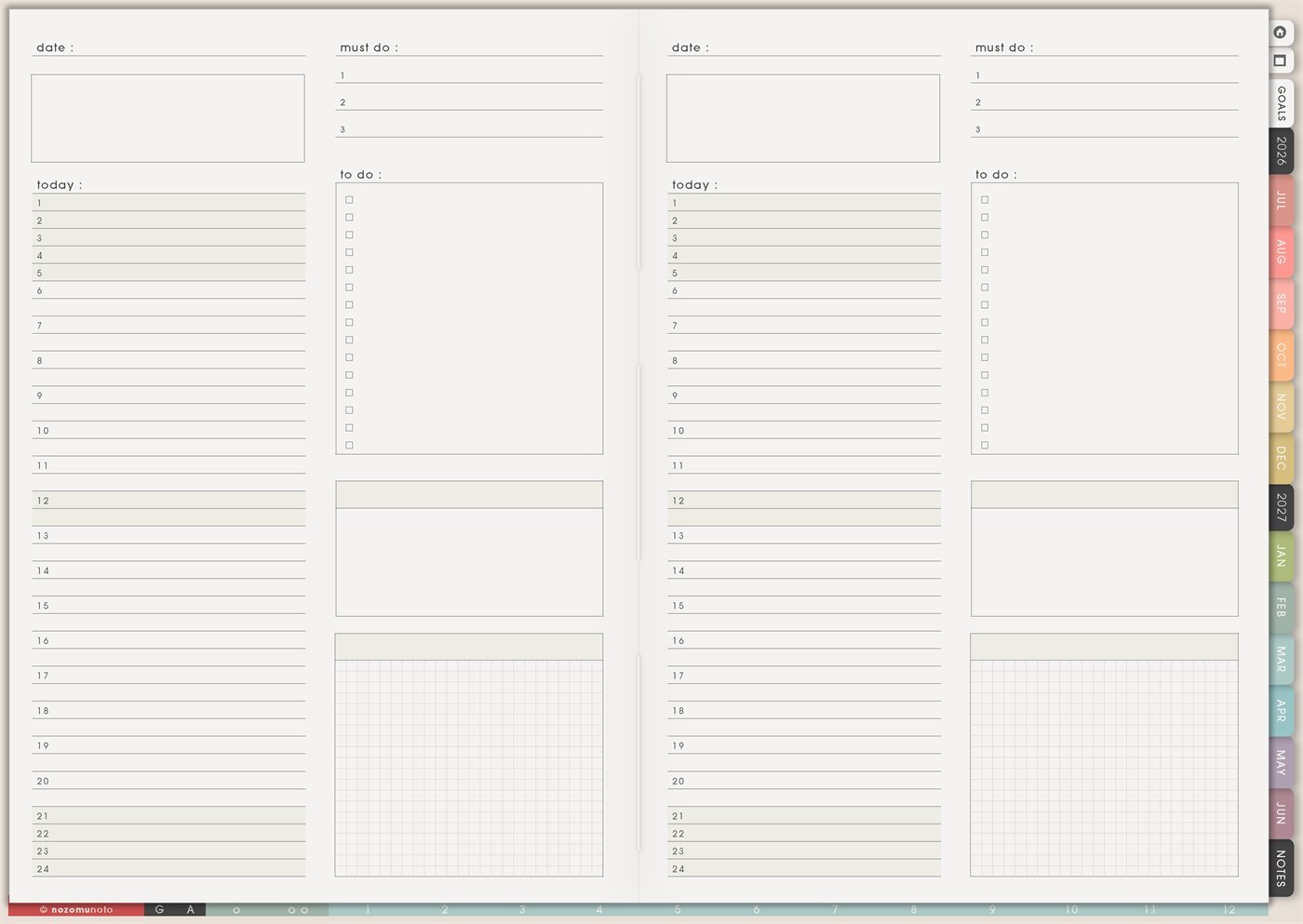
The Yume Techo Daily Page – Type 2 is a reusable daily page with the same core structure as Type 1: date, top note box, Today timeline, three Must Do lines, To Do checklist, and one note box. The difference is the large grid space at the bottom right. Use this page when the day needs a visual workspace, sketch area, diagram, mini table, map, layout, or messy thinking space beside the daily plan.
Choose Type 2 when words alone are not enough. If a day needs drawing, grouping, spacing, arrows, boxes, or a quick visual map, the grid area gives that thinking somewhere to land.
How to get to this page
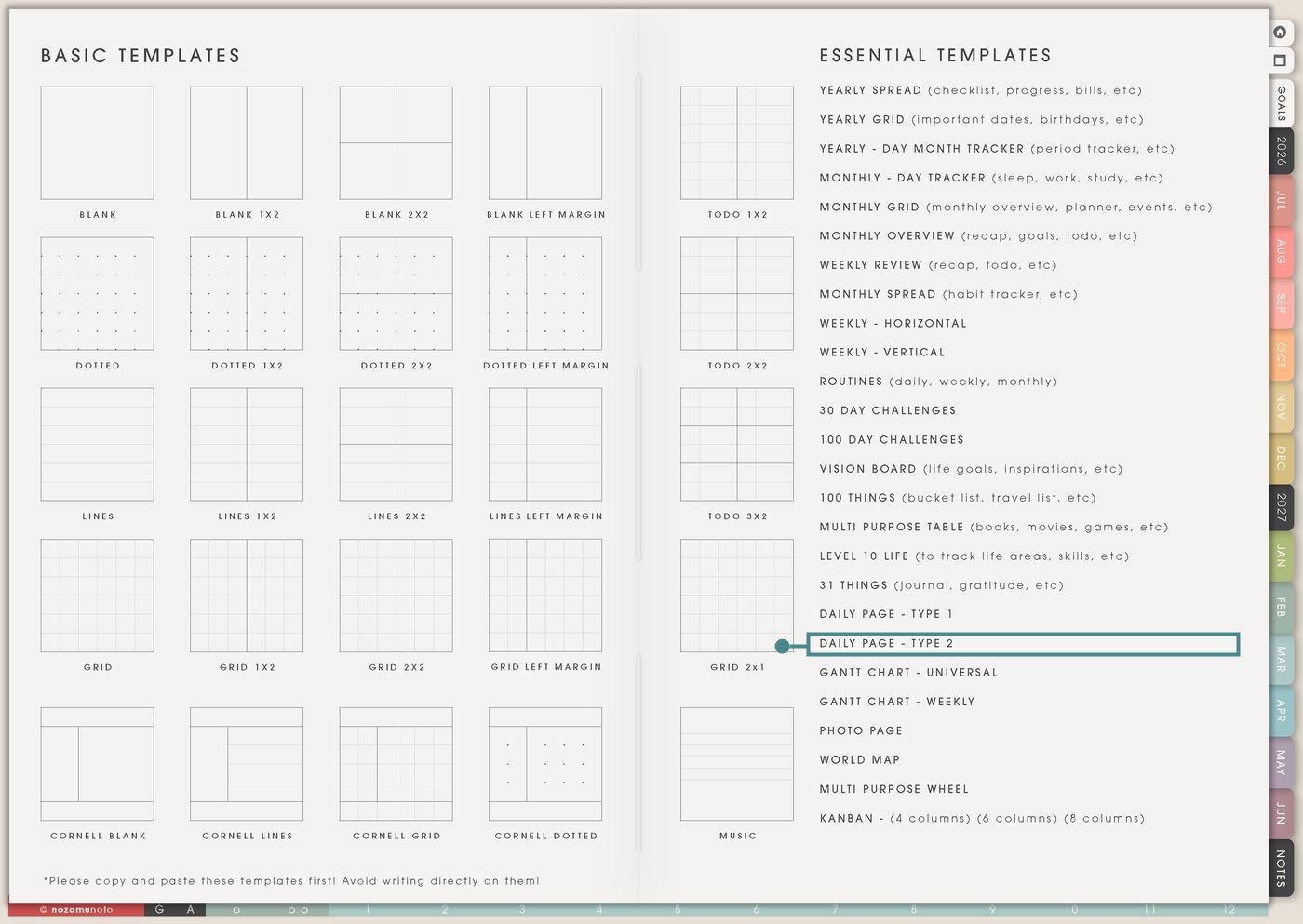
- Open the main Index page: use the planner Index if you need to return to the map.
- Tap the Template Pages icon: this opens the Template Index with reusable clean pages.
- Tap Daily Page – Type 2: it is under Daily Page – Type 1 in the Essential Templates list.
- Copy the page before writing: this is a clean template master. Duplicate it first, then write on the copy.
Before you write: decide what the grid is for
Daily Page – Type 2 is an Essential Template Page. Keep the original clean and make a copy for the day or workflow you want to plan.
- Open Daily Page – Type 2 from Template Index.
- Duplicate or copy the page in your app. Use the page overview, thumbnail view, page manager, or page actions menu.
- Name the copy by purpose. Examples: Study Diagram Day, Content Sketch Day, Room Layout Day, Brain Dump Day, Meeting Map, Homeschool Day, or Project Sprint.
- Fill fixed time first. Use the Today timeline for anchors, appointments, class, work, meals, travel, and rest.
- Give the grid one job. The grid can hold a sketch, diagram, table, map, storyboard, habit mini-chart, or brain dump. One grid job keeps the page readable.
Ways to use this page
1. Visual daily planning page
Use Type 2 when the day needs both schedule and visual thinking. The timeline keeps time visible, while the grid holds the messy part that would not fit nicely in a checklist.
2. Study diagram or problem-solving day
Use the grid for diagrams, formulas, timelines, vocabulary maps, chapter summaries, math steps, science drawings, or exam topic layouts.
3. Project sketch or creative workday
Use Type 2 when a project needs a quick visual plan. The grid can hold layout ideas, thumbnails, product photo plans, design notes, or a tiny project map.
4. Brain dump sorted into boxes
Use the grid for a brain dump that needs visual sorting. Draw boxes for Today, Later, Waiting, Errands, Home, Work, School, or Ideas.
5. Room, desk, bag, or packing layout
Use the grid when physical space matters. It can hold a room layout, desk reset plan, bag checklist, packing map, storage idea, or cleaning zone sketch.
6. Content storyboard or photo plan
Use the grid for visual content planning. It can hold a storyboard, photo sequence, video outline, pin layout, reel shots, or before/after images.
7. Mini tracker for one day
Use the grid as a small same-day tracker when you need to notice patterns inside one day without making a full monthly tracker.
8. Meeting, class, or workshop notes
Use Type 2 for events where notes and actions happen together. The timeline shows the event, Must Do holds the follow-up, and the grid catches the structure of the conversation.
9. Homeschool, tutoring, or lesson day
Use the grid for learning activities, practice problems, reading response, drawing, experiment notes, or a mini lesson plan.
10. Decision map for a complicated day
Use the grid when a day has choices, tradeoffs, or moving parts. Drawing the options can steady the decision faster than rewriting a long list.
What I usually use it for and how I use it
Tips for using this page
- Give the grid a job before decorating. It can be a map, sketch, diagram, table, tracker, or decision box. Decoration is fine after the function is clear.
- After using the grid, circle one next action and copy it into Must Do or To Do. A visual plan becomes useful when one part turns into a real step.
- Use the grid for today's view only. Move bigger planning to Kanban, Multi Purpose Table, Goal Planner, or a project page. Daily Type 2 should help the day, not replace the project system.
- Fill the Today timeline before the grid. Fixed anchors protect the day. The grid should live beside reality, not instead of it.
- Use the grid for structure, not tiny paragraphs. Put long writing on Notes, Journal, or a blank template page. Keep grid labels short.
- Choose Type 1 for mostly written daily planning. Choose Type 2 when the grid has a real job. The right page is the one that lowers friction.
- Undo if possible. If not, bring in a fresh clean copy from the original planner file. After that, make "copy first" the first step every time you use an Essential Template Page.
Final thought
I hope this helps you choose one small next step! Daily Page – Type 2 is useful when the day needs both a plan and a visual thinking space. Copy the clean page, put fixed time and must-do tasks in place first, then let the grid hold the sketch, map, diagram, or messy idea that helps the day make sense. Use the grid when it helps, and choose Type 1 when simple writing is enough!
Need exact app steps for copying daily pages?
If you need the exact buttons for duplicating this template, moving the copied page, importing Yume Techo, or using hyperlinks, use the Help Center app guide for your device.