

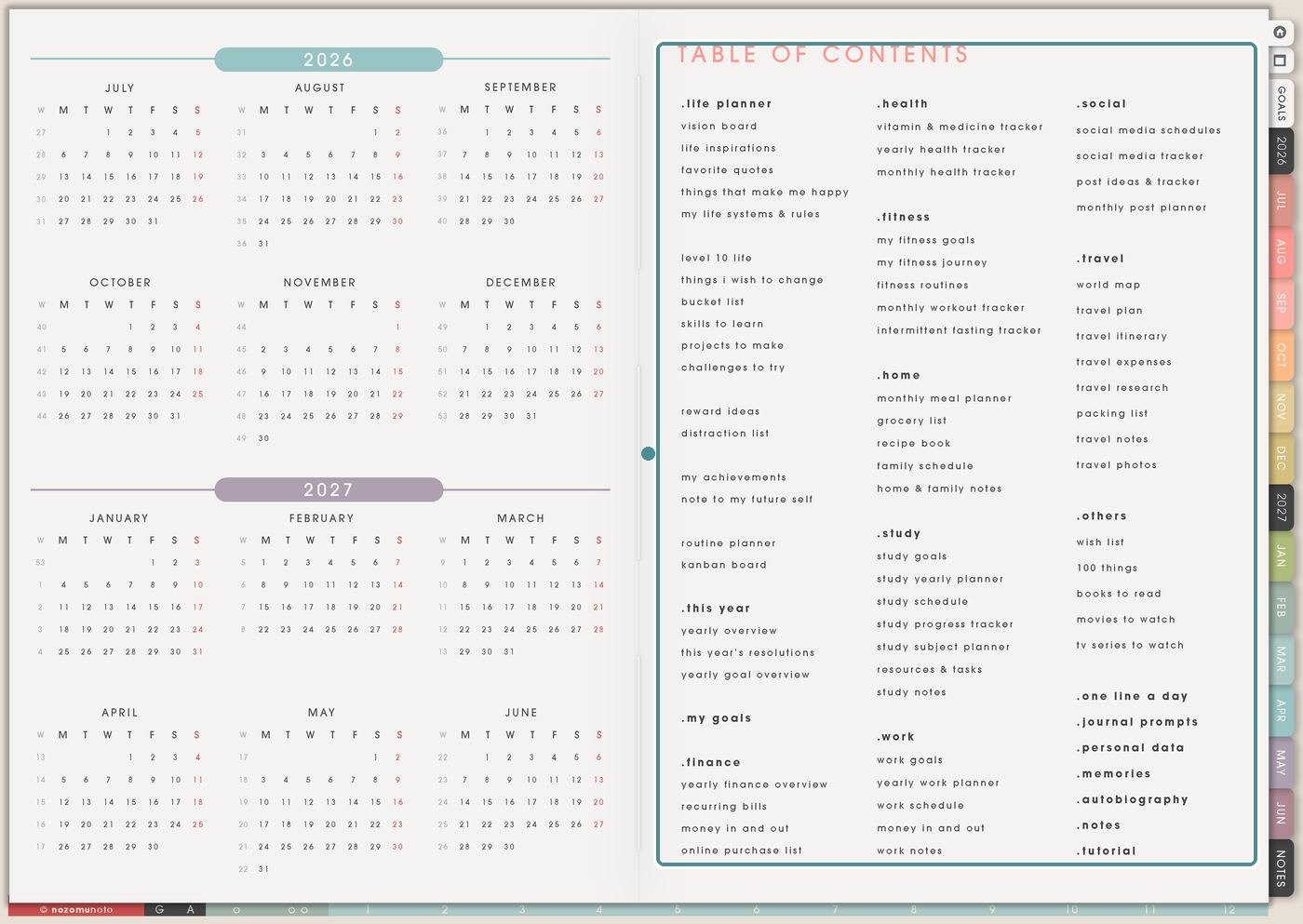
The Planner Pages area is the big practical library inside Yume Techo. This article is a map for choosing the right page without opening every section first. Use it when you want money pages, health pages, study pages, work pages, social media pages, travel pages, lists, memories, and routine pages to have their own home.
These Planner Pages are linked from the main Index / Table of Contents. Tap the page name to open it. You can write on these pages directly. If you want another copy for a second class, trip, project, or month, duplicate the page in your app first.
Ways to use this index
-
1. Finance pages
Use Yearly Finance Overview, Recurring Bills / Subscriptions, Money In And Out, and Online Purchase List when money details need a clear place instead of living in Monthly or Weekly.
-
2. Health and fitness pages
Use Vitamin & Medicine Tracker, Yearly Health Tracker, Monthly Health Tracker, Fitness Journey, Fitness Routines, and workout trackers when body-care details need more room than a dated page can give.
-
3. Home and food pages
Use Monthly Meal Planner, Grocery List, Recipe Book, and Family Schedule when repeat home decisions need a place everyone can return to.
-
4. Study and work pages
Use Study Yearly Planner, Study Schedule, Subject Planner, Resources / Tasks, Work Yearly Planner, Work Schedule, and Social Media pages when projects need their own space before one small action moves to Weekly.
-
5. Travel, lists, and memory pages
Use Travel Planner, Travel Research, Packing List, Wish List, 100 Things, Books To Read, Memory Photos, Best Life Moments, and Top 30 Media when ideas need storage before they become a plan.
Start with the article that matches the current job: Finance pages for money details, Study pages for classes and assignments, Travel pages for trip planning, and Weekly for the next action that belongs this week.
What I usually use it for and how I use it
Tips for using the Planner Pages Index
- Choose one real situation first. If the current problem is bills, open Finance. If the current problem is assignments, open Study. Let the other sections wait.
- Keep Planner Pages connected to the current week. End each useful page with one next action, then move that action to Weekly or Daily.
- Make active pages easy to find again. Add the active page to favorites or bookmarks in your app, or write a tiny note on Index that tells you where the active copy lives.
When you need setup help
If the technical step is the problem, open the NozomuNoto Help Center for app-specific steps. The Help Center is better for importing Yume Techo, testing hyperlinks, duplicating pages, using bookmarks, changing covers, and working with stickers.
Tips for using this page
- Choose the one part of this page that helps the current week instead of trying to fill everything at once.
- Move one small next action to Weekly or Daily so the page changes what happens next.
- Keep the page easy to return to by linking it from Index, favorites, bookmarks, or the related planner section.
Final thought
The Planner Pages Index is there so every detail can stop crowding one weekly spread. I hope this page helps you choose the page that matches the job, keep the active page easy to find, and bring only the next action back to the dated planner!