

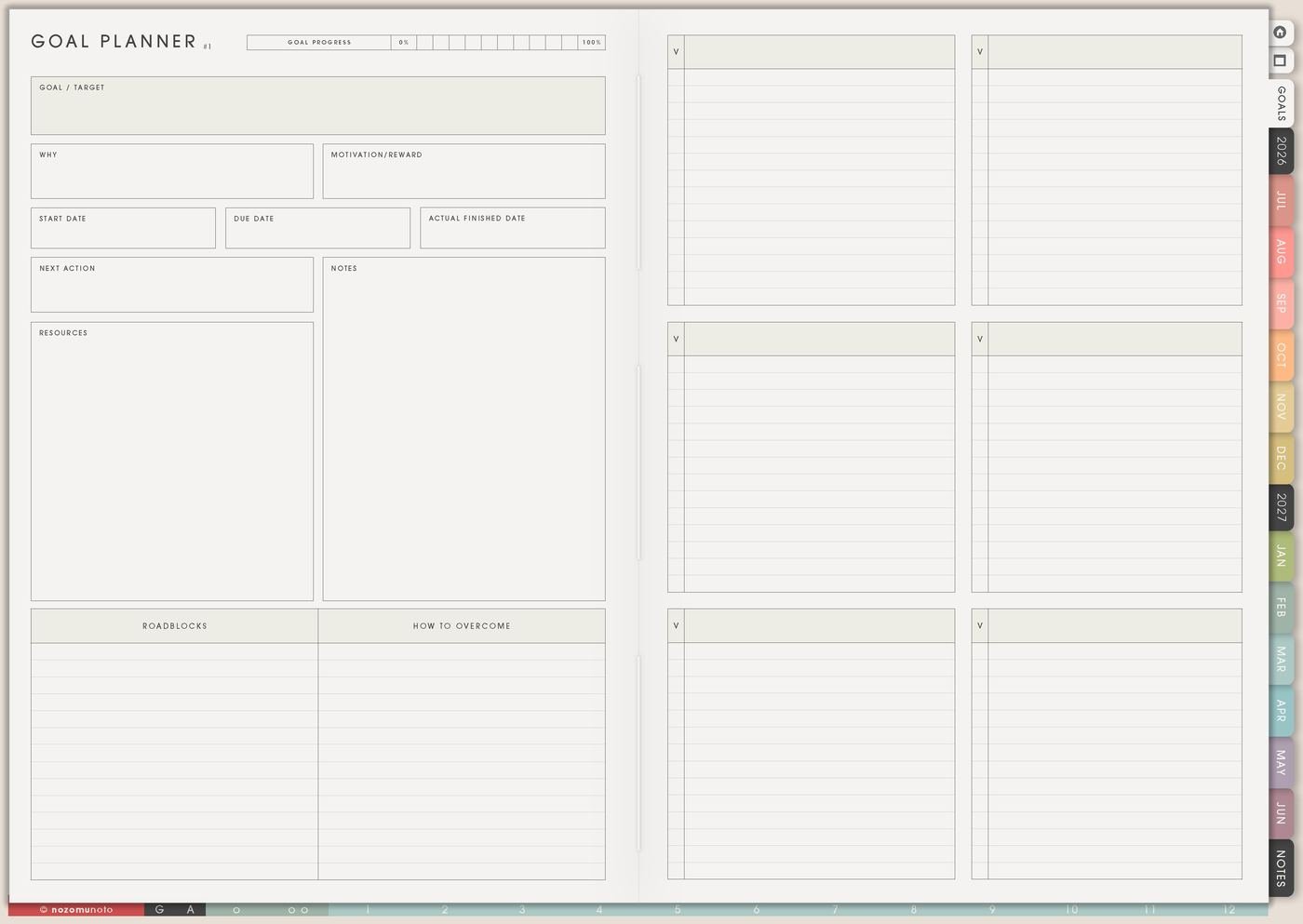
Goal Planner has two connected parts. The Goal Planner Index sits on the right side of the Life Planner Index and helps me track the 12 goal pages. The 12 goal pages give individual goals enough room for the reason, plan, roadblocks, helpers, next actions, and review notes.
I leave most of the 12 goal pages blank until they have a real job. I treat them as available goal rooms and open one page when a goal needs more than a single Weekly task.
How to fill the Goal Planner Index
- Use the index as the map for Goal 1 to Goal 12. Each line points to one goal page.
- Write a short goal name. Use names like Shop Photos, Emergency Fund, Study Routine, Morning Reset, Product Launch, Family Trip, Course Finish, or Home Reset.
- Add the goal area. Use simple labels like work, money, study, home, health, faith, family, travel, creative, shop, or personal.
- Mark the status. Active, later, waiting, paused, done, or blank is enough.
- Add a review place. Choose Weekly Review, Monthly Overview, or Yearly Goal Overview so the goal has somewhere to return.
- Leave unused goal rows empty. Empty pages are not wasted. They are space for later goals.
How to use the 12 goal pages
Each goal page should hold one goal. If two goals have different finish lines, roadblocks, or weekly actions, give them different pages. If something is only a small task, keep it on Weekly instead.
- Goal pages 1 to 3: use these for goals that are active or near-future.
- Goal pages 4 to 6: use these for school, work, shop, money, home, health, or family goals that need their own steps.
- Goal pages 7 to 9: use these for seasonal goals, creative goals, product goals, or goals waiting on information, money, helpers, or timing.
- Goal pages 10 to 12: keep these for later-year goals, redesigned goals, spare pages, or goals that appear after the year begins.
How to fill each goal page
- Goal name: copy the short name from the Goal Planner Index.
- Why it matters: write the reason in words that will still make sense on a tired day.
- Finish line: decide what complete enough will look like.
- Starting point: write where the goal is now without turning it into a judgment.
- Milestones: split the goal into a few visible stages.
- Roadblocks: name what may get in the way.
- Helpers: pair each roadblock with help, a smaller version, a template, a reminder, a person, or a better time.
- Resources: list tools, people, files, money, examples, tutorials, or planner pages that can help.
- Next action: choose one action small enough to move to Weekly.
- Review note: write when to check the goal again and what question to ask.
Examples for the 12 goal pages
Goal 1: Shop Photos. Finish line: update the main listing images. Roadblock: too many versions. Helper: choose one listing first. Weekly action: pick the first five images to replace.
Goal 2: Study Routine. Finish line: review notes three times a week for one month. Roadblock: starting too late. Helper: five-minute review after lunch. Weekly action: schedule two review blocks.
Goal 3: Emergency Fund. Finish line: save the first target amount. Roadblock: surprise spending. Helper: weekly money check. Weekly action: choose one amount for this month.
The other goal pages can stay blank, hold later goals, or wait until Yearly Goal Overview shows that a goal is ready for its own page.
What I usually use it for and how I use it
Related Tips: Life Planner Index shows where the Goal Planner Index sits, Yearly Goal Overview helps me choose which goals belong in which season, Weekly page setup helps me move one next action forward, and Resolutions page ideas helps when a goal begins as a fresh-start promise.
Tips for using this page
- Keep the index light. Name only active or near-future goals. Mark the rest as later or leave them blank.
- Give one page one finish line. If one page says fitness, money, work, study, and home reset, choose the goal that needs attention now and move the others to separate goal pages or Yearly Goal Overview.
- Write what complete enough means. Use a visible finish line: update one listing, walk twice a week, review notes three times, reset one room, or save the first target amount.
- Pair each roadblock with a helper. If the roadblock is tired, too busy, no time, confused, or too many ideas, write a smaller action, morning block, checklist, Help Center step, timer, template, or person to ask.
- Let Weekly carry only the next action. Keep the full plan on Goal Planner. Move one verb-based action to Weekly: outline, test, sort, email, save, walk, review, book, or pay.
Keep private goal details safe
Goal pages can include money, health, school, work, shop, family, travel, faith, and private personal goals. Keep full account details, passwords, client information, private family details, medical documents, financial records, addresses, and sensitive relationship notes in a secure place outside the planner. In Yume Techo, use safe goal labels like emergency fund, shop photos, study routine, home reset, health appointment, or family trip.
When you need setup help
Goal Planner helps with goal structure. If you need exact app steps for copying pages, using hyperlinks, importing Yume Techo, writing on the PDF, or finding the Life Planner section, open the NozomuNoto Help Center for your app or device.
Final thought
The Goal Planner Index keeps the 12 goal pages easy to find. Each goal page gives one goal enough room to become clear. Fill the index lightly, write one goal per page, and let Weekly carry only the next step. I hope the goal feels smaller once it has its own room!