
Browse tips
Yume Techo Use Cases
- As a Student
- As a Teacher
- For Moms & Family
- For Work
- For Creative Projects
- For Bible Study
- For Small Business
- For Content Creation
- For Fitness & Health
- For Travel
- For Rapid Logging
- For Life Planning
- For Journaling & Reflection
- For Budget & Finance
- For Meals & Grocery
- For Project Planning
- For Home Management
- For Creative Writing
- For Music Writing
- For Brainstorming
- For Homeschooling
Page-by-Page Use Ideas
Essential Template Pages
- Template Index
- Yearly Spread
- Yearly Grid
- Yearly - Day Month Tracker
- Monthly - Day Tracker
- Monthly Grid
- Monthly Overview
- Weekly Review
- Monthly Spread
- Weekly - Horizontal
- Weekly - Vertical
- Routines
- 30 Day Challenges
- 100 Day Challenges
- Vision Board
- 100 Things
- Multi Purpose Table
- Level 10 Life
- 31 Things
- Daily Page - Type 1
- Daily Page - Type 2
- Gantt Chart - Universal
- Gantt Chart - Weekly
- Photo Page
- World Map
- Multi Purpose Wheel
- Kanban - 4/6/8 columns
- Template Pages
- Level 10
- Daily Template
- Yearly Tracker
Life Planner Pages
- Life Planner Index
- Life Planner
- Vision Board
- Life Inspirations
- Favorite Quotes
- Things That Make Me Happy
- My Life Systems and Rules
- Level 10 Life
- Things I Need To Change
- Bucket List
- Skills To Learn
- Projects To Make
- Challenges To Try
- Resolutions
- Yearly Goal Overview
- Goal Planner
- Reward Ideas
- Distraction List
- My Achievements
- Note To My Future Self
- Routines
- 30 Day Challenges
- Kanban Board
Books
How to Use the Yume Techo Life Planner Index
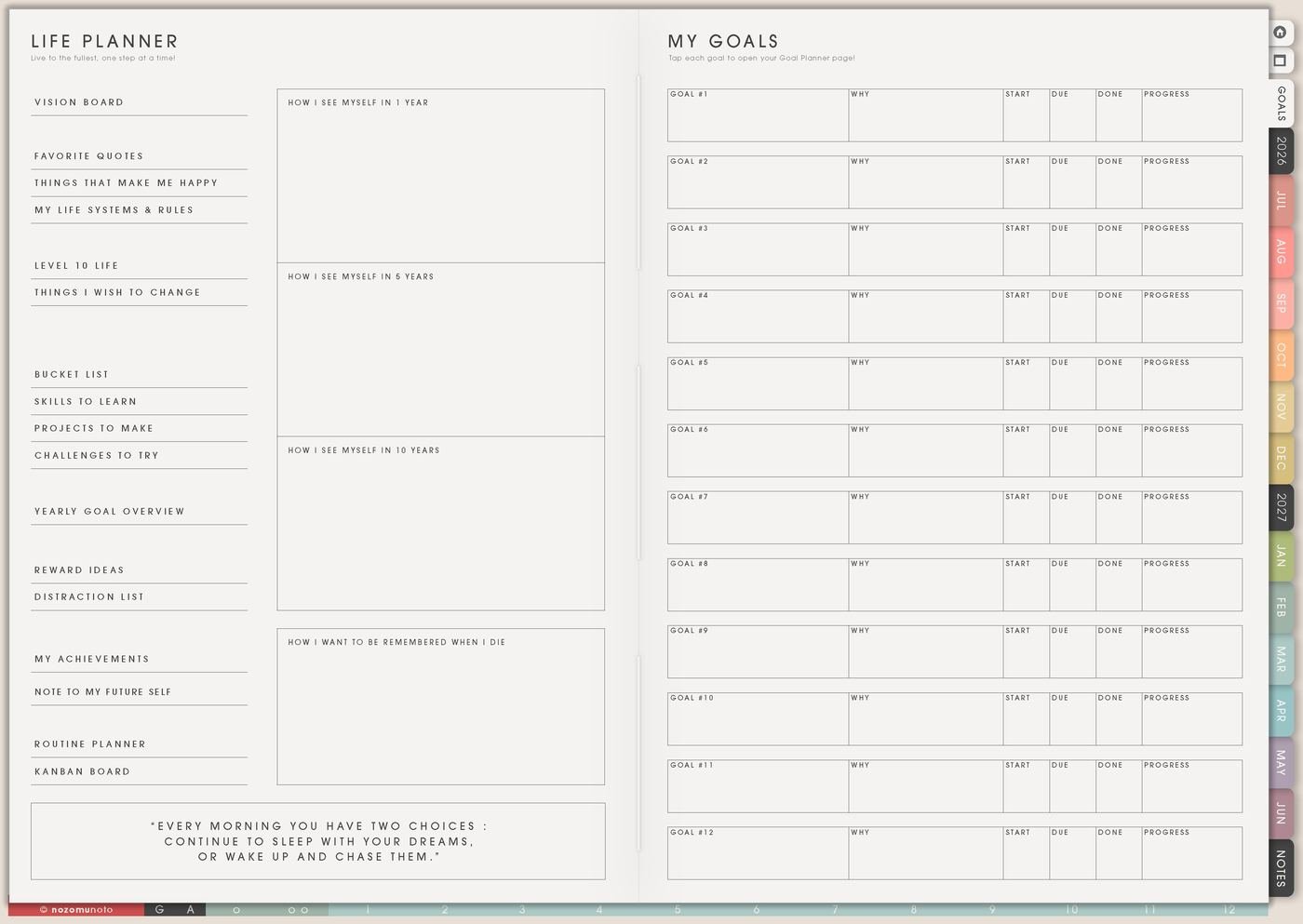
Learn how to use the Yume Techo Life Planner Index to navigate life planning pages, goals, reflection pages, lists, and personal notes.
The Life Planner Index is the first page I open in the Life Planner section. The left side is the map for the Life Planner pages. The right side is the Goal Planner Index, where the 12 goal pages can be named and tracked without turning all 12 into urgent work.
I use this index as the doorway, not as another huge checklist. One page gets one job. If the season needs direction, I open Life Planner. If a goal needs more room, I use the Goal Planner Index on the right and choose one of the 12 goal pages.
How to use the Life Planner Index
Use the Life Planner Index as the menu and home base for the Life Planner section. It helps you choose where to go next without making every page feel urgent.
You can use it to jump to:
- Vision pages.
- Goal pages.
- Life lists.
- Review pages.
- Inspiration pages.
- Future self notes.
- Skills, projects, and challenge pages.
- Achievement and reward pages.
You can leave most pages blank at first. Start with one page that matches what you need today, then return to the Index when you want another life area, goal, list, or reflection page.
Related Tips: Life Planner page ideas, Goal Planner Index and 12 goal pages, and how to start Yume Techo without getting overwhelmed.
How to fill the Life Planner Index
- Start with the page names. Write or check the main Life Planner pages for this season.
- Add a tiny purpose note. Use short labels like direction, visual reminder, quotes, happy list, systems, change list, projects, rewards, focus, achievements, or future note.
- Mark only active pages. A page can be active, later, done, or not needed. The index is a map, not a promise to fill everything.
- Return here when you feel lost. If planning starts spreading everywhere, come back to the index and choose one page for the real problem.
Life Planner pages at a glance
- Life Planner: season, values, direction, personal rules, and one next step.
- Vision Board: images and words that keep the direction visible.
- Life Inspirations: people, places, ideas, faith, art, and examples that help you keep going.
- Favorite Quotes: words worth returning to, with a reason or action beside them.
- Things That Make Me Happy: small, real joy ideas for tired days and normal days.
- My Life Systems and Rules: defaults that make repeated decisions easier.
- Level 10 Life: a quick life-area check before choosing what needs attention.
- Things I Need To Change: one honest change turned into a small experiment.
- Bucket List: experiences and memories to try, not urgent tasks.
- Skills To Learn: skills to collect, choose, practice, and review.
- Projects To Make: creative, home, study, or work projects parked clearly.
- Challenges To Try: short experiments that teach what works.
- Resolutions: fresh-start promises made smaller and easier to restart.
- Yearly Goal Overview: goal timing across the year.
- Goal Planner: the Goal Planner Index plus the 12 goal pages.
- Reward Ideas: healthy rewards, rest, and recovery choices.
- Distraction List: attention traps and return plans.
- My Achievements: proof of progress, wins, and finished pieces.
- Note To My Future Self: a message, reminder, or restart note for later.
- Routines: daily, weekly, monthly, and tiny versions.
- Kanban Board: active projects split into stages.
How to use the Goal Planner Index on the right
The right side of the Life Planner Index is for the Goal Planner Index. I use it as a table of contents for the 12 goal pages. Skip filling all 12 goals just because 12 spaces exist. Name only the goals that need their own page.
- Number the goal pages 1 to 12. Keep the same number on the index and on the matching goal page.
- Write a short goal name. Use names like Shop Photos, Study Routine, Emergency Fund, Morning Setup, Course Finish, or Family Trip.
- Add a status mark. Active, waiting, paused, done, or later is enough.
- Add one review place. Weekly Review, Monthly Overview, or Yearly Goal Overview can remind you to revisit the goal.
Related Tips: Life Planner page ideas, Goal Planner Index and 12 goal pages, Yearly Goal Overview ideas, and Things I Need To Change page ideas show the pages that usually connect to this index.
What I usually use it for and how I use it
Tips for using this page
- Use the index before opening everything. Choose the page that matches the real question: direction, goals, routines, projects, rewards, distractions, achievements, or future notes.
- Keep the Goal Planner Index small at first. Name one active goal, choose the matching goal page, then let the other goal rows wait.
- Write status marks, not essays. Active, later, paused, done, and review this month are enough for the index.
- Move one action back to Weekly. The index points to the page. Weekly carries the next action.
Keep private life details safe
Life Planner pages can include family, money, health, faith, work, and personal goals. Keep full account details, private family information, medical records, passwords, sensitive documents, and other sensitive details in a secure place outside the planner. In Yume Techo, write safe labels like check health note, review budget, ask family, open secure file, or bring this to Weekly Review.
When you need setup help
If the planning idea is clear but the app step is confusing, open how to import the PDF, how to use hyperlinks, how to use NozomuNoto template pages, or how to install and use digital stickers. The main NozomuNoto Help Center can help with app-specific navigation too.
Final thought
The Life Planner Index is useful when it makes the whole Life Planner section easier to enter. Choose the page that matches the season, let the Goal Planner Index point to one goal page, and bring only the next action back to Weekly. I hope this index makes big life planning feel easier to start and easier to return to!
Browse NozomuNoto products
Find the planner, notebook, e-reader file, or add-on that fits the way you actually plan.
About NozomuNoto
NozomuNoto creates Japanese-inspired digital planners, notebooks, stickers, and e-reader PDFs for people who want useful pages that still work in real life.
Yume Techo is built with dated yearly, monthly, weekly, daily, Life Planner, Planner Pages, and Template Pages so one planner can hold study, work, home, ADHD-friendly routines, lists, and creative projects without adding paper bulk.
New to digital planning? Start there, use the Help Center for setup help, or browse NozomuNoto products when you are ready to choose your planner.