

Browse tips
Yume Techo Use Cases
- As a Student
- As a Teacher
- For Moms & Family
- For Work
- For Creative Projects
- For Bible Study
- For Small Business
- For Content Creation
- For Fitness & Health
- For Travel
- For Rapid Logging
- For Life Planning
- For Journaling & Reflection
- For Budget & Finance
- For Meals & Grocery
- For Project Planning
- For Home Management
- For Creative Writing
- For Music Writing
- For Brainstorming
- For Homeschooling
Page-by-Page Use Ideas
Essential Template Pages
- Template Index
- Yearly Spread
- Yearly Grid
- Yearly - Day Month Tracker
- Monthly - Day Tracker
- Monthly Grid
- Monthly Overview
- Weekly Review
- Monthly Spread
- Weekly - Horizontal
- Weekly - Vertical
- Routines
- 30 Day Challenges
- 100 Day Challenges
- Vision Board
- 100 Things
- Multi Purpose Table
- Level 10 Life
- 31 Things
- Daily Page - Type 1
- Daily Page - Type 2
- Gantt Chart - Universal
- Gantt Chart - Weekly
- Photo Page
- World Map
- Multi Purpose Wheel
- Kanban - 4/6/8 columns
- Template Pages
- Level 10
- Daily Template
- Yearly Tracker
Life Planner Pages
- Life Planner Index
- Life Planner
- Vision Board
- Life Inspirations
- Favorite Quotes
- Things That Make Me Happy
- My Life Systems and Rules
- Level 10 Life
- Things I Need To Change
- Bucket List
- Skills To Learn
- Projects To Make
- Challenges To Try
- Resolutions
- Yearly Goal Overview
- Goal Planner
- Reward Ideas
- Distraction List
- My Achievements
- Note To My Future Self
- Routines
- 30 Day Challenges
- Kanban Board
Books
How to use the Yume Techo Multi Purpose Wheel for visual reviews
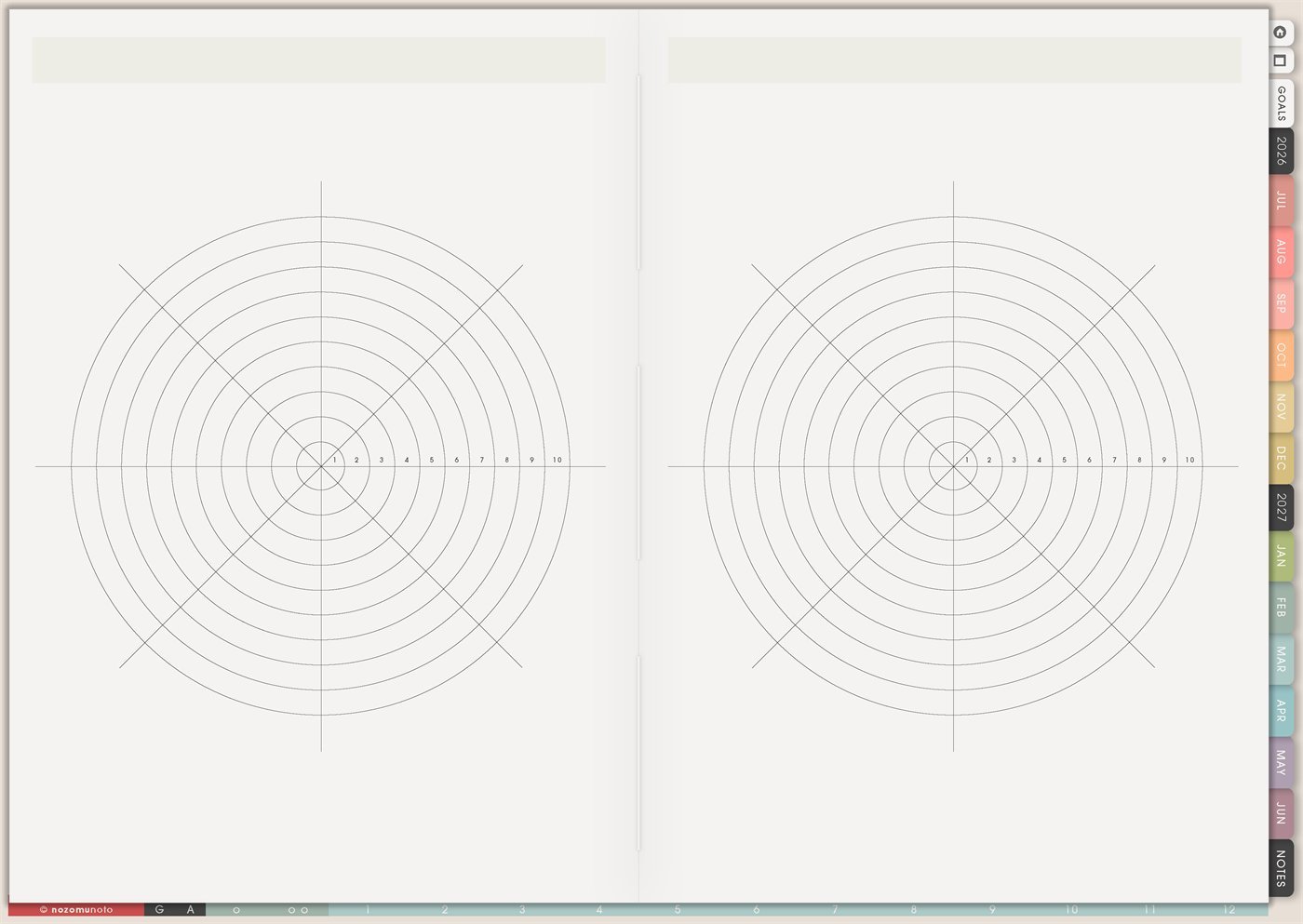
Use the Yume Techo Multi Purpose Wheel for life areas, ratings, priorities, project checks, routines, study areas, and visual reviews.
The Yume Techo Multi Purpose Wheel page is a reusable wheel chart template for seeing balance, priorities, ratings, progress, and comparison at a glance. Use it when a normal list feels too flat and you want to see which area is strong, which area needs attention, and which one small change would help next.
Each wheel can become a life balance check, study confidence map, wellness review, project health chart, routine score, family load map, creative review, or before-and-after comparison. It works best when the wheel has one clear question, one simple scale, and one next action after the review.
How to use the Multi Purpose Wheel
Use the Multi Purpose Wheel when you want to compare different areas visually. I like it for moments when a normal list makes everything look equal, but the wheel shows the shape of the situation right away.
Good uses include life areas, project priorities, study subjects, skill practice, routines, mood or energy notes, home areas, and creative project progress. Choose the categories first so each section has a clear meaning before you rate anything.
Then add a rating, color, symbol, or short note for each section. After you fill the wheel, choose one section that needs attention and write one small next step on Weekly, Daily, Kanban, Study Schedule, or the planner page where you will actually see it.
Related guides: Level 10 Life for life-area check-ins, Level 10 template ideas, and digital life planner ideas.
How to get to this page
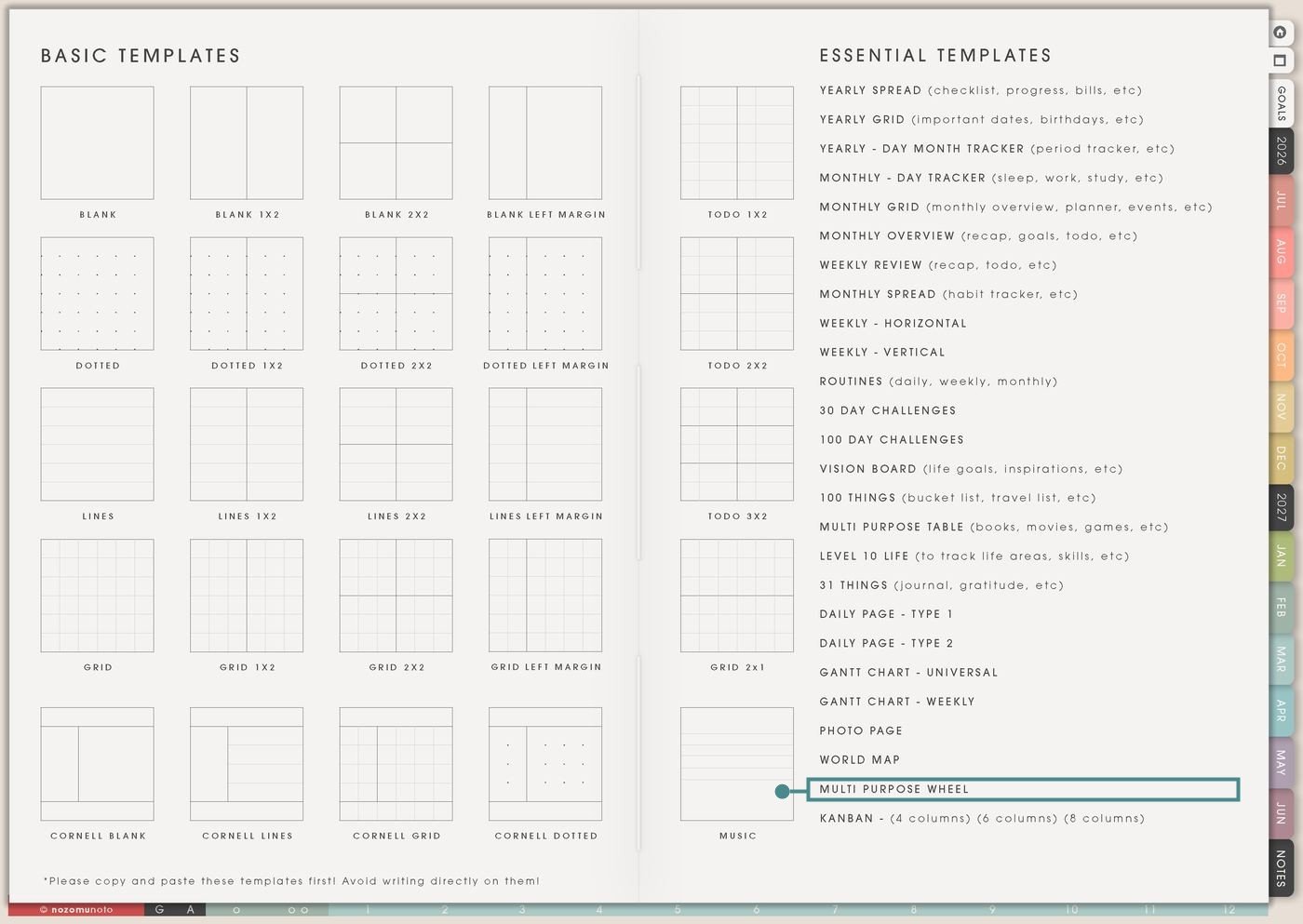
- Open the main Index page: use the planner Index if you need to return to the template section.
- Tap the Template Pages icon: this opens the Template Index with reusable clean pages.
- Tap Multi Purpose Wheel: it is under World Map in the Essential Templates list.
- Copy the page before writing: this is a clean template master. Duplicate it first, then write on the copy.
Before you fill the wheel: choose the question
Multi Purpose Wheel is an Essential Template Page, so keep the original clean and make a copy for each review. The page is flexible, but it becomes confusing if every wheel tries to answer everything at once.
- Name the wheel. Examples: Life Balance June, Study Confidence, Project Health, Home Load, Wellness Check, Content Review, or Routine Rebuild.
- Choose the sections before rating. Write the category names around the wheel first so the numbers have meaning.
- Define the scale. Decide what 1 and 10 mean for this wheel. A 10 does not have to mean perfect; it can mean steady enough for this season.
- Rate the current reality. Fill the wheel based on now, not the version of life you wish you had.
- Move one action forward. After reviewing the shape, choose one wedge and write one small action on Weekly, Daily, or a related planner page.
Ways to use this page
1. Life balance wheel
Use the wheel to check the main life areas without writing a long journal entry. Label the wedges with areas like health, home, work, money, study, relationships, creativity, rest, faith, or personal growth.
2. Goal priority wheel
Use the wheel when there are many goals and they all feel urgent. Each wedge can be one goal, project, or life area. Rate importance, energy, urgency, or readiness.
3. Energy and capacity check-in
Use the wheel to see where energy is going. This is helpful during busy seasons when everyone knows they are tired but cannot see why.
4. Wellness and body-care review
Use the wheel as a practical body-care overview: sleep, meals, hydration, movement, medication or supplements if relevant, appointments, pain notes, stress, and rest.
5. Study confidence wheel
Use the wheel before exams, assignments, or a new semester. Each wedge can be one subject, chapter, skill, assignment stage, or exam topic.
6. Work or project health wheel
Use the wheel when a project has many invisible parts. Label wedges with planning, files, communication, deadline, budget, supplies, review, delivery, follow-up, and energy.
7. Home and family load map
Use the wheel to see where home life is carrying too much weight. This can include meals, laundry, school papers, appointments, bills, cleaning, transport, groceries, bedtime, pet care, or emotional load.
8. Creative or small business review
Use the wheel for a creative project, shop, content plan, or product idea. Wedges can be idea clarity, photos, listing, keywords, tutorial, customer questions, delivery, packaging, promotion, and follow-up.
9. Habit or routine comparison
Use one wheel for the normal version of a routine and the second wheel for the tiny version. This is helpful when a routine breaks because it only has an ideal version.
10. Before-and-after season review
Use the two wheels on the page to compare before and after: start of month vs end of month, before exam week vs after exam week, before launch vs after launch, or current season vs next season.
Also read: Level 10 Life for life-area check-ins, Routines for repeatable routine checks, Weekly Review for choosing the next step, and Multi Purpose Table for detailed tracking.
What I usually use it for and how I use it
Tips for using this page
- Start with six to ten categories. If you need more detail, make a second wheel for that one area instead of forcing everything onto one chart.
- Write the scale before rating. For example: 1 means needs help now, 5 means functioning but uneven, and 10 means steady enough for this season.
- Treat low numbers as information. A low wedge means “this area needs care,” not “I am failing.” Choose one tiny action and let the wheel stay practical.
- Rate the current reality first. If you want, use the second wheel for the desired version. The gap between current and desired can show the next step.
- Turn every review into one action. After every wheel, choose one wedge and one next action. Write it on Weekly, Daily, Kanban, Study Schedule, Monthly Overview, or Notes.
- Label both wheels before filling them. Good labels are Current / Next, Before / After, June / July, Me / Family, Study / Work, or Normal / Tiny.
- Protect private details. For health, money, family, school, client, account, work, or body-care notes, use short labels and keep sensitive details on a private page in a secure place.
- Copy first every time. This is a clean template master. If you wrote on the original by accident, undo if possible or bring in a fresh clean copy from the original planner file.
Final thought
I hope Multi Purpose Wheel helps a fuzzy feeling become a visible shape. Copy the clean page, choose one question, define the scale, rate the current season honestly, and move one small action into the week. The wheel does not need to fix everything. It just needs to show the next useful step!
Need exact app steps for copying this wheel page?
If you need the exact buttons for duplicating this template, moving the copied page, importing Yume Techo, using hyperlinks, adding stickers, or using page overview tools, use the Help Center app guide for your device.
Browse NozomuNoto products
Find the planner, notebook, e-reader file, or add-on that fits the way you actually plan.
About NozomuNoto
NozomuNoto creates Japanese-inspired digital planners, notebooks, stickers, and e-reader PDFs for people who want useful pages that still work in real life.
Yume Techo is built with dated yearly, monthly, weekly, daily, Life Planner, Planner Pages, and Template Pages so one planner can hold study, work, home, ADHD-friendly routines, lists, and creative projects without adding paper bulk.
New to digital planning? Start there, use the Help Center for setup help, or browse NozomuNoto products when you are ready to choose your planner.