

Browse tips
Yume Techo Use Cases
- As a Student
- As a Teacher
- For Moms & Family
- For Work
- For Creative Projects
- For Bible Study
- For Small Business
- For Content Creation
- For Fitness & Health
- For Travel
- For Rapid Logging
- For Life Planning
- For Journaling & Reflection
- For Budget & Finance
- For Meals & Grocery
- For Project Planning
- For Home Management
- For Creative Writing
- For Music Writing
- For Brainstorming
- For Homeschooling
Page-by-Page Use Ideas
Essential Template Pages
- Template Index
- Yearly Spread
- Yearly Grid
- Yearly - Day Month Tracker
- Monthly - Day Tracker
- Monthly Grid
- Monthly Overview
- Weekly Review
- Monthly Spread
- Weekly - Horizontal
- Weekly - Vertical
- Routines
- 30 Day Challenges
- 100 Day Challenges
- Vision Board
- 100 Things
- Multi Purpose Table
- Level 10 Life
- 31 Things
- Daily Page - Type 1
- Daily Page - Type 2
- Gantt Chart - Universal
- Gantt Chart - Weekly
- Photo Page
- World Map
- Multi Purpose Wheel
- Kanban - 4/6/8 columns
- Template Pages
- Level 10
- Daily Template
- Yearly Tracker
Life Planner Pages
- Life Planner Index
- Life Planner
- Vision Board
- Life Inspirations
- Favorite Quotes
- Things That Make Me Happy
- My Life Systems and Rules
- Level 10 Life
- Things I Need To Change
- Bucket List
- Skills To Learn
- Projects To Make
- Challenges To Try
- Resolutions
- Yearly Goal Overview
- Goal Planner
- Reward Ideas
- Distraction List
- My Achievements
- Note To My Future Self
- Routines
- 30 Day Challenges
- Kanban Board
Books
How to use Yume Techo 30 Day Challenges for habits and small experiments
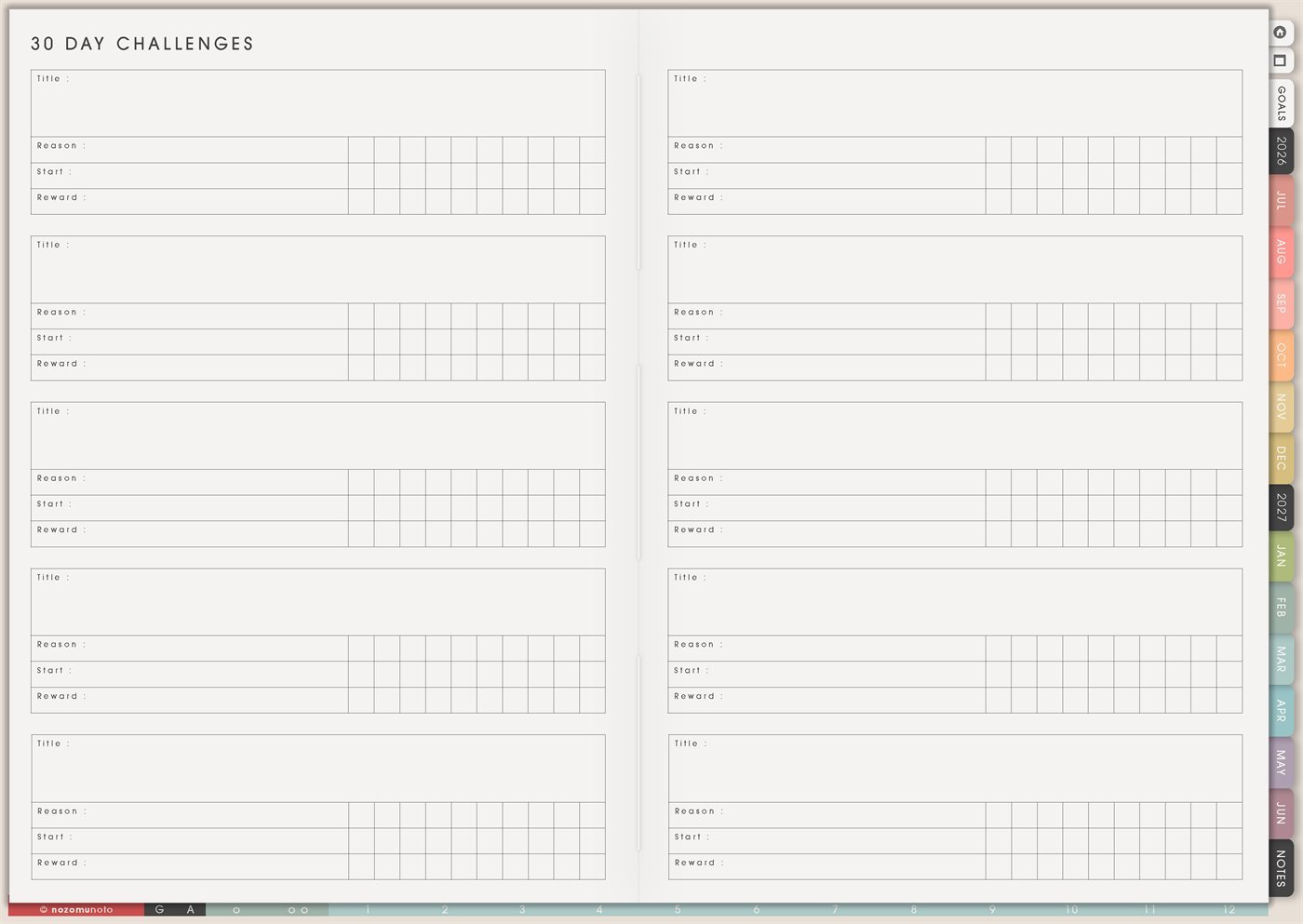
Use Yume Techo 30 Day Challenges to track habits, study, creativity, home projects, practice, and short personal experiments.
The Yume Techo 30 Day Challenges page is a reusable page for planning small experiments. Each challenge card gives space for a title, reason, start, reward, and progress marks, so everyone can test a habit, routine, creative practice, study rhythm, home project, money check, or personal project without turning it into a giant life makeover.
Use this page when you want to try something for about a month and learn what actually works. The best 30-day challenge is small, clear, realistic, and easy to restart. It should help real life, not become another thing to feel behind on.
How to use 30 Day Challenges
Use a 30 Day Challenge for one small experiment you want to try for a month.
Good challenge ideas include:
- Study for a few minutes each day.
- Practice a skill.
- Draw, write, or create daily.
- Tidy one small area.
- Read a little each day.
- Track a simple habit.
- Try a small morning or evening routine.
Choose one clear action. Make it small enough that you can do it even on a busy day.
At the end of 30 days, review what worked, what did not work, and whether you want to continue, change, or stop the challenge.
Related guides: Yume Techo 100 Day Challenges for long projects, practice streaks, study goals, and creative progress, Yume Techo Routines for daily, weekly, and monthly planning, and digital brainstorming planner for ideas and mind maps.
How to get to this page
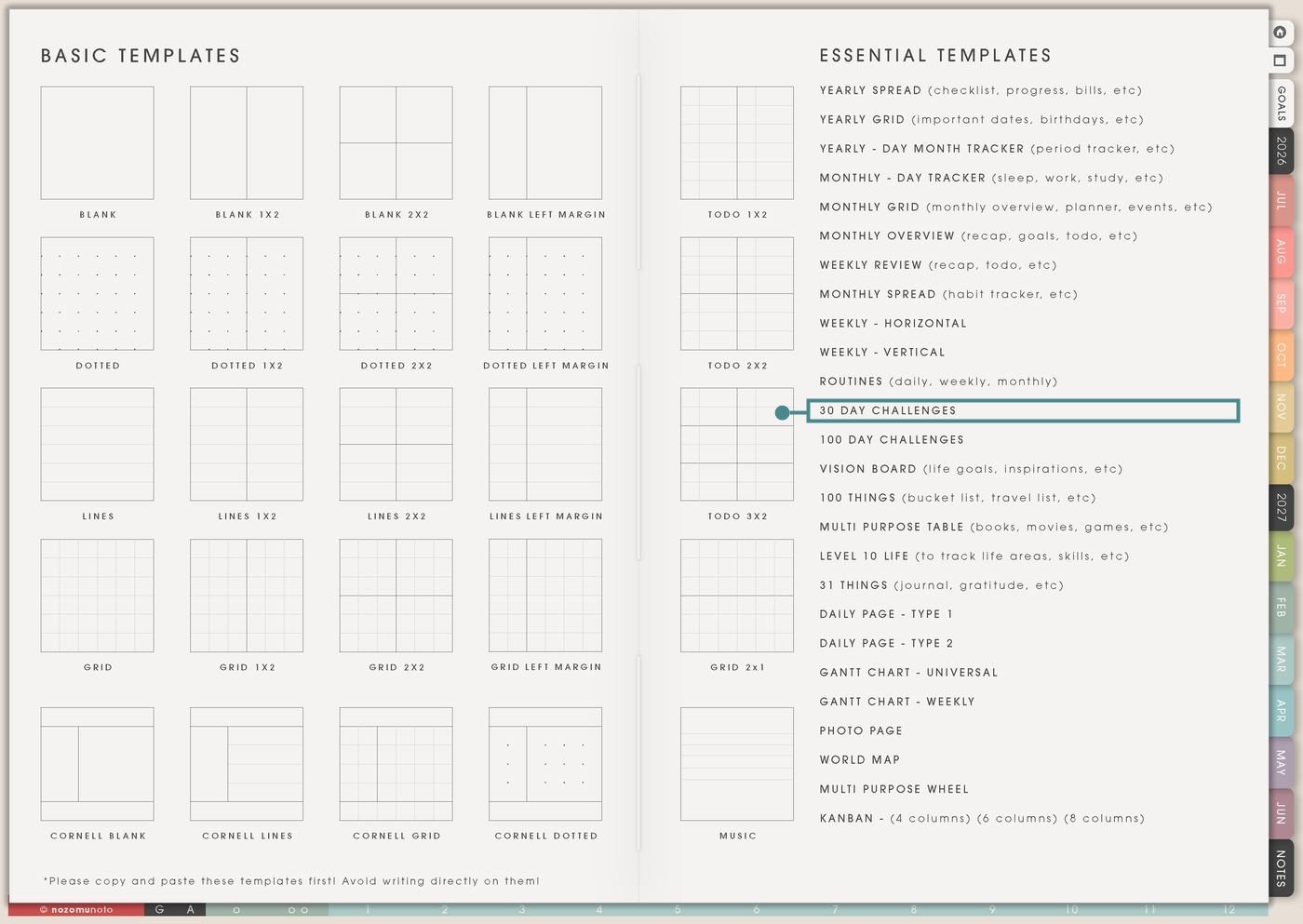
- Open the main Index page: use the planner Index if you need to return to the map.
- Tap the Template Pages icon: this opens the Template Index with reusable clean pages.
- Tap 30 Day Challenges: it is under Routines in the Essential Templates list.
- Copy the page before writing: this is a clean template master. Duplicate it first, then write on the copy.
Before you write: copy the clean 30 Day Challenges page first
30 Day Challenges is an Essential Template Page. Keep the original clean and make a copy for the month, season, school term, catch-up week, or idea list you want to test.
- Open 30 Day Challenges from Template Index.
- Duplicate or copy the page in your app. Use the page overview, thumbnail view, page manager, or page actions menu.
- Name the copy by purpose. Examples: September Challenge, Exam Season Experiments, Home Refresh Ideas, Creative Month, or Planner Return.
- Write one clear challenge per card. Use the Title line for the action, Reason for why it matters, Start for the first day, and Reward for a small finish or milestone.
- Add a tiny version before day one. If the full version is ten pages, the tiny version might be one paragraph. If the full version is a walk, the tiny version might be shoes on and step outside.
Use scenario ideas
1. Planner-open challenge
Use this challenge when the goal is simply to rebuild contact with the planner. The action should be small enough that it can happen even on a messy day.
For example: Title: Open Yume Techo after breakfast. Reason: stop losing the day before checking it. Start: Monday. Reward: new cover or cozy planning drink. Tiny version: open Weekly and circle one task.
2. Study or reading challenge
Use a challenge card for a small study action, not a huge academic promise. This keeps the challenge doable during real school, work, and family life.
For example: Title: Read 5 pages or review 10 flashcards. Reason: make exam prep less scary. Start: first day of the term. Reward: favorite cafe study date. Tiny version: open the book and read one paragraph.
3. Creative practice challenge
Use 30 Day Challenges for drawing, writing, music, journaling, photography, sewing, stickers, content, or any creative practice that grows through tiny repeated starts.
For example: Title: Draw one small thing. Reason: return to making without waiting for perfect time. Start: next Sunday. Reward: print favorite sketch. Tiny version: draw one line, choose one color, or save one reference.
4. Home refresh challenge
Use a challenge card for a home action that makes daily life lighter. Keep it small so the home gets easier instead of becoming another cleaning project.
For example: Title: Clear one surface for five minutes. Reason: reduce visual noise. Start: payday weekend. Reward: flowers, candle, or a clean-desk photo. Tiny version: put away five items.
5. Meal, water, or kitchen challenge
Use this for a practical food rhythm. The challenge can be about making meals easier, drinking water, prepping one thing, or choosing a simple backup.
For example: Title: Prepare one easy lunch. Reason: stop skipping lunch on work days. Start: Monday. Reward: new snack container. Tiny version: pack one fruit, one protein, or leftovers.
6. Movement or body-care challenge
Use a challenge card for short movement or body care. Keep the action specific and adjustable, especially when time, energy, weather, childcare, or work changes.
For example: Title: Stretch for 3 minutes. Reason: reduce stiffness after desk work. Start: after work tomorrow. Reward: new playlist. Tiny version: roll shoulders once and breathe.
7. Money check-in challenge
Use 30 Day Challenges for one small money action that builds awareness. It does not need to become a full budget page.
For example: Title: Write today’s spending. Reason: see patterns without shame. Start: first of the month. Reward: guilt-free small treat. Tiny version: mark no-spend, spent, or unsure.
8. Digital declutter challenge
Use a challenge card for files, photos, inbox, downloads, screenshots, apps, or tablet storage. Digital clutter grows quietly, so one small action per day helps.
For example: Title: Delete or file 10 screenshots. Reason: make my tablet easier to use. Start: after monthly backup. Reward: clean home screen. Tiny version: delete one blurry screenshot.
9. Prayer, gratitude, or reflection challenge
Use a challenge for inner-life routines that feel better when they stay small and honest. The challenge can be faith-based, gratitude-based, or simply a daily reflection.
For example: Title: Write one thankful line. Reason: notice small good things. Start: Sunday night. Reward: reread the list at the end. Tiny version: write one word, like rain, rest, coffee, help, laugh, or quiet.
10. Business, shop, or content challenge
Use 30 Day Challenges for a small business action that moves steadily without requiring a big launch every day. Choose one repeatable action and one fallback.
For example: Title: Improve one listing detail. Reason: grow the shop without panic. Start: next Monday. Reward: planning afternoon after 30 days. Tiny version: fix one typo, add one tag, answer one message, or save one product photo idea.
What I usually use it for and how I use it
Tips for using 30 Day Challenges
- Choose one main challenge. The page can hold many ideas, but the month works better when only one challenge asks for daily attention. Save extra ideas on later cards.
- Write the tiny version before day one. Full can be a 30-minute walk. Tiny can be step outside, stretch for one minute, or put on walking shoes. The tiny version keeps the experiment alive during real life.
- Make the reason specific. A real Reason line helps on busy days: sleep better, make exam prep less scary, keep the kitchen usable, practice showing up for art, or notice spending before payday.
- Plan for blanks. If one day gets skipped, mark skipped, sick, travel, return, or tiny. Continue from today. A 30-day challenge is a learning page, not a perfect-streak display.
- Review every 7 or 10 days. Write one note about what made the action easier, what got in the way, and what needs to change for the next stretch.
- Keep rewards small and real. Choose something that matches effort and learning: favorite drink, sticker, quiet hour, new cover, playlist, printed photo, or time to review what helped.
- Copy first every time. If you write on the clean template by accident, undo if possible. If not, bring in a fresh clean copy from the original planner file and make copy first the first step.
Related Tips: Routines helps turn a successful challenge into a repeat rhythm. Monthly Spread is useful for month-long marks. Weekly Review helps choose what returns next week. 100 Day Challenges fits longer practice.
If a challenge includes health notes, family care, money details, client work, school scores, account reminders, prayer notes, or private emotions, keep the sensitive details in the secure place where they belong. On 30 Day Challenges, write only the safe action, cue, or mark you need to see.
Final thought
30 Day Challenges works best when it feels like a small experiment, not a personality test. Copy the clean page, choose one realistic challenge, write a real reason, make a tiny version, and let the month teach you what actually helps. I hope this page makes trying something new feel smaller, clearer, and easier to return to after an imperfect day!
Need exact app steps for copying pages?
If you need the exact buttons for importing, duplicating, linking, adding stickers, moving, or bookmarking this template in your app, use the Help Center app guide for your device.
Browse NozomuNoto products
Find the planner, notebook, e-reader file, or add-on that fits the way you actually plan.
About NozomuNoto
NozomuNoto creates Japanese-inspired digital planners, notebooks, stickers, and e-reader PDFs for people who want useful pages that still work in real life.
Yume Techo is built with dated yearly, monthly, weekly, daily, Life Planner, Planner Pages, and Template Pages so one planner can hold study, work, home, ADHD-friendly routines, lists, and creative projects without adding paper bulk.
New to digital planning? Start there, use the Help Center for setup help, or browse NozomuNoto products when you are ready to choose your planner.