

Browse tips
Yume Techo Use Cases
- As a Student
- As a Teacher
- For Moms & Family
- For Work
- For Creative Projects
- For Bible Study
- For Small Business
- For Content Creation
- For Fitness & Health
- For Travel
- For Rapid Logging
- For Life Planning
- For Journaling & Reflection
- For Budget & Finance
- For Meals & Grocery
- For Project Planning
- For Home Management
- For Creative Writing
- For Music Writing
- For Brainstorming
- For Homeschooling
Page-by-Page Use Ideas
Essential Template Pages
- Template Index
- Yearly Spread
- Yearly Grid
- Yearly - Day Month Tracker
- Monthly - Day Tracker
- Monthly Grid
- Monthly Overview
- Weekly Review
- Monthly Spread
- Weekly - Horizontal
- Weekly - Vertical
- Routines
- 30 Day Challenges
- 100 Day Challenges
- Vision Board
- 100 Things
- Multi Purpose Table
- Level 10 Life
- 31 Things
- Daily Page - Type 1
- Daily Page - Type 2
- Gantt Chart - Universal
- Gantt Chart - Weekly
- Photo Page
- World Map
- Multi Purpose Wheel
- Kanban - 4/6/8 columns
- Template Pages
- Level 10
- Daily Template
- Yearly Tracker
Life Planner Pages
- Life Planner Index
- Life Planner
- Vision Board
- Life Inspirations
- Favorite Quotes
- Things That Make Me Happy
- My Life Systems and Rules
- Level 10 Life
- Things I Need To Change
- Bucket List
- Skills To Learn
- Projects To Make
- Challenges To Try
- Resolutions
- Yearly Goal Overview
- Goal Planner
- Reward Ideas
- Distraction List
- My Achievements
- Note To My Future Self
- Routines
- 30 Day Challenges
- Kanban Board
Books
How to use Yume Techo 100 Day Challenges for long projects and practice
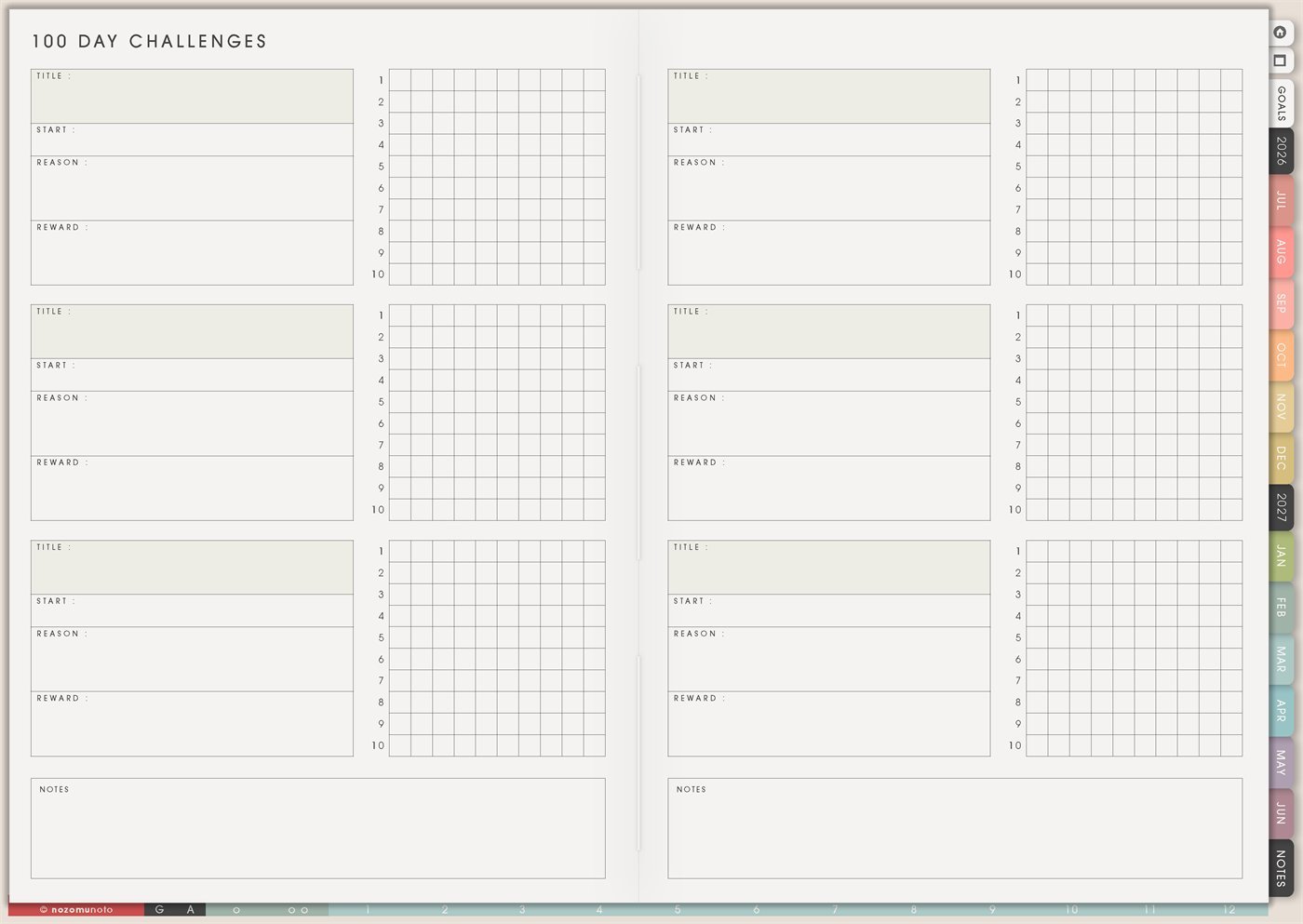
Use Yume Techo 100 Day Challenges to track long projects, practice goals, study progress, creative work, and repeated habits.
The Yume Techo 100 Day Challenges page is a reusable page for longer practice. Each challenge card has space for Title, Start, Reason, Reward, a 10-by-10 progress grid, and a Notes area. Use it when everyone wants to build something slowly: a skill, habit, study goal, creative practice, project rhythm, body-care practice, home project, money routine, or business action.
This page is different from 30 Day Challenges. A 30-day challenge is good for a small experiment. A 100-day challenge is better for a longer season where the goal is consistency, learning, and visible progress over time.
How to use 100 Day Challenges
Use a 100 Day Challenge when you want to follow a longer project or practice goal.
Good challenge ideas include:
- Practice an instrument.
- Study a language.
- Work on a writing project.
- Draw or create regularly.
- Build a home project step by step.
- Track reading progress.
- Practice a skill.
Choose one clear action and one simple way to mark progress.
A missed day does not need to end the challenge. Mark what happened, then continue. The point is to see your progress across time, not to create a perfect streak.
Related guides: Yume Techo 30 Day Challenges for habits and small experiments, digital project planner for work and creative projects, and digital writing planner for stories and creative projects.
How to get to this page
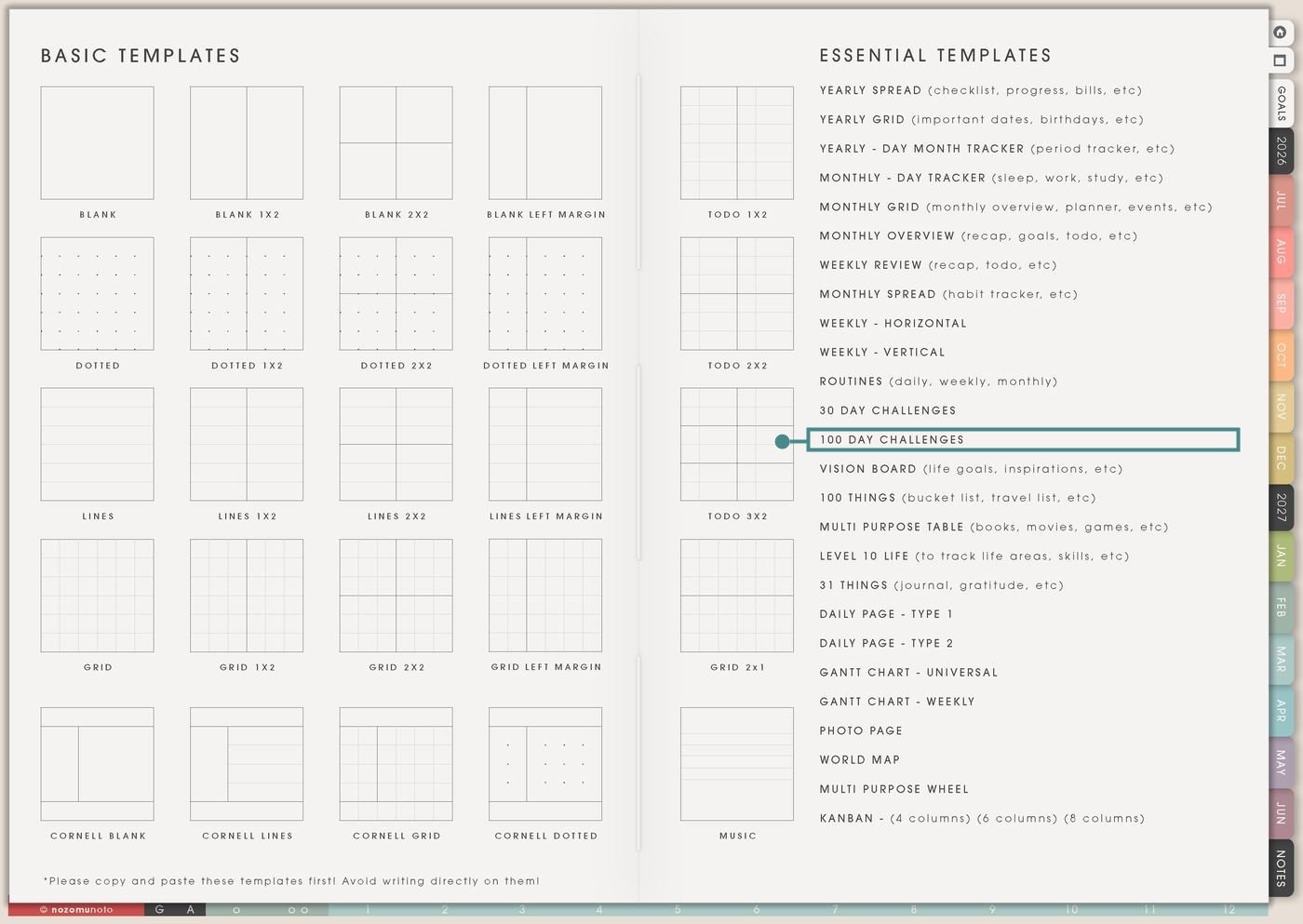
- Open the main Index page: use the planner Index if you need to return to the map.
- Tap the Template Pages icon: this opens the Template Index with reusable clean pages.
- Tap 100 Day Challenges: it is under 30 Day Challenges in the Essential Templates list.
- Copy the page before writing: this is a clean template master. Duplicate it first, then write on the copy.
Before you write: copy the clean 100 Day Challenges page first
100 Day Challenges is an Essential Template Page. Keep the original clean and make a copy for the long challenge, skill, project, or season you want to track.
- Open 100 Day Challenges from Template Index.
- Duplicate or copy the page in your app. Use the page overview, thumbnail view, page manager, or page actions menu.
- Name the copy clearly. Examples: 100 Days of Japanese, 100 Days of Drawing, 100 Study Sessions, 100 Shop Improvements, or 100 Days of Movement.
- Use the grid for progress marks. The 10-by-10 grid is useful for marking one small action per box, one session, one page, one post, one practice, or one completed step.
- Review every 10 boxes. The row numbers make it easy to pause at 10, 20, 30, and so on. Use Notes to write what helped and what needs to change.
Use scenario ideas
1. Skill practice challenge
Use 100 Day Challenges for a skill that grows through repeated practice. The action should be small enough to repeat, but meaningful enough to count.
For example: Title: 100 Days of Japanese. Start: July 1. Reason: build a steady study habit. Reward: buy a new pen or book after day 100. Each box can be one vocabulary review, one lesson, one writing practice, or one listening session.
2. Creative project challenge
Use the page for drawing, writing, photography, music, sewing, sticker design, journaling, or any creative practice that needs momentum more than perfection.
For example: Title: 100 Tiny Drawings. Reason: make art feel normal again. Each box is one tiny sketch. Notes can hold favorite prompts, tools used, and the day you realized a certain style felt fun.
3. Study sessions or exam prep
Use a 100-day grid for study sessions when the goal is repeated contact with the material. This works well for exams, language learning, professional learning, and long courses.
For example: each box can mean one 25-minute study block, one practice test section, one chapter summary, one flashcard review, or one practice question set. Use Notes every 10 boxes to write what topics need more review.
4. Business or shop improvement challenge
Use the page for small business work that benefits from steady improvements. A 100-day challenge can make growth feel less like one huge launch and more like repeatable progress.
For example: each box can be one listing improvement, one product photo, one keyword check, one customer reply batch, one Pinterest pin, one email draft, or one product idea note. Notes can hold what raised views, clicks, or confidence.
5. Movement or body-care practice
Use 100 Day Challenges for body-care actions that need a long runway. Keep the action adjustable so busy days, low-energy days, weather, or appointments can stay inside the challenge.
For example: each box can be one walk, stretch, strength session, water check, meal prep, bedtime prep, or recovery action. A tiny version can still count if it serves the same goal.
6. Home refresh or declutter challenge
Use the 10-by-10 grid for a slow home refresh. A hundred small actions can change a space without requiring a giant weekend cleanout.
For example: one box can be five items donated, one drawer sorted, one shelf cleared, one paper pile handled, one old file deleted, or one basket returned to its place. Notes can track which areas felt lighter afterward.
7. Money awareness or savings challenge
Use 100 Day Challenges for money habits that need repeated attention, like saving small amounts, checking spending, logging purchases, or pausing before impulse buys.
For example: mark one box for each spending check-in, no-spend day, saved amount, receipt logged, or wishlist wait day. Notes can hold patterns like “takeout happens after late work” or “subscription review saved money.”
8. Reading, book notes, or learning challenge
Use the page for a long reading season. This can be one book, many books, study reading, Bible reading, personal development, or professional learning.
For example: each box can be ten pages, one chapter, one quote saved, one note written, or one reading session. Notes can hold favorite ideas, unfinished books, and what you want to apply in the planner.
9. Planner consistency challenge
Use this for rebuilding the habit of opening Yume Techo. The goal can be smaller than a perfect daily planning routine. It can be one tiny planner check-in.
For example: one box can mean open Weekly, check Monthly, write one Daily task, review one Notes page, copy one template, or mark one routine. If a day is missed, keep going at the next box. The grid is progress, not punishment.
10. Long project stage challenge
Use 100 Day Challenges for a project with many small steps: course creation, product update, home project, thesis, portfolio, craft collection, website cleanup, or launch preparation.
For example: each box can be one stage action: research, outline, draft, photograph, edit, upload, test, message, review, or improve. Use Notes to write milestones at 25, 50, 75, and 100.
What I usually use it for and how I use it
Tips for using 100 Day Challenges
- Choose a repeatable unit. One paragraph, one page, one 10-minute tidy, one flashcard set, one listing edit, or one sketch can count. A 100-day challenge needs a unit that can survive a long season.
- Use the grid as progress count. Mark the next box when the next session happens. If you want calendar dates, write them in Notes, Monthly Grid, or Monthly Spread.
- Review every 10 boxes. The row breaks are useful pause points. Write one note about what helped, what got in the way, and what needs to change for the next 10.
- Run one main long challenge. Long challenges need breathing room. Use extra cards for future ideas, lighter side actions, or the next season.
- Add milestone rewards. Day 100 is far away. Add tiny rewards or review notes at 25, 50, and 75 so the middle has visible encouragement.
- Finish with a review. Use Notes for what improved, what was too hard, what tiny version should stay, and what the next season needs.
- Copy first every time. If you write on the clean template by accident, undo if possible. If not, bring in a fresh clean copy from the original planner file and make copy first the first step.
Related Tips: 30 Day Challenges is better for a one-month experiment. Routines helps a repeated action become a weekly rhythm. Weekly Review helps choose the next small step.
If a 100-day challenge includes health notes, body-care details, money amounts, family care, client work, school scores, account reminders, prayer notes, or private emotions, keep sensitive details in the secure place where they belong. On 100 Day Challenges, write only the safe action, mark, or milestone you need to see.
Final thought
100 Day Challenges is useful when a goal needs time to grow. Copy the clean page, choose one meaningful practice, make the action small, review every 10 boxes, and let the Notes area show what changed. I hope this page helps long progress feel real, imperfect, and still worth continuing!
Need exact app steps for copying pages?
If you need the exact buttons for importing, duplicating, linking, adding stickers, moving, or bookmarking this template in your app, use the Help Center app guide for your device.
Browse NozomuNoto products
Find the planner, notebook, e-reader file, or add-on that fits the way you actually plan.
About NozomuNoto
NozomuNoto creates Japanese-inspired digital planners, notebooks, stickers, and e-reader PDFs for people who want useful pages that still work in real life.
Yume Techo is built with dated yearly, monthly, weekly, daily, Life Planner, Planner Pages, and Template Pages so one planner can hold study, work, home, ADHD-friendly routines, lists, and creative projects without adding paper bulk.
New to digital planning? Start there, use the Help Center for setup help, or browse NozomuNoto products when you are ready to choose your planner.