

Browse tips
Yume Techo Use Cases
- As a Student
- As a Teacher
- For Moms & Family
- For Work
- For Creative Projects
- For Bible Study
- For Small Business
- For Content Creation
- For Fitness & Health
- For Travel
- For Rapid Logging
- For Life Planning
- For Journaling & Reflection
- For Budget & Finance
- For Meals & Grocery
- For Project Planning
- For Home Management
- For Creative Writing
- For Music Writing
- For Brainstorming
- For Homeschooling
Page-by-Page Use Ideas
Essential Template Pages
- Template Index
- Yearly Spread
- Yearly Grid
- Yearly - Day Month Tracker
- Monthly - Day Tracker
- Monthly Grid
- Monthly Overview
- Weekly Review
- Monthly Spread
- Weekly - Horizontal
- Weekly - Vertical
- Routines
- 30 Day Challenges
- 100 Day Challenges
- Vision Board
- 100 Things
- Multi Purpose Table
- Level 10 Life
- 31 Things
- Daily Page - Type 1
- Daily Page - Type 2
- Gantt Chart - Universal
- Gantt Chart - Weekly
- Photo Page
- World Map
- Multi Purpose Wheel
- Kanban - 4/6/8 columns
- Template Pages
- Level 10
- Daily Template
- Yearly Tracker
Life Planner Pages
- Life Planner Index
- Life Planner
- Vision Board
- Life Inspirations
- Favorite Quotes
- Things That Make Me Happy
- My Life Systems and Rules
- Level 10 Life
- Things I Need To Change
- Bucket List
- Skills To Learn
- Projects To Make
- Challenges To Try
- Resolutions
- Yearly Goal Overview
- Goal Planner
- Reward Ideas
- Distraction List
- My Achievements
- Note To My Future Self
- Routines
- 30 Day Challenges
- Kanban Board
Books
How to use Yume Techo 100 Things for big lists, ideas, and memories
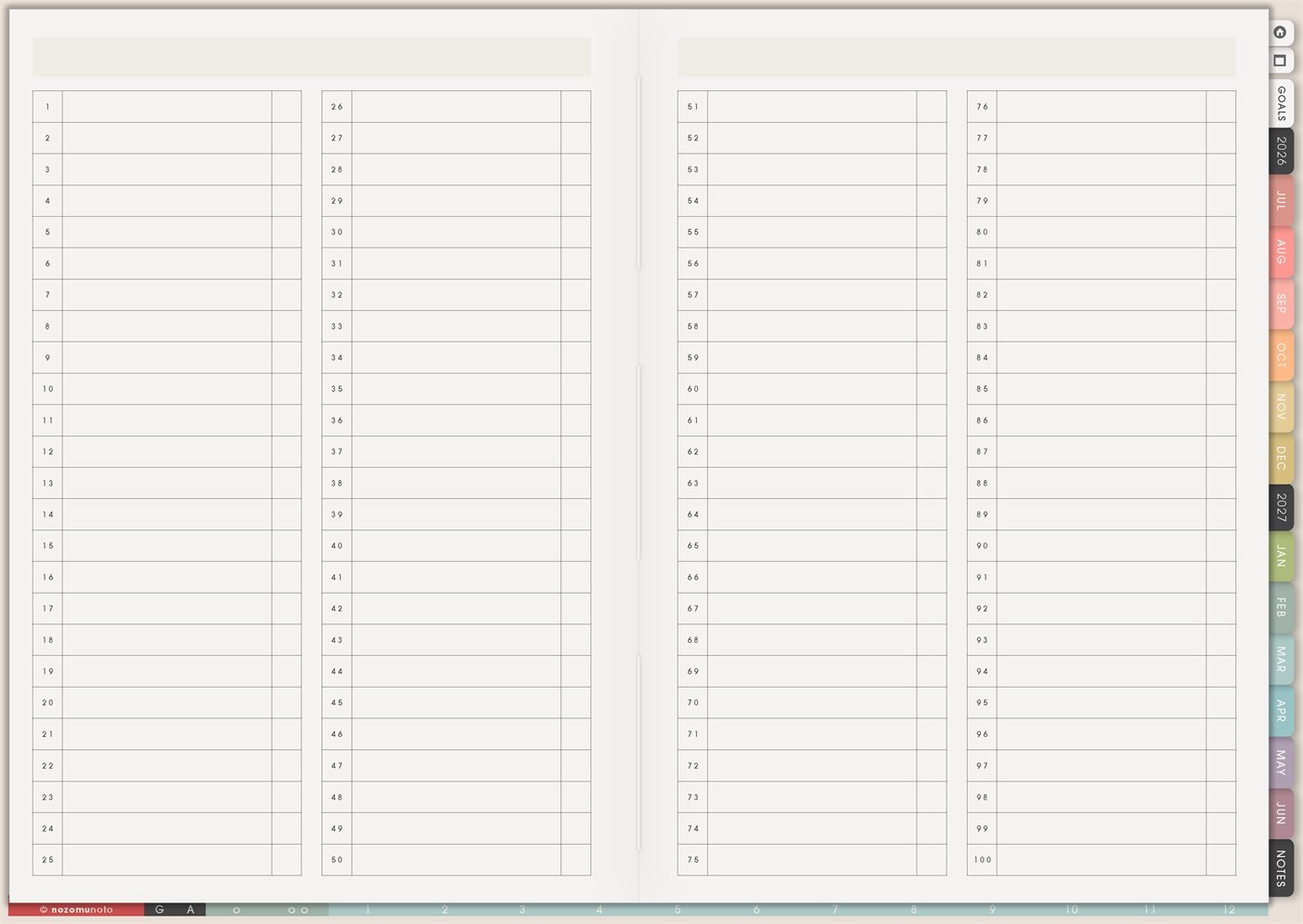
Use Yume Techo 100 Things for big lists, ideas, memories, goals, gifts, books, creative prompts, and collection-style planning.
The Yume Techo 100 Things page is a reusable numbered list from 1 to 100. It has four long columns, space for each item, and a small check area beside each line. Use it when everyone needs a generous place for one themed collection: ideas, memories, goals, gifts, books, prompts, places, meals, projects, tiny joys, or anything that needs more room than a short note.
The best way to use 100 Things is to give one copy one job. A page called 100 Gift Ideas should not also hold book notes, life goals, and grocery ideas. One theme per copy keeps the list useful and easy to return to.
How to use 100 Things
Use 100 Things when you want one big list for ideas, memories, goals, or prompts.
Good list ideas include:
- 100 things to try.
- 100 memories.
- 100 books to read.
- 100 gift ideas.
- 100 creative prompts.
- 100 places to visit.
- 100 project ideas.
- 100 things that made you happy.
You never need to fill all 100 spaces at once. Add to the list over time.
This page works best for collection-style lists. For tasks with dates, use your monthly, weekly, or project pages.
Related guides: use the digital brainstorming planner for ideas and mind maps, the digital journal planner for prompts and reflection, and the digital project planner when one idea becomes a real project.
How to get to this page
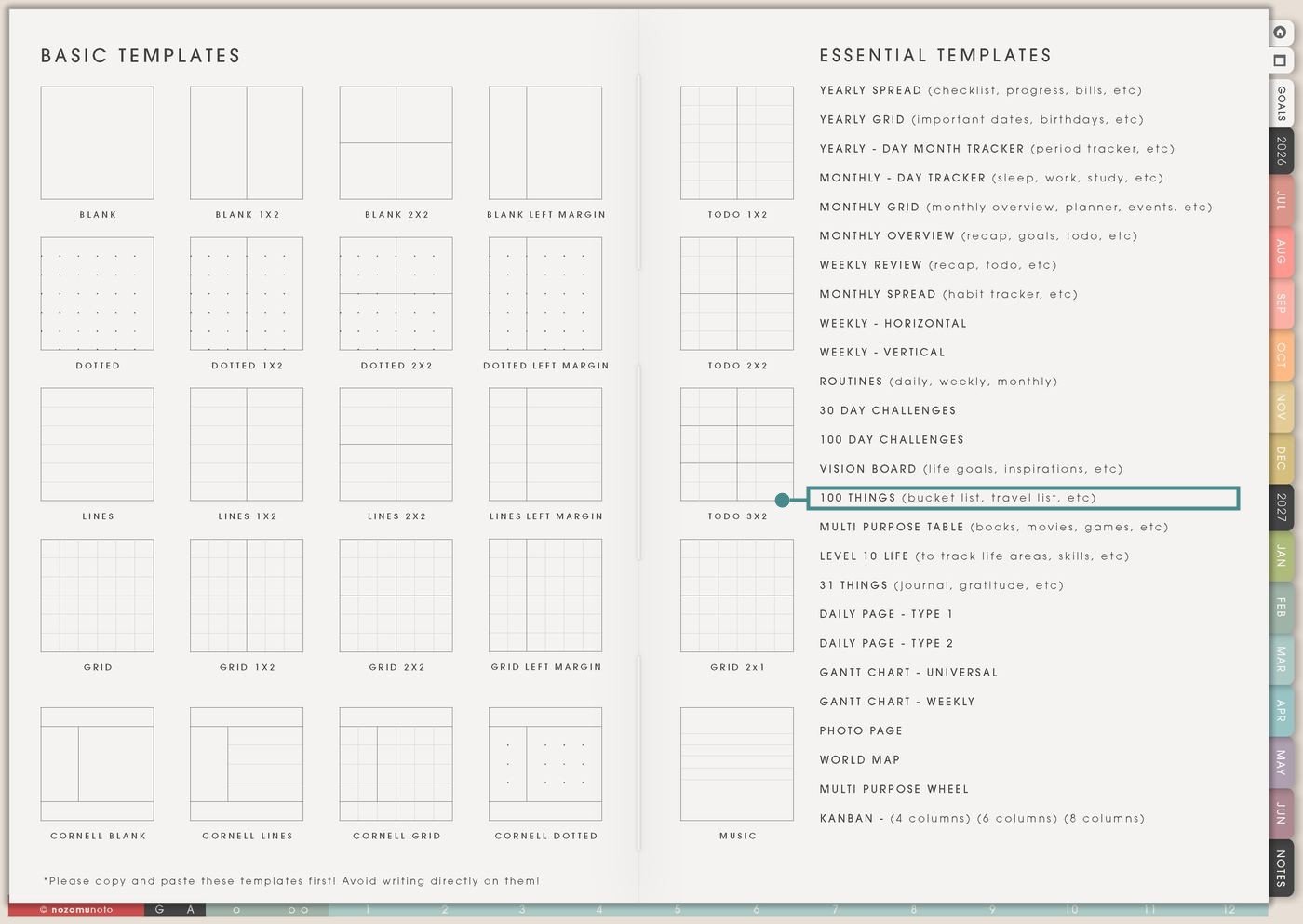
- Open the main Index page: use the planner Index if you need to return to the map.
- Tap the Template Pages icon: this opens the Template Index with reusable clean pages.
- Tap 100 Things: it is under Vision Board in the Essential Templates list.
- Copy the page before writing: this is a clean template master. Duplicate it first, then write on the copy.
Before you write: copy the clean 100 Things page first
100 Things is an Essential Template Page. Keep the original clean and make a copy for the list or collection you want to build.
- Open 100 Things from Template Index.
- Duplicate or copy the page in your app. Use the page overview, thumbnail view, page manager, or page actions menu.
- Name the copy by theme. Examples: 100 Gift Ideas, 100 Tiny Tidy Ideas, 100 Books, 100 Places, 100 Product Ideas, 100 Memories, or 100 Things That Help.
- Fill the obvious first 10. Start before perfect ideas arrive. The page gets better when it has a beginning.
- Use the check column with a rule. A check can mean done, chosen, tried, moved, bought, read, posted, visited, or loved. Decide what it means for that list.
Use scenario ideas
1. 100 gift ideas
Use the page for gift ideas by person, season, holiday, budget, or theme. This is helpful when gift ideas appear randomly during the year and disappear when the holiday arrives.
For example: make a copy called 100 Mother’s Day Gift Ideas, 100 Teacher Gifts, or 100 Stocking Stuffers. Write ideas as they come: tea, photo print, digital planner, favorite pen, handmade card, book, cozy socks, flowers, or memory note. Check items when they are bought, made, or moved to Wish List.
2. 100 tiny tidy ideas
Use the list for small actions that help when life feels messy. This can become an ADHD-friendly or low-energy menu that starts from a ready list instead of a blank page.
For example: put away five things, drink water, open window, clear sink, restart laundry, plug in tablet, write one task, choose easy dinner, delete 10 screenshots, step outside, or make the bed. Check an item when it helps.
3. 100 content or business ideas
Use the page as a big idea bank for posts, products, emails, videos, pins, tutorials, listing improvements, customer answers, or blog ideas. It keeps ideas safe without forcing every idea into action immediately.
For example: write product FAQs, planner page ideas, GoodNotes tips, e-reader setup posts, ADHD planning tips, gift guides, seasonal planner refresh, and customer questions. Move active ideas to Monthly Post Planner, Kanban, or Weekly.
4. 100 books, movies, shows, or media
Use 100 Things for long media lists when the smaller pages are not the right fit yet. It is a good catch-all before choosing what to read, watch, or review.
For example: list books to read, favorite movies, documentaries, manga, podcasts, videos, or articles. Use the check column for finished, saved, borrowed, reviewed, or recommended.
5. 100 places to visit or small adventures
Use the page for travel dreams and local adventures. This can be big trips, nearby cafes, museums, parks, seasonal outings, family activities, or quiet day-off ideas.
For example: list beach, bookstore, shrine, library, farmers market, picnic spot, train trip, flower park, museum, cafe, or hometown walk. Move active trips to Travel Research, Monthly Grid, or Weekly.
6. 100 meals, snacks, or easy food ideas
Use this list to reduce the “what do we eat?” question. A big meal list is especially useful for tired weeks because it reminds everyone of easy defaults.
For example: rice bowl, pasta, soup, eggs, noodles, freezer dumplings, tuna mayo, curry, sandwich, toast, salad, chicken rice, leftovers, or breakfast-for-dinner. Check meals that were easy and worth repeating.
7. 100 memories or gratitude notes
Use 100 Things as a memory collection. It can hold tiny moments too small for a full journal page but still worth remembering.
For example: rainy morning, kid’s joke, first sale of the day, finished hard message, quiet tea, clean sheets, favorite song, sunset, helpful friend, or a good lunch. The list becomes proof that small things happened.
8. 100 goals, dreams, or life ideas
Use the page to collect big and small life ideas before deciding which ones become real goals. This keeps dreaming separate from committing.
For example: learn Japanese, save emergency fund, visit Kyoto, organize photos, make recipe book, build morning routine, write letters, improve shop photos, start walking, or read 12 books. Circle one item before moving it to Goal Planner.
9. 100 prompts for journaling, prayer, study, or reflection
Use this page for prompts you can return to when you feel stuck. A prompt list is useful because it removes the blank-page freeze.
For example: what helped today, what needs a next step, what am I avoiding, what did I learn, who needs a message, what can be smaller, what is one honest next step, or what am I thankful for?
10. 100 project, craft, or product ideas
Use the page for creative volume before sorting. Let the list be messy first, then move only the strongest ideas to Kanban, Projects To Make, or Weekly.
For example: sticker set ideas, notebook themes, crochet projects, planner inserts, blog topics, printable gifts, classroom worksheets, recipe cards, social post series, or product bundles. Check ideas that feel worth testing.
What I usually use it for and how I use it
Tips for using 100 Things
- Give each copy one theme. If a new theme appears, copy another 100 Things page or move the item to a better page, such as Wish List, Books To Read, Kanban, or Notes.
- Write a rule at the top. Try: collect first, choose later. Only circled or checked items are active. Everything else can stay as an idea.
- Let the list grow over time. Write the obvious first 10, add more when ideas arrive, and keep blanks as open space. A useful 100 Things page can grow slowly.
- Give the check column one meaning. Gift list checks can mean bought. Book list checks can mean finished. Idea list checks can mean moved to Kanban. Memory list checks can mean favorite.
- Move one strong idea during review. During Weekly Review or Monthly Overview, circle one item, then move it to the right action page: Kanban, Goal Planner, Monthly Grid, Weekly, or a project page.
- Edit the list when it stops helping. Use the check column, a small x, or a note like later, no, done, moved, or maybe. A list can change as the season changes.
- Copy first every time. If you write on the clean template by accident, undo if possible. If not, bring in a fresh clean copy from the original planner file and make copy first the first step.
Related Tips: Wish List is better for wanted items and prices. Books To Read is better once a reading list needs notes. Kanban Board helps move one chosen idea into action. Multi Purpose Table is better when the list needs columns.
If a 100 Things list includes family details, money ideas, gift plans, client work, school notes, account reminders, private memories, prayer prompts, or future dreams, keep sensitive details in the secure place where they belong. On 100 Things, write only the safe title, theme, or clue you want visible while planning.
Final thought
100 Things is useful because it gives one theme room to grow. Copy the clean page, name the list clearly, fill the obvious ideas first, and choose only one item when it is time to act. I hope this page gives your ideas a generous place to wait without turning all of them into homework!
Need exact app steps for copying list pages?
If you need the exact buttons for importing Yume Techo, duplicating this template, moving the copy, adding links, using hyperlinks, or adding stickers, use the Help Center app guide for your device.
Browse NozomuNoto products
Find the planner, notebook, e-reader file, or add-on that fits the way you actually plan.
About NozomuNoto
NozomuNoto creates Japanese-inspired digital planners, notebooks, stickers, and e-reader PDFs for people who want useful pages that still work in real life.
Yume Techo is built with dated yearly, monthly, weekly, daily, Life Planner, Planner Pages, and Template Pages so one planner can hold study, work, home, ADHD-friendly routines, lists, and creative projects without adding paper bulk.
New to digital planning? Start there, use the Help Center for setup help, or browse NozomuNoto products when you are ready to choose your planner.