

Browse tips
Product use guides
Yume Techo Use Cases
- As a Student
- As a Teacher
- For Moms & Family
- For Work
- For Creative Projects
- For Bible Study
- For Small Business
- For Content Creation
- For Fitness & Health
- For Travel
- For Rapid Logging
- For Life Planning
- For Journaling & Reflection
- For Budget & Finance
- For Meals & Grocery
- For Project Planning
- For Home Management
- For Creative Writing
- For Music Writing
- For Brainstorming
- For Homeschooling
Page-by-Page Use Ideas
Essential Template Pages
- Template Index
- Yearly Spread
- Yearly Grid
- Yearly - Day Month Tracker
- Monthly - Day Tracker
- Monthly Grid
- Monthly Overview
- Weekly Review
- Monthly Spread
- Weekly - Horizontal
- Weekly - Vertical
- Routines
- 30 Day Challenges
- 100 Day Challenges
- Vision Board
- 100 Things
- Multi Purpose Table
- Level 10 Life
- 31 Things
- Daily Page - Type 1
- Daily Page - Type 2
- Gantt Chart - Universal
- Gantt Chart - Weekly
- Photo Page
- World Map
- Multi Purpose Wheel
- Kanban - 4/6/8 columns
- Template Pages
- Level 10
- Daily Template
- Yearly Tracker
Life Planner Pages
- Life Planner Index
- Life Planner
- Vision Board
- Life Inspirations
- Favorite Quotes
- Things That Make Me Happy
- My Life Systems and Rules
- Level 10 Life
- Things I Need To Change
- Bucket List
- Skills To Learn
- Projects To Make
- Challenges To Try
- Resolutions
- Yearly Goal Overview
- Goal Planner
- Reward Ideas
- Distraction List
- My Achievements
- Note To My Future Self
- Routines
- 30 Day Challenges
- Kanban Board
Books
Build a small kana practice routine with Ikigai Noto
Practise one kana family with models, tracing, recall and a review list, using the correct digital or printable Ikigai Noto workflow.
On this page
Applies to: Ikigai Noto digital Kana Workbook and printable Kana Workbook. Use the version you purchased. File options can vary by version. Digital navigation, extra notes and templates belong to the digital edition; printable practice follows the printed contents and page references.
Choose one kana family and one question for your practice: which characters can you write without looking? This gives a short session a clear purpose. You can return to a difficult family instead of moving through more pages just to finish them.
Choose your practice route
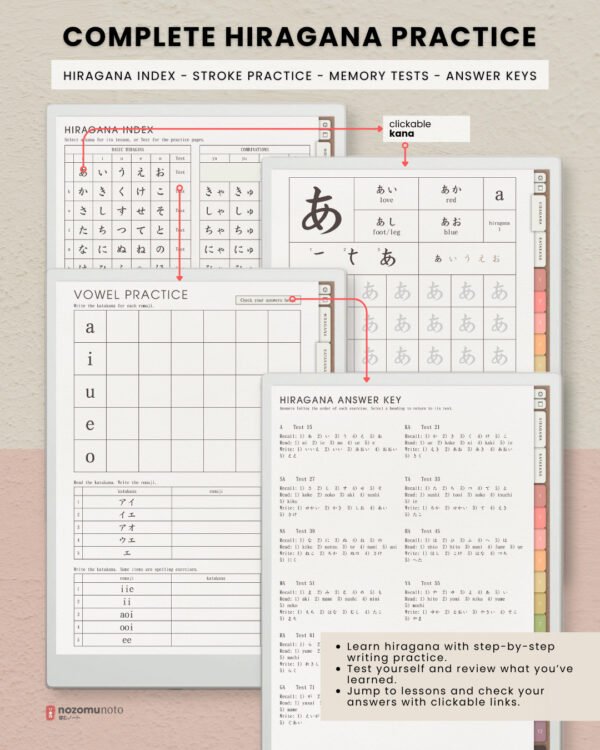
Digital workbook: open a lesson through the linked Index or Hiragana/Katakana tabs. Write in the lesson’s practice spaces. You can use an extra notes page to keep a small review list. Exact app controls vary.
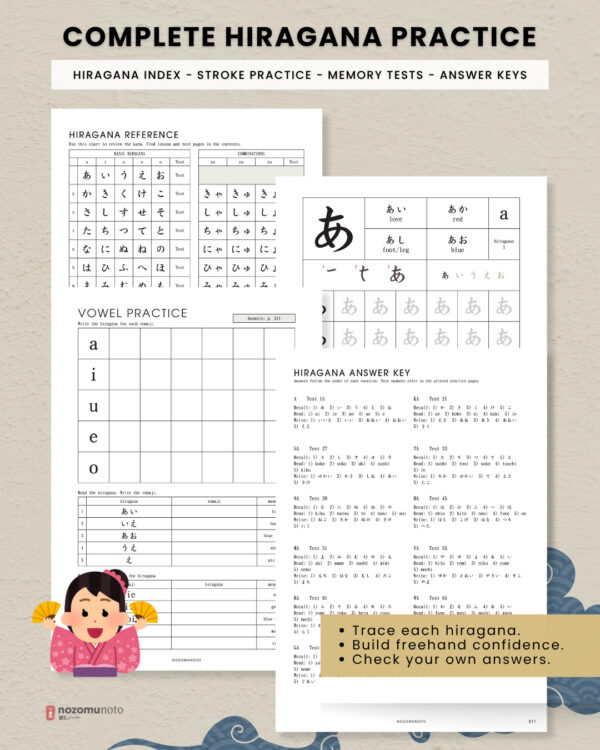
Printable workbook: choose a supplied file that matches your paper, then check a test print before preparing more sheets. Use the printed contents to find lessons and answer pages. This version has no clickable PDF links or the digital edition’s extra notes and template sections. Keep your review list on separate paper.
Follow one family through practice and review
- Look at the model. Choose the family you need. If you are starting with hiragana, the vowel family is a starting point. Follow the numbered stroke models and read the accompanying romaji.
- Trace, then use the blank cells. Trace the gray characters first. Write another attempt in the blank space, then try without looking back at the model.
- Try the family test. Give your own answers before opening the answer key. On paper, use the printed reference; digitally, follow the answer link where provided.
- Choose what to revisit. Compare your attempt with the model and key. Note the particular character or stroke you need to practise again, rather than restarting every lesson.
Make the next practice choice specific
For example, after practising the hiragana vowels, you might remember some characters and hesitate on another. Put that character on your review list, return to its stroke model and make another attempt. At your next session, try it from memory before checking again.
If an example word contains unfamiliar kana, concentrate on the lesson’s main character and return to the word later. Use the workbook’s writing and sound guides when you need an explanation.
For file, printing and app setup, read the Ikigai Noto workbook guide. Compare the digital workbook and printable workbook before choosing a format.
Choose your Ikigai Noto format
The digital and printable workbooks use different file and navigation workflows. Choose the format you need.