

Browse tips
Yume Techo Use Cases
- As a Student
- As a Teacher
- For Moms & Family
- For Work
- For Creative Projects
- For Bible Study
- For Small Business
- For Content Creation
- For Fitness & Health
- For Travel
- For Rapid Logging
- For Life Planning
- For Journaling & Reflection
- For Budget & Finance
- For Meals & Grocery
- For Project Planning
- For Home Management
- For Creative Writing
- For Music Writing
- For Brainstorming
- For Homeschooling
Page-by-Page Use Ideas
Essential Template Pages
- Template Index
- Yearly Spread
- Yearly Grid
- Yearly - Day Month Tracker
- Monthly - Day Tracker
- Monthly Grid
- Monthly Overview
- Weekly Review
- Monthly Spread
- Weekly - Horizontal
- Weekly - Vertical
- Routines
- 30 Day Challenges
- 100 Day Challenges
- Vision Board
- 100 Things
- Multi Purpose Table
- Level 10 Life
- 31 Things
- Daily Page - Type 1
- Daily Page - Type 2
- Gantt Chart - Universal
- Gantt Chart - Weekly
- Photo Page
- World Map
- Multi Purpose Wheel
- Kanban - 4/6/8 columns
- Template Pages
- Level 10
- Daily Template
- Yearly Tracker
Life Planner Pages
- Life Planner Index
- Life Planner
- Vision Board
- Life Inspirations
- Favorite Quotes
- Things That Make Me Happy
- My Life Systems and Rules
- Level 10 Life
- Things I Need To Change
- Bucket List
- Skills To Learn
- Projects To Make
- Challenges To Try
- Resolutions
- Yearly Goal Overview
- Goal Planner
- Reward Ideas
- Distraction List
- My Achievements
- Note To My Future Self
- Routines
- 30 Day Challenges
- Kanban Board
Books
How to use Yume Techo Daily Page Type 1 for realistic daily plans
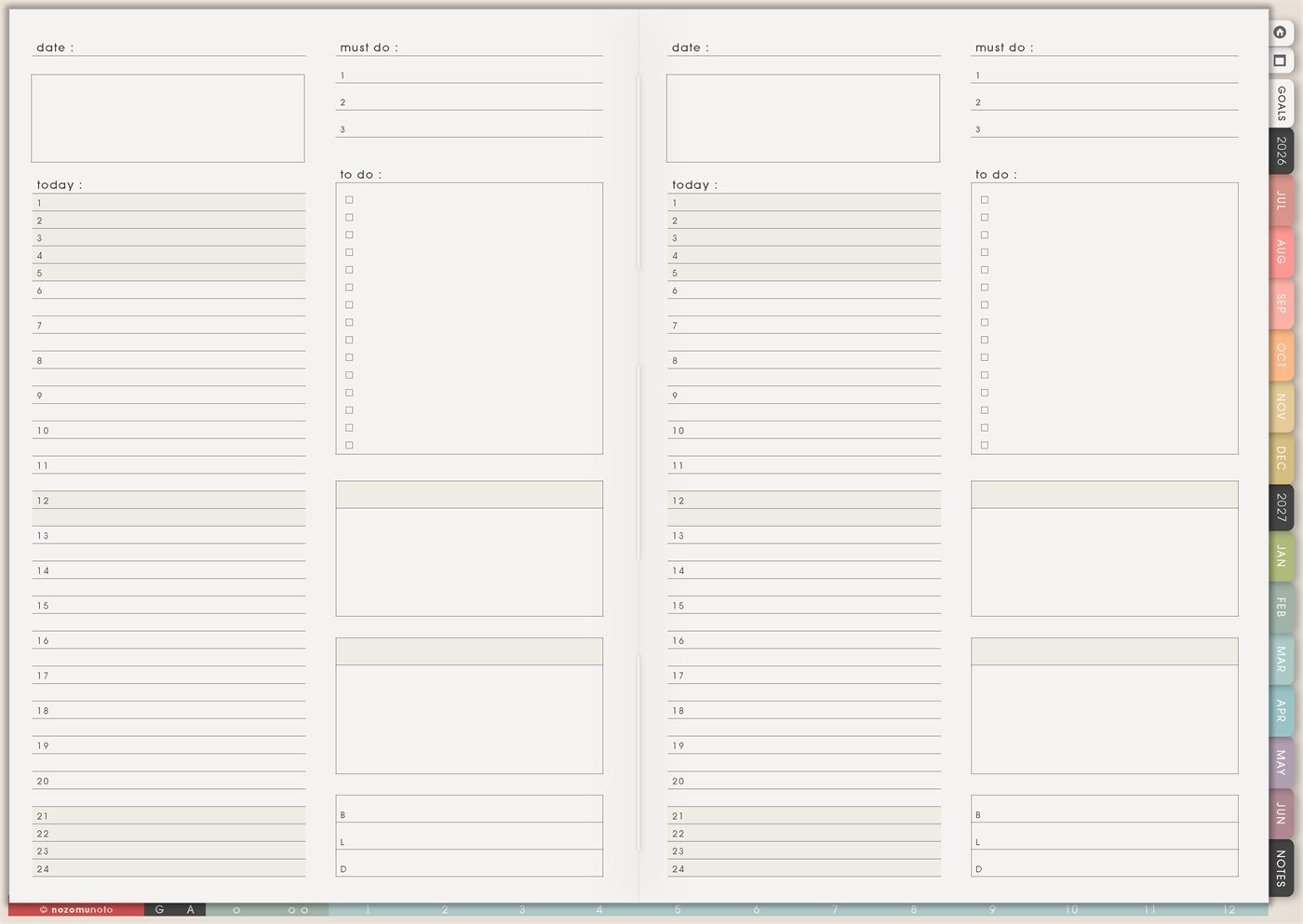
Use Yume Techo Daily Page Type 1 for realistic daily planning, must-do tasks, notes, reminders, and simple daily review.
The Yume Techo Daily Page – Type 1 is a reusable daily planning page with a date line, a large top note box, a Today timeline from 1 to 24, a three-item Must Do section, a checklist-style To Do box, extra note boxes, and B/L/D lines for breakfast, lunch, and dinner. Use it when a normal dated daily page is not enough, or when a clean daily layout fits a special day.
This page is helpful because it separates fixed time, true priorities, flexible tasks, notes, and meals. A realistic day needs all of those, not one giant list pretending every task has the same weight.
How to use Daily Page Type 1
Use Daily Page Type 1 when you want a clear plan for one day.
Try this setup:
- Write the date.
- Choose three must-do tasks.
- Add appointments or time-sensitive reminders.
- Write quick notes as the day happens.
- Add small tasks only if there is real space.
- At the end of the day, move unfinished important tasks forward.
Avoid filling the whole page in the morning. Leave space for changes, notes, and unexpected tasks.
A daily page should help you see today, not pressure you to complete a perfect list.
Related guides: Daily Template ideas helps when you want a reusable day shape, Daily Page Type 2 ideas is better for visual notes and sketches, and rapid logging in a digital planner helps when thoughts arrive faster than you can sort them.
How to get to this page
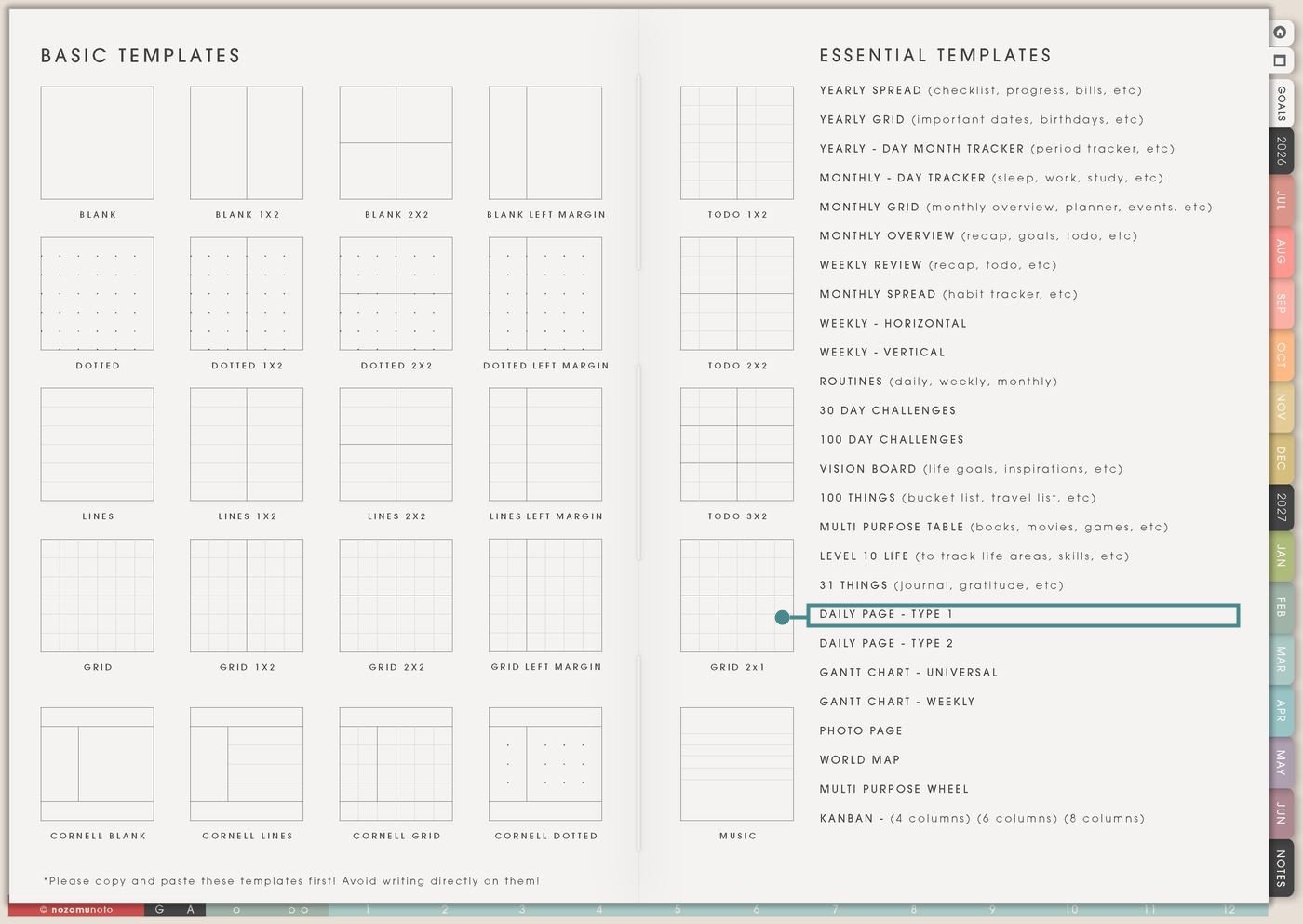
- Open the main Index page: use the planner Index if you need to return to the map.
- Tap the Template Pages icon: this opens the Template Index with reusable clean pages.
- Tap Daily Page – Type 1: it is under 31 Things in the Essential Templates list.
- Copy the page before writing: this is a clean template master. Duplicate it first, then write on the copy.
Before you write: give the copied day a clear job
Daily Page – Type 1 is an Essential Template Page. Keep the original clean and make a copy for the day you are planning.
- Open Daily Page – Type 1 from Template Index.
- Duplicate or copy the page in your app. Use the page overview, thumbnail view, page manager, or page actions menu.
- Name the copy by day or purpose. Examples: Exam Day, Errand Day, Launch Day, Low-Energy Day, Travel Day, Busy Saturday, or Catch-Up Day.
- Write fixed time first. Put appointments, class, work, pickup, meals, or travel on the Today timeline before adding tasks.
- Choose only three must-do tasks. The checklist can hold extras, but Must Do should stay small and honest.
Use scenario ideas
1. Busy day control page
Use this page when a day has appointments, errands, family needs, work, and little tasks all mixed together. The timeline shows fixed anchors, while Must Do protects the tasks that truly matter.
For example: write school pickup at 15, dinner at 18, and meeting at 10. Must Do can be pay bill, send form, and pack bag. Everything else goes in To Do.
2. ADHD-friendly realistic day
Use the page to reduce decision overload. The layout gives each planning piece a home: time on the left, top three on the right, flexible tasks in the checklist, and notes in the boxes.
For example: Must Do can be “open class notes,” “reply to one message,” and “wash one load.” The timeline can hold food, medicine, pickup, work, and rest, so the day is not only tasks.
3. Study or exam day
Use Daily Page – Type 1 for days when study needs both time blocks and a short action list. The top box can hold the exam goal, formula reminders, or the main topics for the day.
For example: block 9-10 for chapter review, 11-12 for practice questions, 14 for flashcards, and 19 for light review. Must Do can be submit assignment, print notes, and pack charger.
4. Work, client, or shop day
Use the page for a workday that needs priorities, admin, customer messages, content, orders, or project notes. It keeps the day from becoming one endless work blob.
For example: Must Do can be upload listing, answer customer, and check files. To Do can hold smaller tasks like resize photo, write caption, update FAQ link, or backup folder.
5. Home care day
Use the timeline for real-life anchors and the checklist for small home actions. This works better than writing “clean everything.”
For example: block laundry start, grocery pickup, dinner prep, and rest. Must Do can be clear sink, wash uniforms, and order groceries. One blank box can hold “things found while cleaning.”
6. Travel or outing day
Use the timeline for departures, arrivals, meals, check-in, tickets, transportation, and rest. Use Must Do for the few things that can cause real trouble if forgotten.
For example: Must Do can be passport, wallet, charger. To Do can be snacks, headphones, download files, confirm address, and message family. B/L/D keeps meals visible during the trip.
7. Parenting, caregiving, or family logistics day
Use the page when several people need different times, bags, meals, forms, appointments, or reminders. The page lets the day stay visible instead of living in your head.
For example: timeline: school drop-off, work, pickup, appointment, dinner. Must Do: sign form, bring medicine, pay fee. Notes box: teacher message, kid quote, or tomorrow’s bag list.
8. Low-energy or recovery day
Use the structure lightly when energy is low. The page can hold only anchors, care tasks, and one tiny must-do. It does not need a full productivity plan.
For example: Must Do can be eat, shower, send one message. Timeline can show rest, medicine if prescribed, meals, and pickup. To Do can stay mostly empty.
9. Creative sprint or project day
Use the page when one creative project needs a dedicated day. The top box can hold the project goal or sketch, the timeline can hold focus blocks, and the notes boxes can catch ideas.
For example: Must Do can be draft outline, make three images, and export files. To Do can hold smaller steps like choose font, check colors, proofread, upload, and write caption.
10. Evening review and tomorrow handoff
Use the page at night to close the day instead of carrying everything into your head. The blank boxes can hold what changed, what moved, and what tomorrow needs first.
For example: cross off finished tasks, move one unfinished item to tomorrow, write one note about what helped, and fill B/L/D if meals affected energy. The page becomes useful for remembering, not only planning.
Also read: Daily Page – Type 2 for visual days, Weekly Vertical for bigger daily space, Routines for repeatable daily anchors, and Kanban Board for overflow tasks.
What I usually use it for and how I use it
Tips for using this page
- Keep Must Do to three true priorities. If something has no serious consequence today, move it to To Do, Weekly, or another day.
- Block fixed anchors first. Add appointments, pickup, work, class, travel, meals, and rest before flexible tasks. Leave open space around anything that usually runs late.
- Use To Do for today’s flexible tasks only. Put overflow in Notes, Weekly, Kanban, or a project page. A daily checklist should fit the day you actually have.
- Write B/L/D early. Leftovers, sandwich, rice bowl, takeout, freezer meal, or snack bag still count. Food is part of the plan, not an extra.
- Move only the next block when time slips. Draw an arrow, rewrite the next block, and ask, “What is still true now?” The whole page does not need rebuilding.
- Name the note boxes. Try Notes, Errands, Waiting On, Tomorrow, Family, Ideas, or Handoff. A named box is easier to use than a blank box.
- Protect private details. For health, family, money, school, client, or account notes, keep sensitive details in a secure place and use initials or short codes on this page.
- Copy first every time. This is a clean template master. If you wrote on the original by accident, undo if possible or bring in a fresh clean copy from the original planner file.
Final thought
I hope Daily Page – Type 1 helps busy days feel possible without turning the day into one giant task pile. Copy the clean page, fill fixed anchors first, protect only three must-do tasks, and leave room for real life. A good daily page should help the day breathe!
Need exact app steps for copying daily pages?
If you need the exact buttons for importing Yume Techo, duplicating this template, moving the copied page, using hyperlinks, or adding stickers, use the Help Center app guide for your device.
Browse NozomuNoto products
Find the planner, notebook, e-reader file, or add-on that fits the way you actually plan.
About NozomuNoto
NozomuNoto creates Japanese-inspired digital planners, notebooks, stickers, and e-reader PDFs for people who want useful pages that still work in real life.
Yume Techo is built with dated yearly, monthly, weekly, daily, Life Planner, Planner Pages, and Template Pages so one planner can hold study, work, home, ADHD-friendly routines, lists, and creative projects without adding paper bulk.
New to digital planning? Start there, use the Help Center for setup help, or browse NozomuNoto products when you are ready to choose your planner.