

Browse tips
Yume Techo Use Cases
- As a Student
- As a Teacher
- For Moms & Family
- For Work
- For Creative Projects
- For Bible Study
- For Small Business
- For Content Creation
- For Fitness & Health
- For Travel
- For Rapid Logging
- For Life Planning
- For Journaling & Reflection
- For Budget & Finance
- For Meals & Grocery
- For Project Planning
- For Home Management
- For Creative Writing
- For Music Writing
- For Brainstorming
- For Homeschooling
Page-by-Page Use Ideas
Essential Template Pages
- Template Index
- Yearly Spread
- Yearly Grid
- Yearly - Day Month Tracker
- Monthly - Day Tracker
- Monthly Grid
- Monthly Overview
- Weekly Review
- Monthly Spread
- Weekly - Horizontal
- Weekly - Vertical
- Routines
- 30 Day Challenges
- 100 Day Challenges
- Vision Board
- 100 Things
- Multi Purpose Table
- Level 10 Life
- 31 Things
- Daily Page - Type 1
- Daily Page - Type 2
- Gantt Chart - Universal
- Gantt Chart - Weekly
- Photo Page
- World Map
- Multi Purpose Wheel
- Kanban - 4/6/8 columns
- Template Pages
- Level 10
- Daily Template
- Yearly Tracker
Life Planner Pages
- Life Planner Index
- Life Planner
- Vision Board
- Life Inspirations
- Favorite Quotes
- Things That Make Me Happy
- My Life Systems and Rules
- Level 10 Life
- Things I Need To Change
- Bucket List
- Skills To Learn
- Projects To Make
- Challenges To Try
- Resolutions
- Yearly Goal Overview
- Goal Planner
- Reward Ideas
- Distraction List
- My Achievements
- Note To My Future Self
- Routines
- 30 Day Challenges
- Kanban Board
Books
How to use the Yume Techo Weekly Vertical planner layout
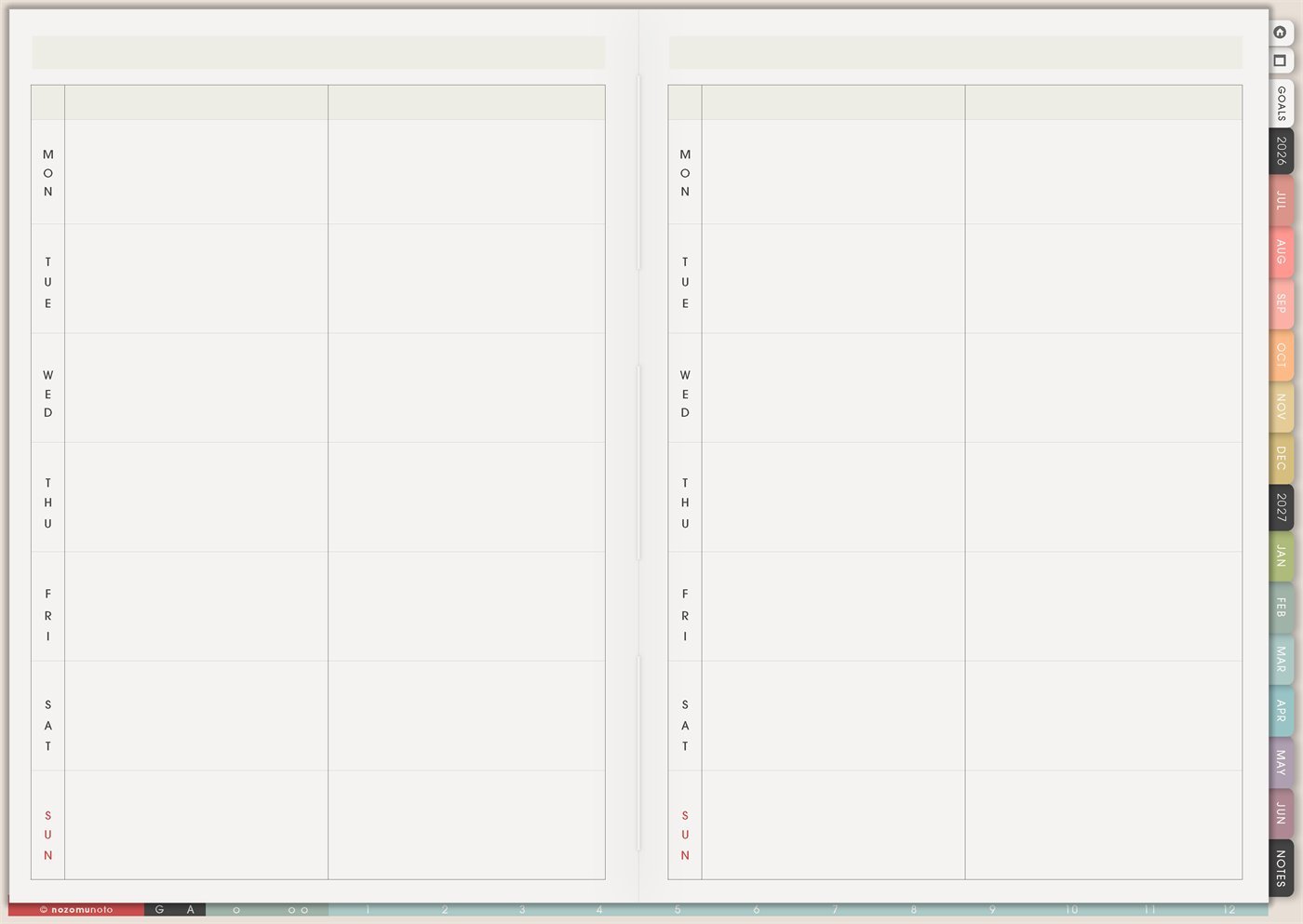
Use the Yume Techo Weekly Vertical layout for spacious daily plans, task lists, notes, flexible weeks, and day-by-day planning.
The Yume Techo Weekly – Vertical page is a reusable weekly layout with Monday to Sunday stacked down the spread. Each day has large open writing space instead of narrow time columns, so it works well when everyone needs room for tasks, notes, meals, reminders, study, work, family plans, and flexible day-by-day thinking.
This page is different from Weekly – Horizontal. Weekly – Horizontal is best when time blocking matters. Weekly – Vertical is best when each day needs a spacious box for what has to happen, what helps, what to remember, and what can move if life changes.
How to use Weekly Vertical
Use Weekly Vertical when you want more room for each day.
It works well for:
- Daily task lists.
- Notes for each day.
- School or work plans.
- Family reminders.
- Flexible weekly planning.
- Project notes.
- Journaling with tasks.
- Days that do not follow the same schedule.
Start by writing the few things each day must hold. Then add notes, reminders, or extra tasks only if you need them.
If you want to compare the whole week by time, Weekly Horizontal may fit better. If you want more writing room per day, Weekly Vertical is usually easier.
How to get to this page
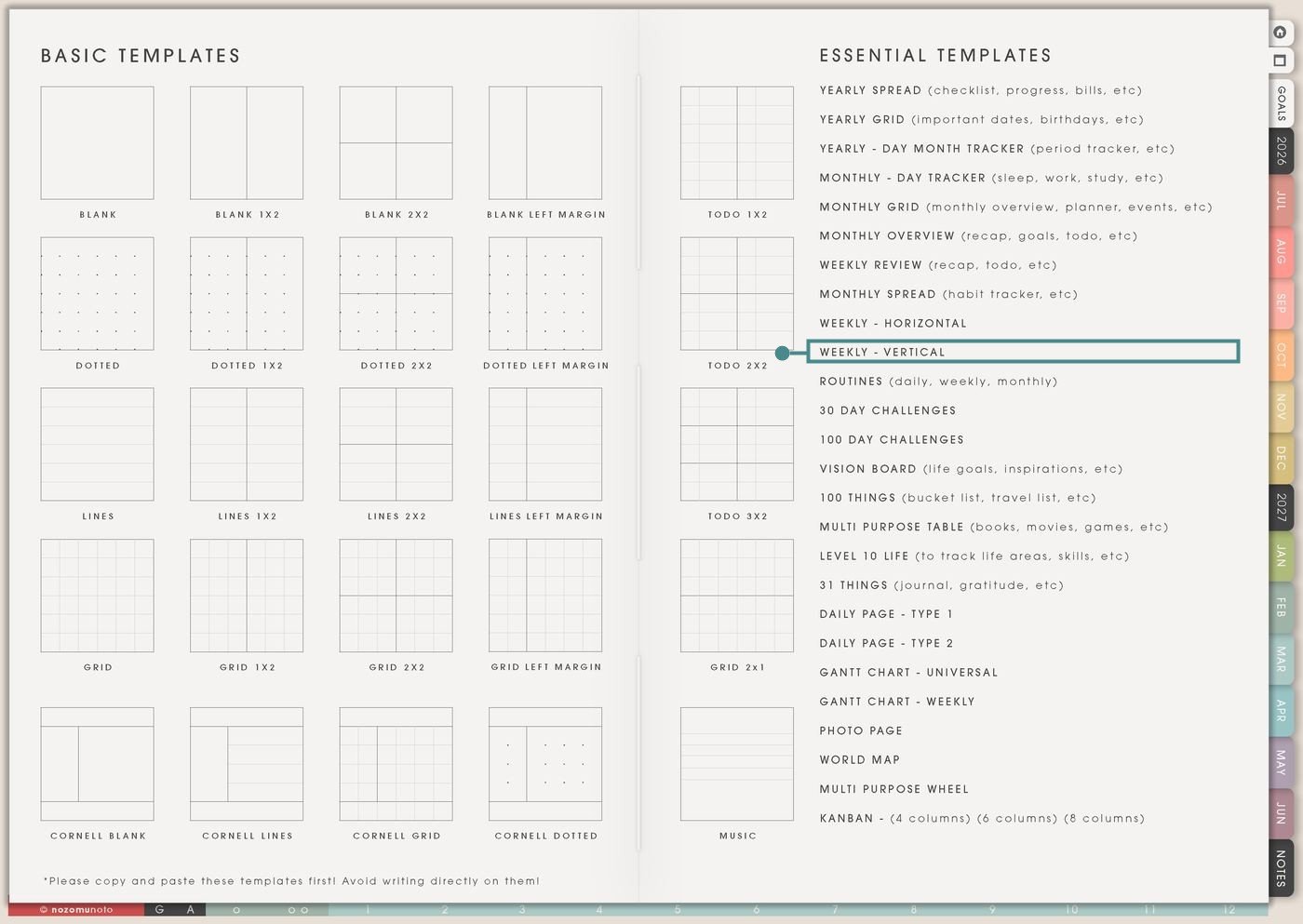
- Open the main Index page: use the planner Index if you need to return to the map.
- Tap the Template Pages icon: this opens the Template Index with reusable clean pages.
- Tap Weekly – Vertical: it is under Weekly – Horizontal in the Essential Templates list.
- Copy the page before writing: this is a clean template master. Duplicate it first, then write on the copy.
Before you write: copy the clean Weekly – Vertical first
Weekly – Vertical is an Essential Template Page. Keep the original clean and make a copy for the week you want to plan, review, or organize.
- Open Weekly – Vertical from Template Index.
- Duplicate or copy the page in your app. Use the page overview, thumbnail view, page manager, or page actions menu.
- Name the copy by week or purpose. Examples: August Week 1, Finals Week, Home Catch-Up Week, Work Catch-Up Week, or Family Week.
- Choose what the two big spaces mean. You can split each day into schedule and notes, must-do and maybe, school and home, work and personal, or tasks and meals.
- Keep the daily rows simple. This page works best when each day gets a clear purpose instead of a crowded mini notebook.
Related guides: Yume Techo Weekly – Horizontal for time blocking, routines, school, work, and family plans, Yume Techo Weekly Review for carrying tasks forward and planning next week, and rapid logging in a digital planner without losing thoughts.
Use scenario ideas
1. Spacious daily task planning
Use each day row for the tasks that belong to that day. The big open boxes make it easier to write short lists, group related tasks, and keep the week readable.
For example: on Monday, write bank, grocery order, reply to teacher, and laundry. On Tuesday, write package orders, upload file, and call clinic. Use the second space for notes like “bring umbrella” or “low-energy dinner.”
2. Must-do and flexible-task split
Use the left side of each day for must-do tasks and the right side for tasks that can move. This keeps urgent things visible without pretending every task is equally important.
For example: Monday must-do: pay bill, submit worksheet, pick up medicine. Flexible: fold laundry, edit photo, clean one shelf. If Monday becomes full, only the flexible side moves.
3. School week with assignments and reminders
Use the daily rows for class notes, homework, readings, exam reminders, tutoring, clubs, and study plans. Weekly – Vertical works well when school tasks need a little more writing room.
For example: Monday can hold “Biology lab, read chapter 4, email group.” Wednesday can hold “outline essay, review flashcards, ask about quiz.” Put due dates in the day row where they happen, and put prep tasks one or two days before.
4. Work week with daily priorities and follow-ups
Use each day for work priorities, meetings, customer replies, open loops, admin, content, orders, or client tasks. The page is useful when the week has many small moving pieces.
For example: Monday: inbox, order check, listing update. Tuesday: photos, captions, customer replies. Friday: invoice, weekly review, next-week prep. The second space can hold waiting-for notes so follow-ups stay visible.
5. Home, family, and meal rhythm
Use the big daily rows to hold household plans without needing a separate page for every small thing. This is helpful for busy family weeks because meals, errands, chores, and reminders can sit together.
For example: one side of each day can be meals and errands, while the other side is school forms, appointments, laundry, pet care, or family plans. Sunday can hold a small prep list for groceries, uniforms, bags, and Monday prep.
6. Low-energy or recovery week
Use Weekly – Vertical when you want a lighter week that does not require precise time blocks. The big spaces can hold short anchors instead of a packed schedule.
For example: each day can have one body-care anchor, one must-do task, and one easy meal. If energy is low, write “shower, medicine, reply to one message” and let that be enough for the day.
7. Project week with daily focus
Use the day rows to break one project into daily focus areas. This is good for launches, craft projects, school papers, room refreshes, content batches, or any project that needs steady progress.
For example: Monday research, Tuesday draft, Wednesday edit, Thursday photos, Friday upload, Saturday check links, Sunday rest and review. Use the second space for notes, materials, links to check, or questions.
8. Content creation or shop planning
Use Weekly – Vertical for creative work when each day needs a clear theme but not an hourly schedule. The open space is good for captions, shot lists, product notes, and quick reminders.
For example: Monday idea list, Tuesday product photos, Wednesday edit, Thursday schedule posts, Friday update Etsy listing, Saturday Pinterest, Sunday review. Keep the right side for missing assets, links, or captions to finish.
9. Appointment and errand week
Use the daily rows when the week is full of appointments, phone calls, pickups, deliveries, or errands. The spacious layout lets you write what to bring and what to do after.
For example: dentist day can include time, address, insurance card, questions to ask, and “pick up groceries after.” A package pickup day can include tracking number, ID, and the next action when you get home.
10. Memory keeping and weekly recap
Use Weekly – Vertical after or during the week as a memory page. Because each day has large space, it can hold one photo note, one gratitude note, one tiny win, or one sentence about what happened.
For example: Monday: rainy walk. Tuesday: finished hard email. Wednesday: kid’s funny sentence. Thursday: cafe work session. Friday: early sleep. These notes make the planner feel lived in, not only productive.
What I usually use it for and how I use it
Tips for using Weekly – Vertical
- Give the two spaces a job before writing. Try left side for must-do and right side for notes, or left side for schedule and right side for tasks. Repeat the same split for the whole week.
- Limit each day to the real anchors first. Pick 1 to 3 must-do tasks per day before adding flexible tasks. A spacious box is for clarity, not unlimited assignments.
- Move tasks to the day with real space. Look across the full week before committing. If Monday already has work, an appointment, and school pickup, place the grocery trip on a lighter day.
- Give the copy a special purpose. Use Weekly – Vertical for a busy week, school week, recovery week, family week, project week, or recap week. Keep the regular weekly page as the main plan if it already works.
- Make edits normal. Circle what moved, draw one arrow, and rewrite the item on the new day. A working week page can have arrows and still be useful.
- Keep long details on their own page. Put project notes, supply lists, links, and captions on Notes, a project page, or another copied template. Keep Weekly – Vertical for the day plan and the next few actions.
- Copy first every time. If you write on the clean template by accident, undo if possible. If not, bring in a fresh clean copy from the original planner file and make copy first the first habit.
Related Tips: Weekly Review helps me move unfinished tasks forward without crowding every day. Monthly Overview helps me notice what belongs in the next month instead of this week. Monthly Grid is better for fixed dates that need a wider month view.
If the page includes appointments, family plans, client tasks, health notes, addresses, confirmation codes, or school details, keep sensitive details in a secure place. On Weekly – Vertical, write only the reminder or next action you need to see.
Final thought
Weekly – Vertical is useful when a week needs space more than strict time blocks. Copy the clean template, give each day a simple split, choose a few must-do tasks, and let the big boxes hold a week that can still move when real life moves. I hope this page helps each day feel easier to read, easier to adjust, and easier to come back to!
Need exact app steps for copying pages?
If you need the exact buttons for importing, duplicating, linking, adding stickers, moving, or bookmarking this template in your app, use the Help Center app guide for your device.
Browse NozomuNoto products
Find the planner, notebook, e-reader file, or add-on that fits the way you actually plan.
About NozomuNoto
NozomuNoto creates Japanese-inspired digital planners, notebooks, stickers, and e-reader PDFs for people who want useful pages that still work in real life.
Yume Techo is built with dated yearly, monthly, weekly, daily, Life Planner, Planner Pages, and Template Pages so one planner can hold study, work, home, ADHD-friendly routines, lists, and creative projects without adding paper bulk.
New to digital planning? Start there, use the Help Center for setup help, or browse NozomuNoto products when you are ready to choose your planner.