

Browse tips
Yume Techo Use Cases
- As a Student
- As a Teacher
- For Moms & Family
- For Work
- For Creative Projects
- For Bible Study
- For Small Business
- For Content Creation
- For Fitness & Health
- For Travel
- For Rapid Logging
- For Life Planning
- For Journaling & Reflection
- For Budget & Finance
- For Meals & Grocery
- For Project Planning
- For Home Management
- For Creative Writing
- For Music Writing
- For Brainstorming
- For Homeschooling
Page-by-Page Use Ideas
Essential Template Pages
- Template Index
- Yearly Spread
- Yearly Grid
- Yearly - Day Month Tracker
- Monthly - Day Tracker
- Monthly Grid
- Monthly Overview
- Weekly Review
- Monthly Spread
- Weekly - Horizontal
- Weekly - Vertical
- Routines
- 30 Day Challenges
- 100 Day Challenges
- Vision Board
- 100 Things
- Multi Purpose Table
- Level 10 Life
- 31 Things
- Daily Page - Type 1
- Daily Page - Type 2
- Gantt Chart - Universal
- Gantt Chart - Weekly
- Photo Page
- World Map
- Multi Purpose Wheel
- Kanban - 4/6/8 columns
- Template Pages
- Level 10
- Daily Template
- Yearly Tracker
Life Planner Pages
- Life Planner Index
- Life Planner
- Vision Board
- Life Inspirations
- Favorite Quotes
- Things That Make Me Happy
- My Life Systems and Rules
- Level 10 Life
- Things I Need To Change
- Bucket List
- Skills To Learn
- Projects To Make
- Challenges To Try
- Resolutions
- Yearly Goal Overview
- Goal Planner
- Reward Ideas
- Distraction List
- My Achievements
- Note To My Future Self
- Routines
- 30 Day Challenges
- Kanban Board
Books
How to use Yume Techo Routines for daily, weekly, and monthly planning
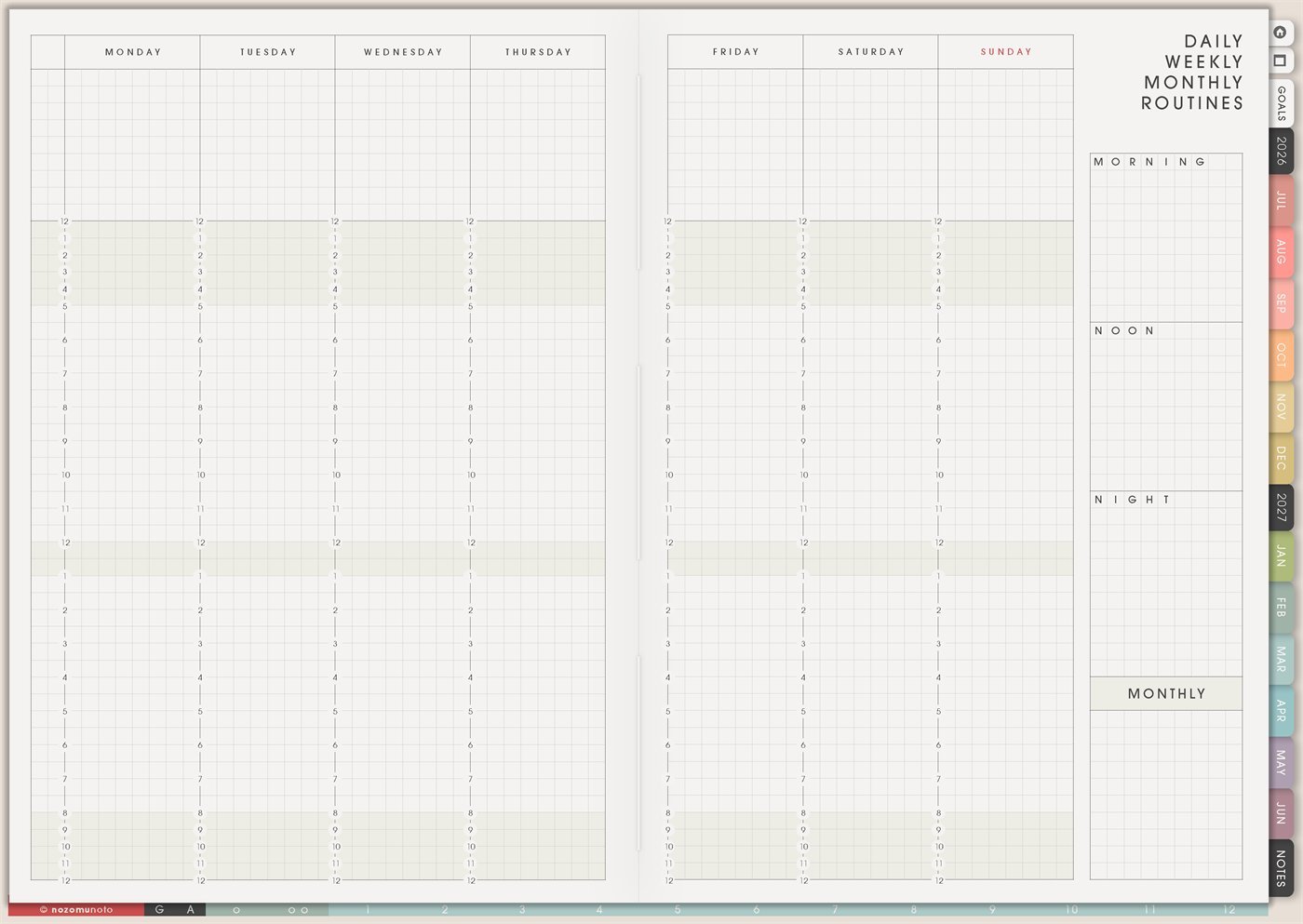
Use Yume Techo routine pages for daily routines, weekly routines, monthly tasks, chores, planning anchors, and simple fallback lists.
The Yume Techo Routines page is a reusable routine-building page for daily, weekly, and monthly rhythms. It has a weekly view across Monday to Sunday, plus separate boxes for Morning, Noon, Night, and Monthly routines. Use it when everyone needs a steady default plan for repeating things instead of rebuilding the same decisions every day.
This page is not only a habit tracker. It is a place to write the routines that carry the week: morning start, midday check-in, bedtime close, weekly home rhythm, work shutdown, study blocks, meal prep, body care, family chores, monthly admin, and low-energy backup versions.
How to use Routine pages
Use routine pages to make repeat tasks easier to remember.
You can create different routine lists for:
- Morning.
- Evening.
- Work days.
- School days.
- Cleaning days.
- Weekly review.
- Monthly admin.
- Simple fallback days.
A routine does not need to be perfect to be useful. Think of it as a menu you can return to.
Start with one short routine, such as a morning list or weekly review list. Add more only after the first routine is easy to find and use.
Related guides: start Yume Techo without getting overwhelmed, Weekly Review for carrying tasks forward and planning next week, and digital home management planner for chores and family admin.
How to get to this page
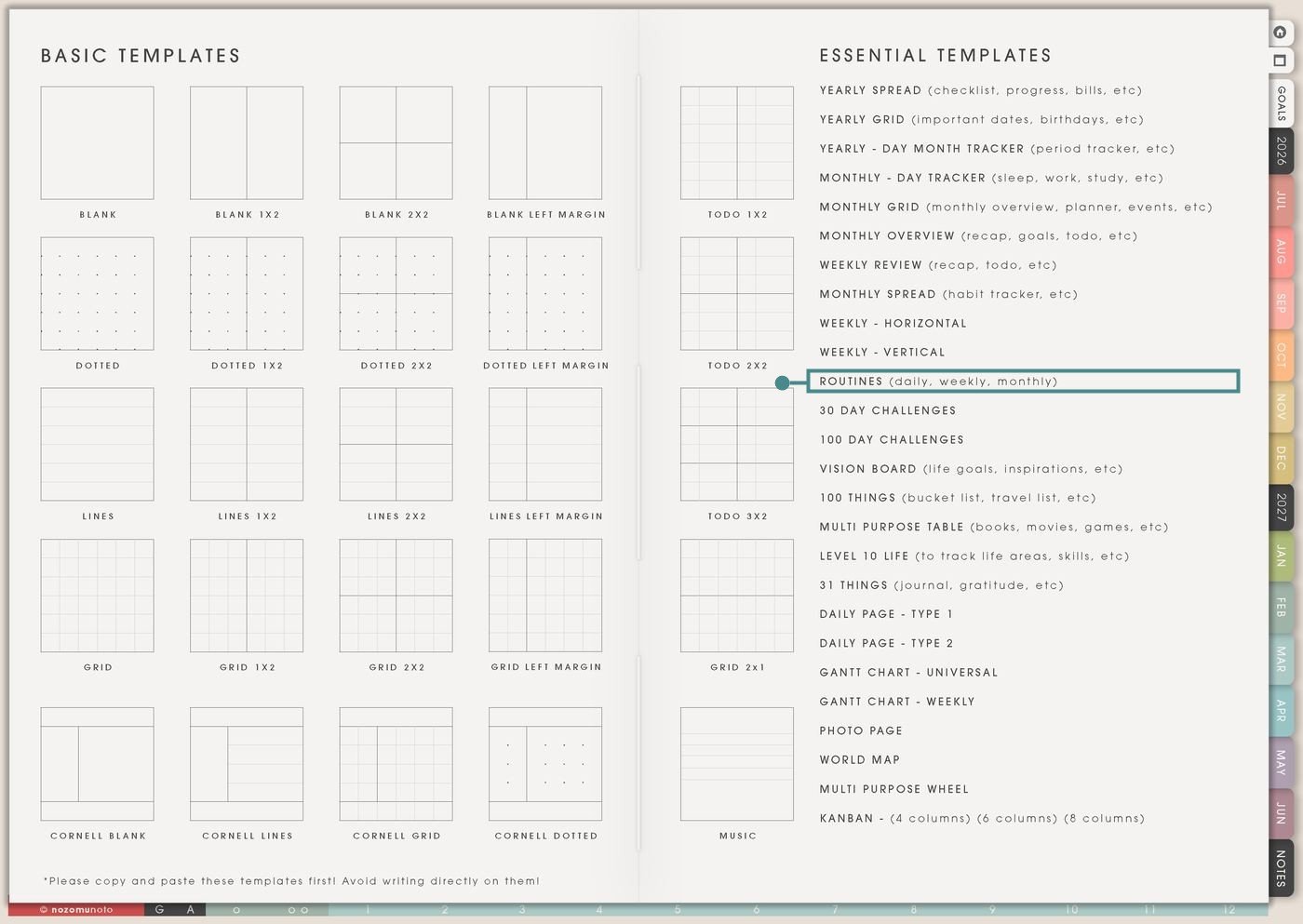
- Open the main Index page: use the planner Index if you need to return to the map.
- Tap the Template Pages icon: this opens the Template Index with reusable clean pages.
- Tap Routines: it is under Weekly – Vertical in the Essential Templates list.
- Copy the page before writing: this is a clean template master. Duplicate it first, then write on the copy.
Before you write: copy the clean Routines page first
Routines is an Essential Template Page. Keep the original clean and make a copy for the season, month, week, home rhythm, school term, work season, or routine plan you want to build.
- Open Routines from Template Index.
- Duplicate or copy the page in your app. Use the page overview, thumbnail view, page manager, or page actions menu.
- Name the copy by purpose. Examples: School Morning Routine, Low-Energy Week, Home Catch-Up, Work Shutdown, Ramadan Routine, Exam Season Routine, or Monthly Admin.
- Write the tiny version first. A routine that works on a tired day is more useful than a perfect routine that disappears.
- Connect routines to real moments. Use cues like after coffee, after lunch, before shower, after school pickup, Friday shutdown, Sunday planning, or payday.
Use scenario ideas
1. Morning routine that starts the day with less rush
Use the Morning box for the first few actions that make the day easier. Keep it short enough that it can happen before messages, errands, school, work, or family needs take over.
For example: water, medicine or vitamins if needed, breakfast, open Weekly, choose one must-do task, clothes, bag, and leave. A tiny version can be water, one clean outfit, and check today. The tiny version still counts because it protects the day from starting in panic.
2. Noon or midday check-in
Use the Noon box for a small check-in that catches the day before it runs away. This works well for lunch breaks, school breaks, work-from-home days, or any day that needs a second start.
For example: eat something, drink water, check appointments, move one task, reply to one urgent message, and clear one surface. If the morning went badly, the noon routine gives everyone a way back without waiting for tomorrow.
3. Night routine that helps tomorrow
Use the Night box for the routine that closes today and makes tomorrow less hard. This is especially useful for school bags, work bags, chargers, medicine, kitchen close, clothes, and tomorrow’s first task.
For example: plug in tablet, put planner near breakfast, set out clothes, pack bag, write tomorrow’s first task, check alarm, and clear enough of the sink for morning. A tiny version can be charger, alarm, and one clean outfit.
4. Weekly review routine
Use the Monday to Sunday columns for the repeated weekly rhythm. This is where you place laundry day, grocery day, planning day, review day, cleaning loop, admin hour, content day, or family prep.
For example: Monday laundry, Tuesday errands, Wednesday admin, Thursday grocery list, Friday work shutdown, Saturday family prep, Sunday Weekly Review. Keep the rhythm visible so every repeat task does not feel like a surprise.
5. Monthly admin routine
Use the Monthly box for repeated checks that matter outside the weekly rhythm. Monthly routines are easy to forget because they are not part of daily life.
For example: check subscriptions, download statements, back up files, refresh budget, update planner covers, review goals, check refills, clean downloads folder, archive old notes, and choose next month focus. Put the actual date on Monthly Grid or Monthly Overview.
6. Home and family routines
Use Routines for repeat home rhythms that carry a lot of invisible work. Write the normal version and the minimum version, especially for busy family weeks.
For example: normal evening routine can be dishes, lunchboxes, school bags, laundry switch, tomorrow clothes, medicine check, quick tidy, and lights out. Minimum evening routine can be bags by door, one clean outfit, charger, and sink cleared enough for breakfast.
7. Study or school routine
Use the weekly columns for recurring study times and the routine boxes for how to start and finish each study session. This helps students who know they need to study but get stuck at the opening step.
For example: study start routine: open planner, open class notes, set timer for 25 minutes, write one question, begin with the easiest exercise. Study shutdown routine: mark what was done, write the next page number, put the file back, and choose the next study block.
8. Work start and work shutdown routine
Use Routines to reduce work-start friction and stop work from leaking into the rest of the day. This is helpful for home work, small business work, customer replies, content work, and admin-heavy weeks.
For example: start routine: open inbox, check calendar, choose top three, start one deep-work block. Shutdown routine: send one follow-up, update orders, write tomorrow first task, close tabs, and move unfinished details to Notes or Kanban.
9. Low-energy or ADHD-friendly default routine
Use Routines to write a version for days when motivation, memory, or energy is low. The backup version is not a failure plan. It is the plan that keeps the door open.
For example: normal morning might be shower, breakfast, planner, tidy, lunch, bag, and leave. Low-energy morning might be wash face, water, medication if needed, clean shirt, phone, keys, leave. Write the backup version clearly so the plan is already there during a hard morning.
10. Planning routine so the planner gets opened
Use the page to create a tiny routine for using the planner itself. A planner works better when opening it has a cue, not when everyone has to remember it from nothing.
For example: after coffee, open Weekly. After lunch, check today. Before bed, write tomorrow’s first task. On Friday, review what is still open. On Sunday, copy the next weekly page. Keep the planner routine smaller than the planner system.
What I usually use it for and how I use it
Tips for using Routines
- Write three sizes. Full can be the ideal version. Medium is the normal busy-day version. Tiny is the version that keeps the routine alive with two or three actions.
- Attach each routine to a cue. After coffee, open planner. After school pickup, unpack bag. Before charger, check tomorrow. A cue makes the routine easier to find.
- Choose the routine the current week needs. If mornings are hard, make the night routine about tomorrow. If meals are hard, make the routine about food. If work leaks late, make the routine about shutdown.
- Put monthly routines on a dated page. The Routines page stores the checklist. Monthly Grid, Monthly Overview, or the first weekend of the month tells you when to use it.
- Add a return rule. Try: if I miss it, I do the tiny version next. Or: open planner, choose today, do one small action. Routines need return paths, not perfect streaks.
- Connect routines to the weekly columns. Place each routine on real days. If Sunday is full, move planning to Friday afternoon or Monday morning. The routine should fit the week, not fight it.
- Copy first every time. If you write on the clean template by accident, undo if possible. If not, bring in a fresh clean copy from the original planner file and make copy first the first habit.
Related Tips: Weekly – Horizontal works well when the routine needs time blocks. Weekly Review helps me decide what routine returns next week.
If the routine includes medicine, health notes, family logistics, client work, school details, addresses, or account reminders, keep sensitive details in a secure place. On Routines, write only the safe cue or next action you need to see.
Final thought
Routines are useful when they make life easier to return to. Copy the clean page, write tiny versions first, connect each routine to a real cue, and use the weekly columns to place routines where they can actually happen. I hope this page helps your routines become something you can return to, even after a messy week!
Need exact app steps for copying pages?
If you need the exact buttons for importing, duplicating, linking, adding stickers, moving, or bookmarking this template in your app, use the Help Center app guide for your device.
Browse NozomuNoto products
Find the planner, notebook, e-reader file, or add-on that fits the way you actually plan.
About NozomuNoto
NozomuNoto creates Japanese-inspired digital planners, notebooks, stickers, and e-reader PDFs for people who want useful pages that still work in real life.
Yume Techo is built with dated yearly, monthly, weekly, daily, Life Planner, Planner Pages, and Template Pages so one planner can hold study, work, home, ADHD-friendly routines, lists, and creative projects without adding paper bulk.
New to digital planning? Start there, use the Help Center for setup help, or browse NozomuNoto products when you are ready to choose your planner.