

Browse tips
Yume Techo Use Cases
- As a Student
- As a Teacher
- For Moms & Family
- For Work
- For Creative Projects
- For Bible Study
- For Small Business
- For Content Creation
- For Fitness & Health
- For Travel
- For Rapid Logging
- For Life Planning
- For Journaling & Reflection
- For Budget & Finance
- For Meals & Grocery
- For Project Planning
- For Home Management
- For Creative Writing
- For Music Writing
- For Brainstorming
- For Homeschooling
Page-by-Page Use Ideas
Essential Template Pages
- Template Index
- Yearly Spread
- Yearly Grid
- Yearly - Day Month Tracker
- Monthly - Day Tracker
- Monthly Grid
- Monthly Overview
- Weekly Review
- Monthly Spread
- Weekly - Horizontal
- Weekly - Vertical
- Routines
- 30 Day Challenges
- 100 Day Challenges
- Vision Board
- 100 Things
- Multi Purpose Table
- Level 10 Life
- 31 Things
- Daily Page - Type 1
- Daily Page - Type 2
- Gantt Chart - Universal
- Gantt Chart - Weekly
- Photo Page
- World Map
- Multi Purpose Wheel
- Kanban - 4/6/8 columns
- Template Pages
- Level 10
- Daily Template
- Yearly Tracker
Life Planner Pages
- Life Planner Index
- Life Planner
- Vision Board
- Life Inspirations
- Favorite Quotes
- Things That Make Me Happy
- My Life Systems and Rules
- Level 10 Life
- Things I Need To Change
- Bucket List
- Skills To Learn
- Projects To Make
- Challenges To Try
- Resolutions
- Yearly Goal Overview
- Goal Planner
- Reward Ideas
- Distraction List
- My Achievements
- Note To My Future Self
- Routines
- 30 Day Challenges
- Kanban Board
Books
How to use Yume Techo Level 10 Life for life areas and next steps
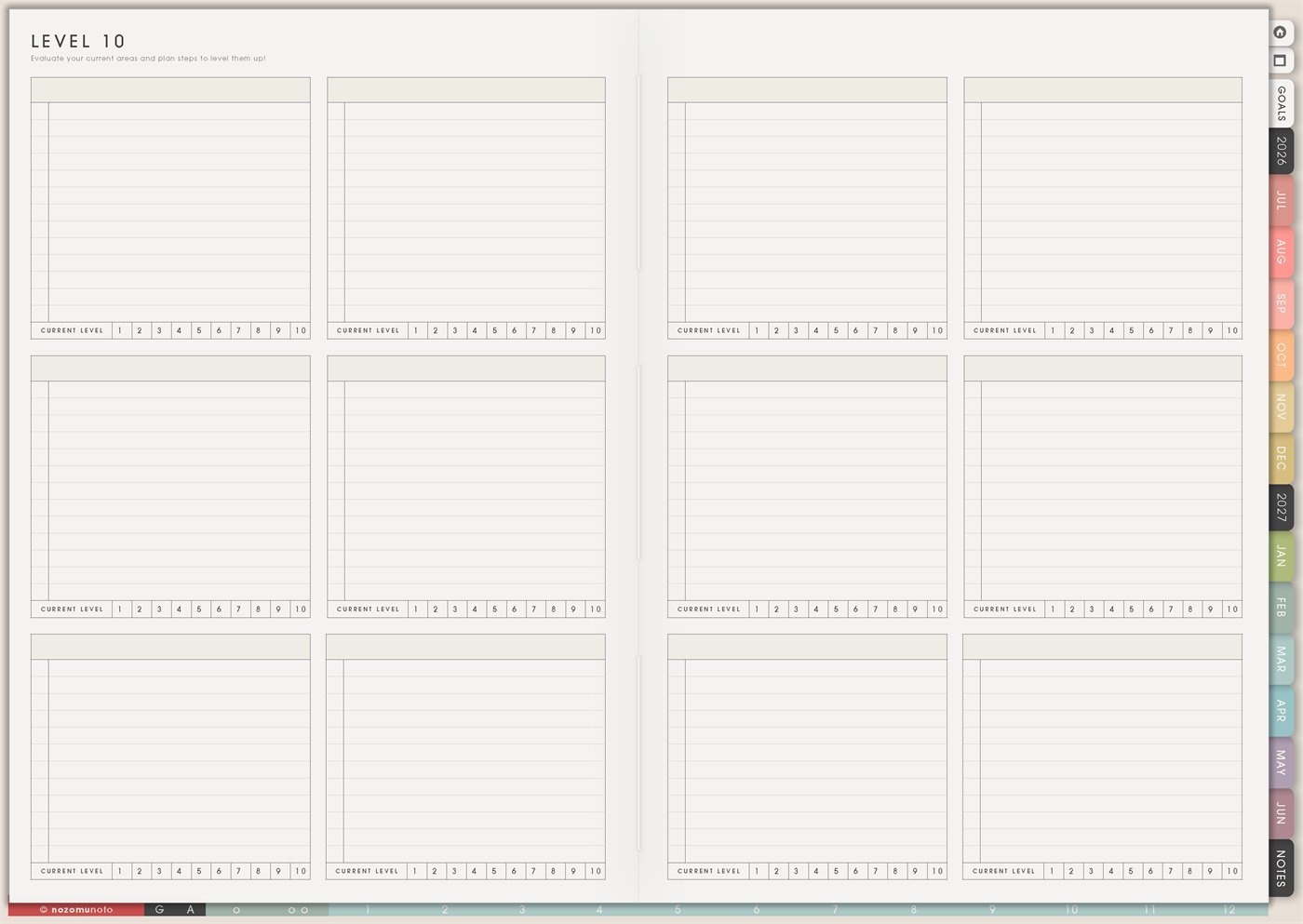
Use Yume Techo Level 10 Life to review life areas, notice what needs attention, and choose small next steps without overbuilding your plan.
The Yume Techo Level 10 Life page is a reusable life-area check-in page. Each box gives space to name one area, write notes, and circle a current level from 1 to 10. Use it when you need to step back from daily tasks and ask, “Which parts of life need attention, and what is one small thing that helps?”
This page works best when the numbers stay honest and practical. They are not grades. They are a quick snapshot so you can notice patterns, choose priorities, and stop trying to improve every part of life at the same time.
How to use Level 10 Life
Use Level 10 Life to check different areas of your life and choose what needs attention next.
Common life areas include:
- Health.
- Home.
- Work.
- Family.
- Friends.
- Learning.
- Money notes.
- Creativity.
- Rest.
- Personal projects.
Give each area a simple rating or note. Then choose one small next step for one area.
You never need to improve every area at once. This page works best when it helps you see where to focus next.
Related guides: Level 10 template ideas shows another way to use the copied template, the digital life planner guide helps connect life areas to goals and routines, and Multi Purpose Wheel ideas helps when you want a more visual review.
How to get to this page
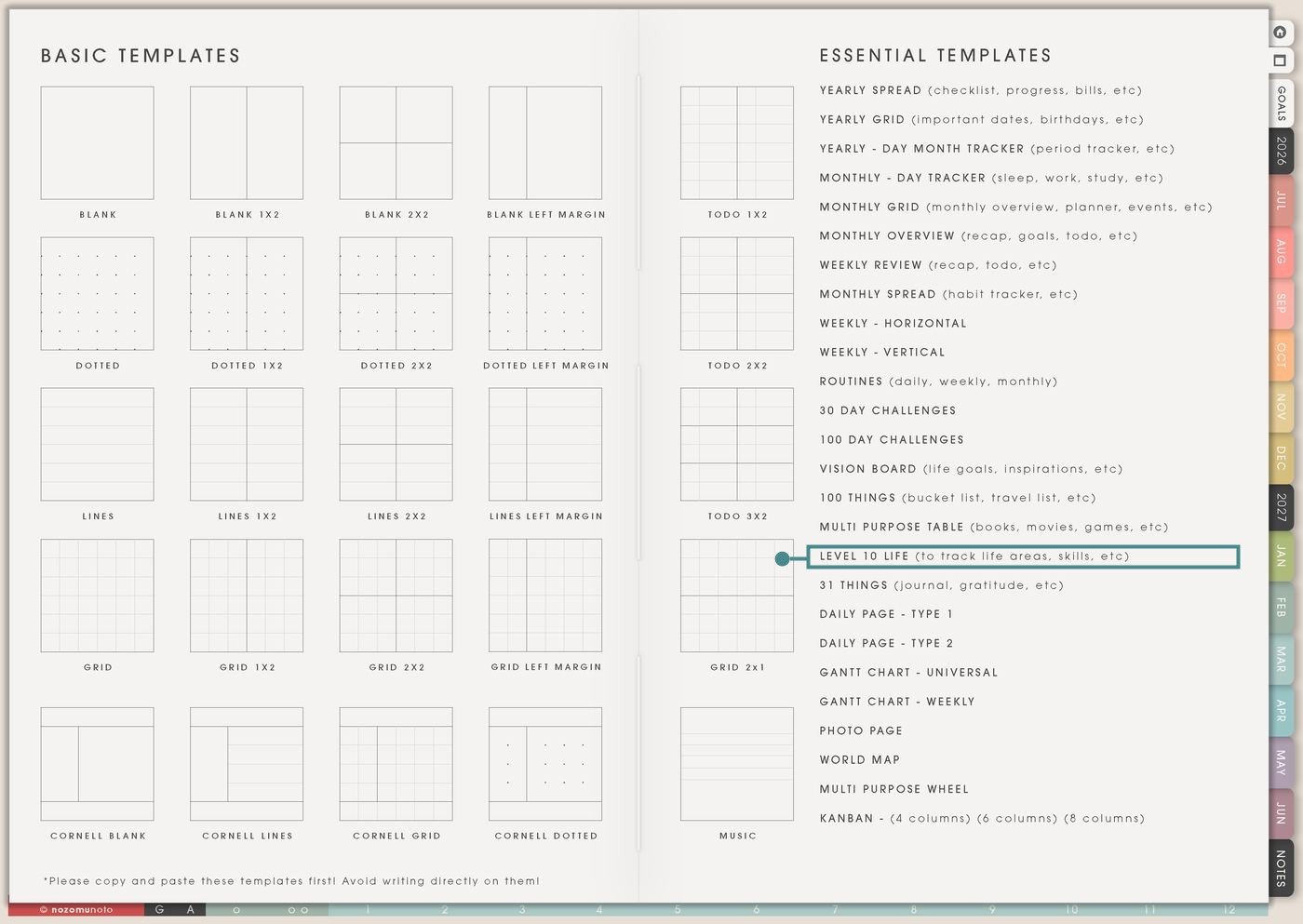
- Open the main Index page: use the planner Index if you need to return to the map.
- Tap the Template Pages icon: this opens the Template Index with reusable clean pages.
- Tap Level 10 Life: it is under Multi Purpose Table in the Essential Templates list.
- Copy the page before writing: this is a clean template master. Duplicate it first, then write on the copy.
Before you write: choose life areas for this season
Level 10 Life is an Essential Template Page. Keep the original clean and make a copy for the season, month, quarter, birthday check-in, school year, or life transition you want to review.
- Open Level 10 Life from Template Index.
- Duplicate or copy the page in your app. Use the page overview, thumbnail view, page manager, or page actions menu.
- Name the copy by timing. Examples: June Life Check, Birthday Check-In, Back-to-School Check-In, New Year Check-In, or After Burnout Check-In.
- Pick areas that actually matter right now. Area ideas include health, home, family, money, faith, study, work, friendship, rest, creativity, business, body care, or joy.
- Choose one small next step after rating. The number shows where attention might help. The action is what makes the page useful.
Use scenario ideas
1. Monthly life-area check-in
Use one copy at the start or end of the month to notice which areas are steady, which feel neglected, and which need only a tiny next step.
For example: write Home, Work, Money, Body Care, Family, Rest, Creativity, and Faith. Circle current levels, then choose one monthly next step such as “meal plan two easy dinners,” “review subscriptions,” or “sleep routine three nights.”
2. Birthday or New Year check-in
Use the page for a bigger check-in when you want to think about the next season of life without writing a huge resolution list.
For example: write the life areas that matter this year, then circle the current level honestly. If Creativity is a 3, the next step might be “one sketch night per week,” not “become a completely different person.”
3. Back-to-school or semester check-in
Use Level 10 Life before a school term starts so study does not swallow everything else. This is useful for students, teachers, tutors, and families following an academic rhythm.
For example: use areas like Study, Sleep, Meals, Money, Friends, Home, Body Care, and Free Time. If Study is high but Sleep is low, the next step may be a bedtime checklist or one no-study evening.
4. Work and life balance check
Use the page when work, business, caregiving, or side projects start taking over. The point is to see what is missing before the month becomes only output.
For example: write Work, Admin, Home, Family, Body, Rest, Friends, and Joy. If Work is an 8 but Rest is a 2, the next action can be small: block one quiet evening, move one task, or make tomorrow lighter.
5. Burnout recovery or low-energy season
Use Level 10 Life honestly when life feels heavy. Use it to find the next area that needs care and reduce pressure.
For example: use areas like Sleep, Food, Home, Money, Help, Workload, Body Care, and Peace. If several areas are low, choose only the most basic next step first: food, rest, clean clothes, one message, or one appointment reminder.
6. Home and family rhythm review
Use the page to check household areas without making one giant chore list. This helps when home care, school forms, meals, routines, and family needs are spread across too many places.
For example: use areas like Meals, Laundry, Paperwork, Kids, Calendar, Groceries, Cleaning, and Family Time. If Groceries is low, the next step might be a five-meal default list, not a perfect pantry system.
7. Money, admin, and paperwork check-in
Use Level 10 Life to notice whether money and admin feel steady, avoided, messy, or urgent. The page only needs enough truth to choose a next step.
For example: write Bills, Subscriptions, Savings, Taxes, Receipts, Orders, Paperwork, and Digital Files. If Subscriptions is a 4, move one review task to Multi Purpose Table or Monthly Overview.
8. Creative life and personal joy check
Use the page to make sure useful life still has room for ideas, art, books, hobbies, music, faith, play, memories, and little things that make the year feel alive.
For example: use areas like Reading, Craft, Music, Photos, Journaling, Learning, Fun, and Adventure. If Photos is low, the next step can be “print 10 favorites” or “make one Photo Page copy.”
9. Relationship and community check-in
Use the page to notice which relationships need care, boundaries, repair, celebration, or simple contact. Keep it honest and realistic.
For example: use areas like Family, Friends, Partner, Kids, Community, Mentors, Customers, and Myself. If Friends is low, the next step might be one message, one coffee invite, or adding birthdays to Yearly Grid.
10. Faith, values, or personal direction check
Use Level 10 Life when you want your planner to help you notice who you are becoming, not only what you are finishing. This can be religious, reflective, values-based, or simply personal.
For example: use areas like Faith, Prayer, Service, Gratitude, Integrity, Courage, Rest, and Learning. Choose one small action that matches the value, like one reading plan, one note of thanks, or one quiet pause.
What I usually use it for and how I use it
Tips for using Level 10 Life
- Treat the number as a snapshot. Write “current level, not character level” near the top if numbers start feeling personal. Follow every low score with one next step, such as clear one surface, choose easy dinner, or ask for help.
- Choose one to three focus areas. Circle only the areas that need attention now. Everything else can be noticed without becoming active.
- Make area names specific. Instead of Health, choose Sleep, Meals, Movement, Appointments, or Body Care. Instead of Work, choose Admin, Deep Work, Clients, or Schedule.
- Write one physical next action. Examples: open bank app, list subscriptions, check bill date, put receipts in one folder, or move one money task to Weekly.
- Rate by your real season. Ask, “Does this area help me enough right now?” The next step should fit your body, family, money, time, and energy.
- Date the page and name the season. Examples: June Check-In, Birthday 2026, Fall Semester Start, After Move, or Recovery Month. The context matters as much as the score.
- Copy first every time. If you write on the clean template by accident, undo if possible. If not, bring in a fresh clean copy from the original planner file and make copy first the first step.
Related Tips: Monthly Overview helps turn the check-in into a monthly plan. Goal Planner Index and 12 goal pages helps when one area becomes a real goal. Things I Need To Change helps turn one low area into a practical next step. Routines helps when the next step needs a repeat rhythm.
If a Level 10 Life page includes health details, family issues, money stress, client work, school scores, relationship notes, faith notes, or private emotions, keep sensitive details in the secure place where they belong. On Level 10 Life, write only the safe label, score, and next action you need to see.
Final thought
Level 10 Life is useful when it helps everyone notice life honestly and choose small next steps. Copy the clean page, name the season, rate honestly without turning the number into a judgment, and pick only a few areas for the next action. I hope this page helps life feel easier to read without making a perfect 10 the goal!
Need exact app steps for copying this page?
If you need the exact buttons for importing Yume Techo, duplicating this template, moving the copied page, using hyperlinks, or adding stickers, use the Help Center app guide for your device.
Browse NozomuNoto products
Find the planner, notebook, e-reader file, or add-on that fits the way you actually plan.
About NozomuNoto
NozomuNoto creates Japanese-inspired digital planners, notebooks, stickers, and e-reader PDFs for people who want useful pages that still work in real life.
Yume Techo is built with dated yearly, monthly, weekly, daily, Life Planner, Planner Pages, and Template Pages so one planner can hold study, work, home, ADHD-friendly routines, lists, and creative projects without adding paper bulk.
New to digital planning? Start there, use the Help Center for setup help, or browse NozomuNoto products when you are ready to choose your planner.