

Browse tips
Yume Techo Use Cases
- As a Student
- As a Teacher
- For Moms & Family
- For Work
- For Creative Projects
- For Bible Study
- For Small Business
- For Content Creation
- For Fitness & Health
- For Travel
- For Rapid Logging
- For Life Planning
- For Journaling & Reflection
- For Budget & Finance
- For Meals & Grocery
- For Project Planning
- For Home Management
- For Creative Writing
- For Music Writing
- For Brainstorming
- For Homeschooling
Page-by-Page Use Ideas
Essential Template Pages
- Template Index
- Yearly Spread
- Yearly Grid
- Yearly - Day Month Tracker
- Monthly - Day Tracker
- Monthly Grid
- Monthly Overview
- Weekly Review
- Monthly Spread
- Weekly - Horizontal
- Weekly - Vertical
- Routines
- 30 Day Challenges
- 100 Day Challenges
- Vision Board
- 100 Things
- Multi Purpose Table
- Level 10 Life
- 31 Things
- Daily Page - Type 1
- Daily Page - Type 2
- Gantt Chart - Universal
- Gantt Chart - Weekly
- Photo Page
- World Map
- Multi Purpose Wheel
- Kanban - 4/6/8 columns
- Template Pages
- Level 10
- Daily Template
- Yearly Tracker
Life Planner Pages
- Life Planner Index
- Life Planner
- Vision Board
- Life Inspirations
- Favorite Quotes
- Things That Make Me Happy
- My Life Systems and Rules
- Level 10 Life
- Things I Need To Change
- Bucket List
- Skills To Learn
- Projects To Make
- Challenges To Try
- Resolutions
- Yearly Goal Overview
- Goal Planner
- Reward Ideas
- Distraction List
- My Achievements
- Note To My Future Self
- Routines
- 30 Day Challenges
- Kanban Board
Books
How to use the Yume Techo Multi Purpose Table
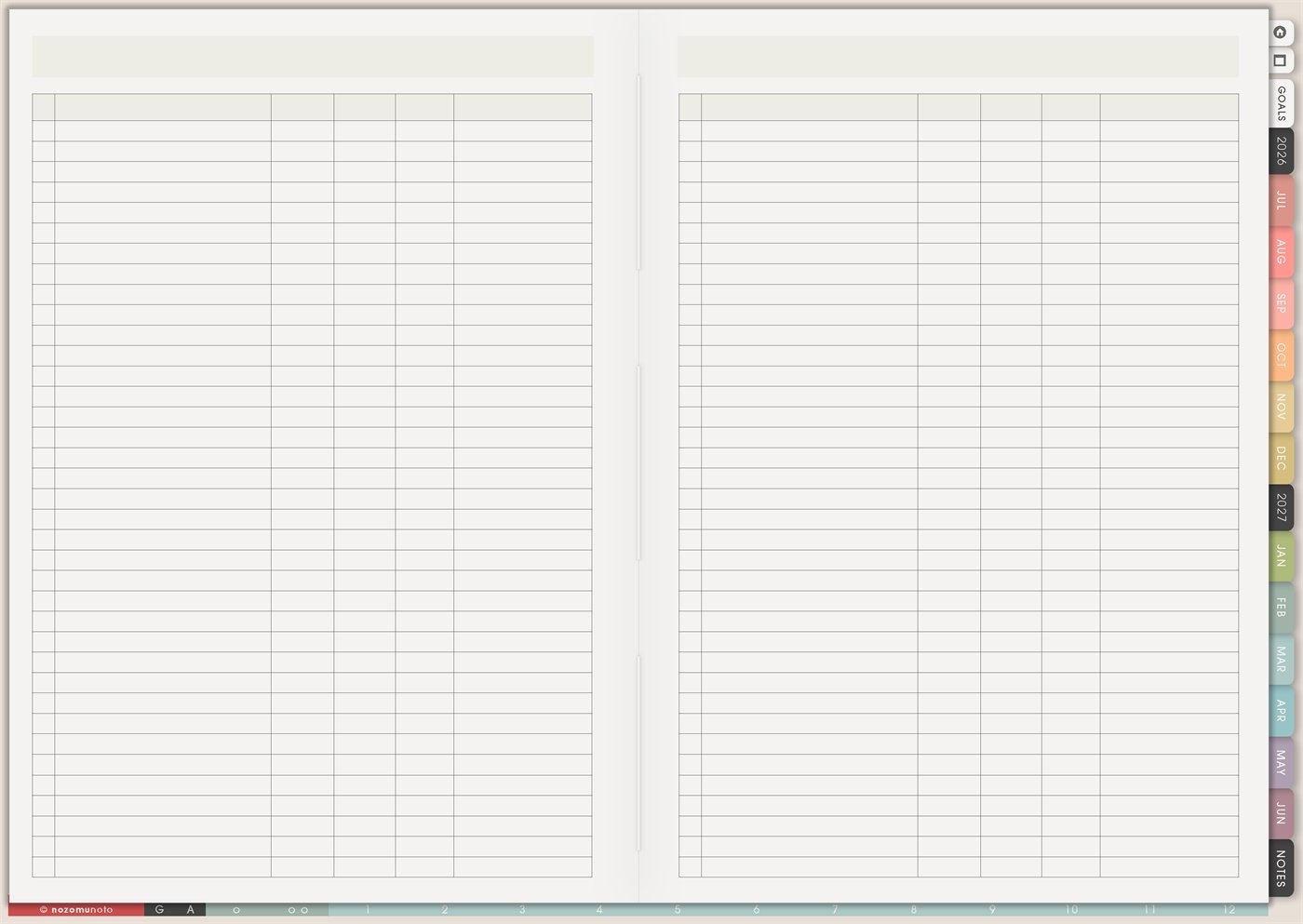
Use the Yume Techo Multi Purpose Table for trackers, comparisons, inventories, simple logs, lists, and structured planner notes.
The Yume Techo Multi Purpose Table is a reusable two-page table with wide rows and several blank columns. Use it when a normal list is too flat and everyone needs to compare details side by side: books, movies, games, shopping options, product ideas, supplies, subscriptions, class topics, project resources, inventory, or simple logs.
This page is different from 100 Things. 100 Things is for one long numbered collection. Multi Purpose Table is for items that need columns. If you keep asking, “What is the status, price, place, rating, due date, category, or next step for each item?” this is the page.
How to use the Multi Purpose Table
Use the Multi Purpose Table when your information needs rows and columns.
Good uses include:
- Inventory lists.
- Book lists.
- Supply lists.
- Project logs.
- Comparison tables.
- Simple trackers.
- Shopping research.
- Class or client notes.
Start by choosing your column titles first. For example, item, date, status, notes, price, priority, or next step.
Keep the table simple. If the columns become too crowded, split the topic into a separate page.
Related guides: use Template Pages Ideas when you need to choose and copy a reusable page, the digital project planner for work and creative projects, and the digital home management planner for chores and family admin.
How to get to this page
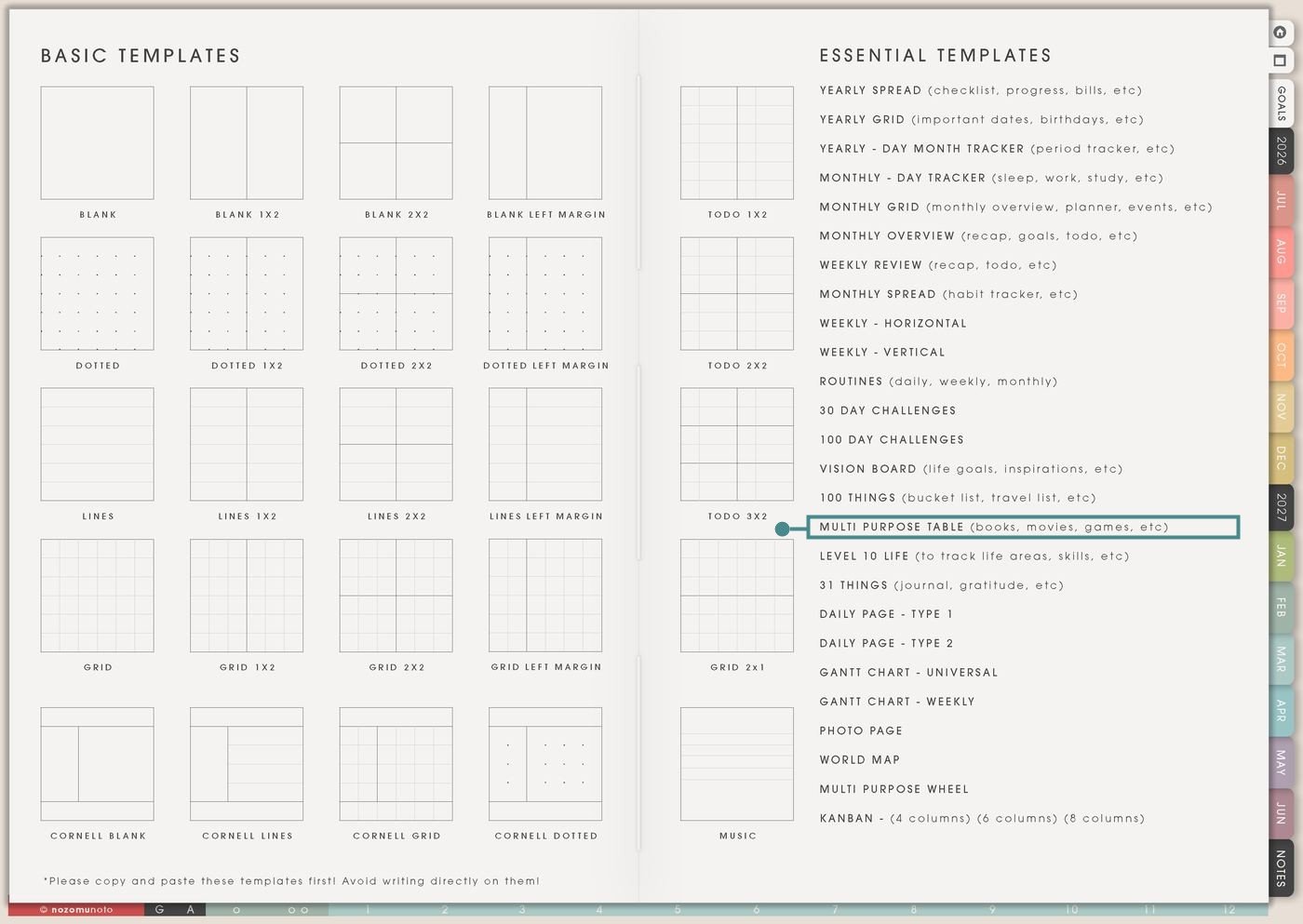
- Open the main Index page: use the planner Index if you need to return to the map.
- Tap the Template Pages icon: this opens the Template Index with reusable clean pages.
- Tap Multi Purpose Table: it is under 100 Things in the Essential Templates list.
- Copy the page before writing: this is a clean template master. Duplicate it first, then write on the copy.
Before you write: choose the columns first
Multi Purpose Table is an Essential Template Page. Keep the original clean and make a copy for the table you want to build.
- Open Multi Purpose Table from Template Index.
- Duplicate or copy the page in your app. Use the page overview, thumbnail view, page manager, or page actions menu.
- Name the copy by topic. Examples: Book Tracker, Gift Comparison, Sticker Inventory, Subscription Review, Study Topics, Product Ideas, or Home Supplies.
- Write column headers before filling rows. Start with four to six columns. Add more only if the table still feels clear.
- Keep row text short. The table is for scanning. Longer thoughts can go on a Notes page, project page, or the related planner section.
Use scenario ideas
1. Books, movies, shows, games, or media tracker
Use the table when each title needs more than a check mark. This is helpful for tracking what you want to read, watch, play, borrow, buy, review, recommend, or finish.
For example: use columns for title, format, source, status, rating, and note. A book row can say “borrowed, halfway, 4 stars, useful chapter 3.” A game row can say “Switch, wish list, wait for sale, cozy.”
2. Shopping comparison before choosing
Use Multi Purpose Table when several options look similar and you need to make a clear choice. It is very useful for gifts, tablets, styluses, apps, desk items, school supplies, digital tools, or household purchases.
For example: use columns for item, shop, price, size, delivery, pros, and decision. Instead of keeping ten browser tabs open, the table shows which option is actually best.
3. Product, shop, or listing tracker
Use the table for small business or shop work when each product has repeated details. This keeps listing updates from becoming a messy notes pile.
For example: use columns for product, size, color, listing photo, description, price, update needed, and next action. One row can hold “Yume Techo Landscape, Garden, photos done, description needs FAQ link.”
4. Inventory for supplies, stickers, files, or materials
Use the table when you need to know what exists, where it is, and whether it needs refill, cleanup, backup, or deletion.
For example: use columns for item, quantity, location, condition, refill date, and note. This works for craft supplies, stationery, digital sticker sets, homeschool materials, pantry staples, medicine cabinet basics, or planner files.
5. Subscription and renewal review
Use the table for recurring costs that quietly multiply. Seeing them in columns makes it easier to decide what to keep, cancel, pause, downgrade, or review later.
For example: use columns for service, cost, renewal month, purpose, last used, keep/cancel, and note. Keep passwords and private login details in the secure place where they belong. Write only the information needed for the decision.
6. Study topic or class progress table
Use the table for subjects, chapters, skills, readings, videos, practice sets, exam topics, or assignments that need a simple progress view.
For example: use columns for topic, chapter, due date, status, confidence, review date, and next step. A row can say “biology cell structure, chapter 2, low confidence, review flashcards Friday.”
7. Project resources and follow-up list
Use Multi Purpose Table when a project has many resources, contacts, links, documents, references, or follow-up pieces. It keeps reference material separate from the actual task list.
For example: use columns for resource, where it lives, why it matters, status, next action, and note. A row can say “photo folder, Google Drive, listing image source, choose best 5.”
8. Meal, recipe, or family default table
Use the table for repeated decisions at home. This works especially well when a family has different preferences, effort levels, ingredients, or routines.
For example: use columns for meal, ingredients, effort, kid-friendly, freezer, cost, and note. A tired-week meal can be marked easy, cheap, and repeatable so dinner does not start from zero every night.
9. Gift, wish list, or holiday planning table
Use the table when gift ideas need details like person, budget, occasion, shop, delivery, bought status, wrapping status, and thank-you note.
For example: use columns for person, idea, budget, where to buy, deadline, status, and note. This keeps birthdays, Mother’s Day, Christmas, school gifts, and teacher gifts from turning into last-minute panic.
10. Simple log with categories and notes
Use the page as a log when each entry needs more structure than a journal line but less structure than a full tracker. This can be for symptoms, moods, expenses, workouts, practice sessions, customer questions, creative ideas, or maintenance notes.
For example: use columns for date, category, what happened, intensity, action taken, and follow-up. Keep it practical and short. If one row becomes a story, move the story to Notes and keep the table as the index.
What I usually use it for and how I use it
Tips for using Multi Purpose Table
- Start with decision columns only. Good first columns are item, status, price, place, next action, and note. If a column never changes the decision, remove it.
- Use a table only when columns matter. If the page only needs a long collection, use 100 Things. If it needs dates, use Monthly Grid or Weekly. If it needs stages, use Kanban.
- Write a tiny status key. Use clear words like idea, compare, chosen, bought, done, moved, or waiting. Boring status words are easier to scan later.
- Keep table notes short. Move longer thoughts to a Notes page, Book Notes, project page, or journal page. The table can point to details without holding all of them.
- Write decision-level information only. For subscriptions, write service name, cost, renewal month, keep/cancel, and where the official details are stored. Keep private data in the secure place meant for it.
- Add a review cue. During Weekly Review or Monthly Overview, choose one row to move forward, one row to archive, and one row to leave for later.
- Copy first every time. If you write on the clean template by accident, undo if possible. If not, bring in a fresh clean copy from the original planner file and make copy first the first step.
Related Tips: Monthly Grid is better when the table needs dates. Kanban Board is better when the rows need stages. Wish List is better for wanted items and buying priority.
If a table includes health details, account reminders, subscription notes, family information, client work, school data, passwords, card details, or private numbers, keep sensitive details in the secure place where they belong. On Multi Purpose Table, write only the safe decision-level information you need to see.
Final thought
Multi Purpose Table is useful when rows need columns. Copy the clean page, choose one topic, name the columns before filling the rows, and let the table help you compare, decide, restock, review, or move one item forward. I hope this page makes scattered details easier to see, not heavier to carry!
Need exact app steps for copying table pages?
If you need the exact buttons for importing Yume Techo, duplicating this template, moving the copied page, using hyperlinks, or adding stickers, use the Help Center app guide for your device.
Browse NozomuNoto products
Find the planner, notebook, e-reader file, or add-on that fits the way you actually plan.
About NozomuNoto
NozomuNoto creates Japanese-inspired digital planners, notebooks, stickers, and e-reader PDFs for people who want useful pages that still work in real life.
Yume Techo is built with dated yearly, monthly, weekly, daily, Life Planner, Planner Pages, and Template Pages so one planner can hold study, work, home, ADHD-friendly routines, lists, and creative projects without adding paper bulk.
New to digital planning? Start there, use the Help Center for setup help, or browse NozomuNoto products when you are ready to choose your planner.