

Browse tips
Yume Techo Use Cases
- As a Student
- As a Teacher
- For Moms & Family
- For Work
- For Creative Projects
- For Bible Study
- For Small Business
- For Content Creation
- For Fitness & Health
- For Travel
- For Rapid Logging
- For Life Planning
- For Journaling & Reflection
- For Budget & Finance
- For Meals & Grocery
- For Project Planning
- For Home Management
- For Creative Writing
- For Music Writing
- For Brainstorming
- For Homeschooling
Page-by-Page Use Ideas
Essential Template Pages
- Template Index
- Yearly Spread
- Yearly Grid
- Yearly - Day Month Tracker
- Monthly - Day Tracker
- Monthly Grid
- Monthly Overview
- Weekly Review
- Monthly Spread
- Weekly - Horizontal
- Weekly - Vertical
- Routines
- 30 Day Challenges
- 100 Day Challenges
- Vision Board
- 100 Things
- Multi Purpose Table
- Level 10 Life
- 31 Things
- Daily Page - Type 1
- Daily Page - Type 2
- Gantt Chart - Universal
- Gantt Chart - Weekly
- Photo Page
- World Map
- Multi Purpose Wheel
- Kanban - 4/6/8 columns
- Template Pages
- Level 10
- Daily Template
- Yearly Tracker
Life Planner Pages
- Life Planner Index
- Life Planner
- Vision Board
- Life Inspirations
- Favorite Quotes
- Things That Make Me Happy
- My Life Systems and Rules
- Level 10 Life
- Things I Need To Change
- Bucket List
- Skills To Learn
- Projects To Make
- Challenges To Try
- Resolutions
- Yearly Goal Overview
- Goal Planner
- Reward Ideas
- Distraction List
- My Achievements
- Note To My Future Self
- Routines
- 30 Day Challenges
- Kanban Board
Books
How to use the Yume Techo Monthly Spread for habits, routines, and logs
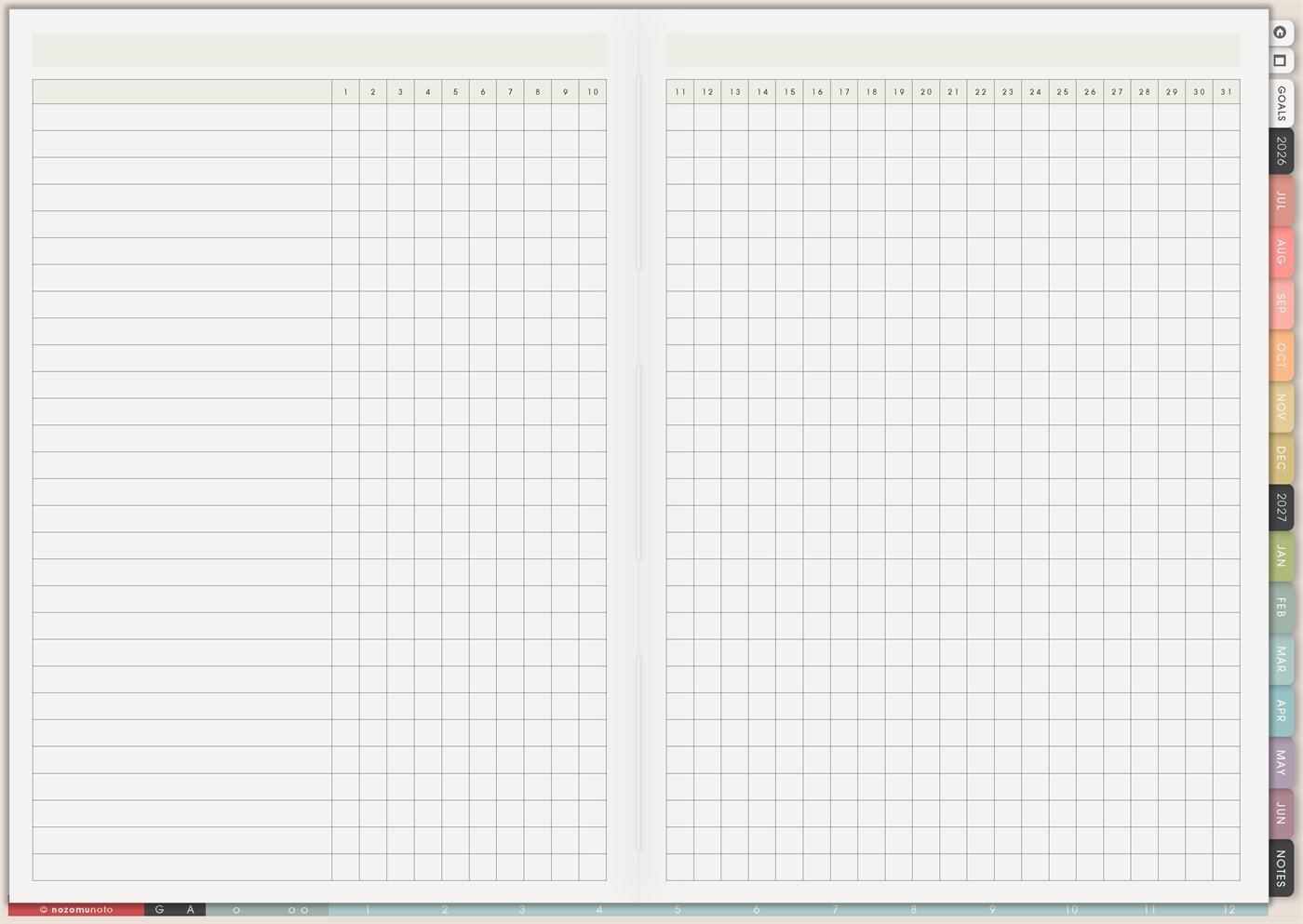
Use the Yume Techo Monthly Spread for habits, routines, chores, meals, repeated tasks, and month-long logs.
The Yume Techo Monthly Spread page is a reusable month-long tracker with blank row labels on the left and days 1 to 31 across the top. It is useful when everyone wants to see a whole month of tiny repeated actions, notes, checks, counts, routines, or patterns on one clean spread.
This page is different from Monthly Grid. Monthly Grid is best for events and calendar planning. Monthly Spread is best for repeated rows: habits, chores, meals, study sessions, symptoms, content steps, spending, family care, and anything else you want to watch across many days.
How to use the Monthly Spread
Use the Monthly Spread for things that repeat across the month.
Good things to track here include:
- Habits.
- Routines.
- Chores.
- Meals.
- Cleaning zones.
- Study or practice days.
- Work focus.
- Monthly logs.
The Monthly Spread is useful when you want to see repetition and patterns.
Use the Monthly Grid for events tied to specific dates. Use the Monthly Overview for reflection and planning the next month.
Start with one or two repeating things first. Add more only if the page still feels easy to read.
How to get to this page
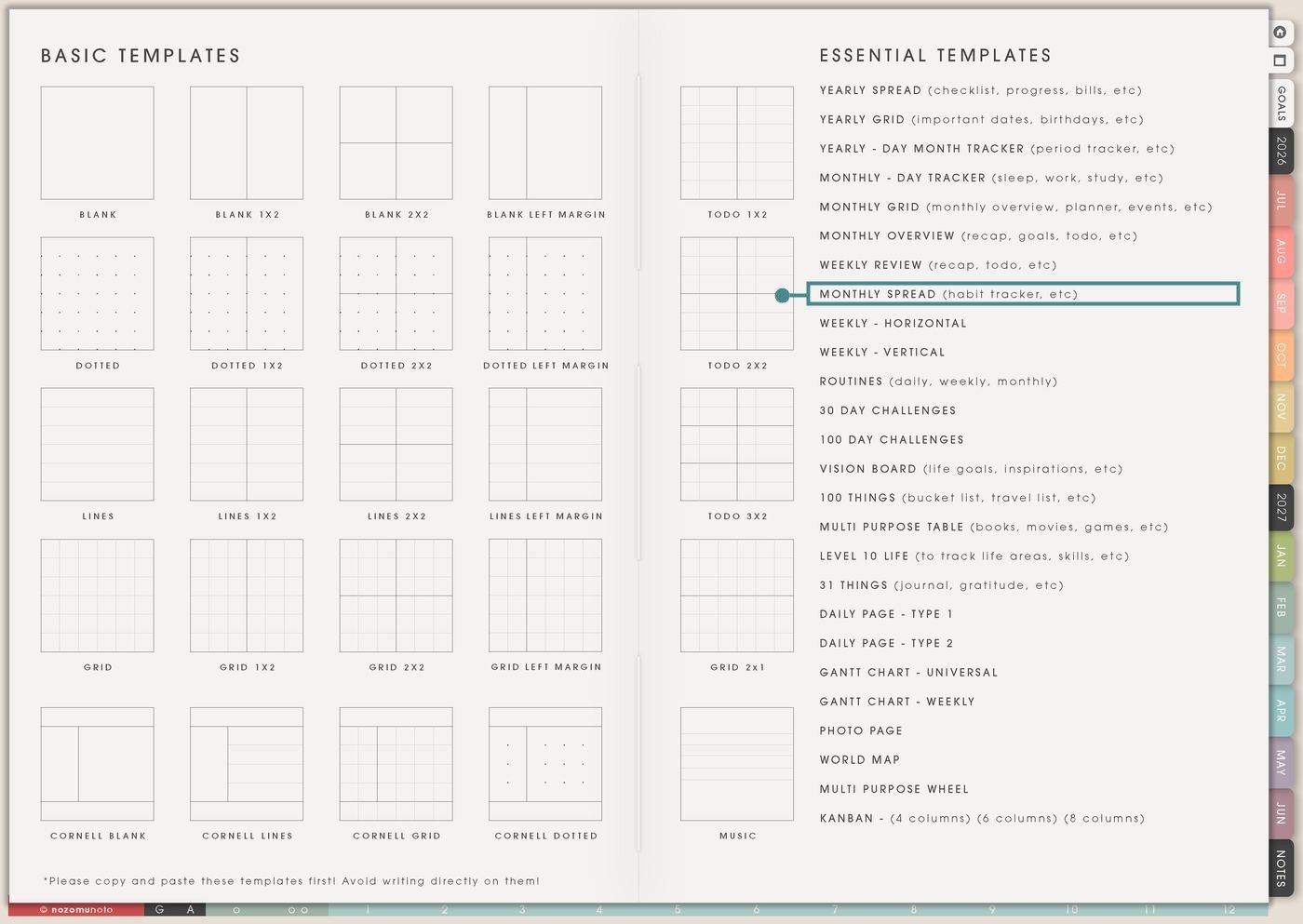
- Open the main Index page: use the planner Index if you need to return to the map.
- Tap the Template Pages icon: this opens the Template Index with reusable clean pages.
- Tap Monthly Spread: it is under Weekly Review in the Essential Templates list.
- Copy the page before writing: this is a clean template master. Duplicate it first, then write on the copy.
Before you write: copy the clean Monthly Spread first
Monthly Spread is an Essential Template Page, so keep the original clean. Make one copy for the month, season, project, class, or experiment you want to track.
- Open Monthly Spread from Template Index.
- Duplicate or copy the page in your app. Use the page overview, thumbnail view, page manager, or page actions menu.
- Name the copy clearly. Examples: August Routines, Launch Month Tracker, Study Month Log, Family Chores, or Health Notes.
- Write row names before filling boxes. The left side is for labels such as Sleep, Water, Math review, Laundry, Orders, Dinner, or Reading.
- Choose a simple mark system. Use a check mark, dot, color, number, short word, or one-letter code. This page works best when the boxes stay easy to fill.
Related guides: Yume Techo Monthly Grid for events, goals, projects, meals, and family planning, Yume Techo Monthly – Day Tracker for sleep, work, study, routines, and symptoms, and digital home management planner for chores and family admin.
Use scenario ideas
1. Habit and routine rows across the month
Use one row for each habit or routine you want to notice. Monthly Spread is good for habits because the whole month is visible at once, and you can see patterns without opening thirty separate daily pages.
For example: label rows Sleep, Water, Walk, Vitamins, Reading, Planner Open, Tidy 10, and Stretch. Mark each day with a check, dot, number, or tiny note. If you miss several days, continue from today and use the blank space as information.
2. Chore and home care rotation
Use the rows for chores that repeat without needing a full daily schedule. This is helpful when home tasks are easy to forget because they are small, invisible, or shared by more than one person.
For example: label rows Laundry, Dishes done, Trash, Bathroom, Groceries, Vacuum, Plant water, and Paper clutter. Mark the day when each task happens. At the end of the week, you can see if one task keeps sliding and choose a smaller version.
3. Meal planning and food rhythm
Use Monthly Spread to see food patterns without writing a full meal plan in every calendar box. This works well for dinner themes, packed lunches, grocery prep, freezer meals, snacks, or eating-out days.
For example: rows can be Dinner plan, Leftovers, Lunch packed, Grocery prep, Freezer meal, Eat out, Water, and Easy backup meal. You can write short words like pasta, rice bowl, soup, leftovers, or takeout instead of long recipes.
4. Study, class, or practice tracking
Use one row per subject, course, exam area, instrument, language skill, or practice type. This gives students a simple view of where study time actually went during the month.
For example: label rows Math, Biology, Reading, Essay, Flashcards, Practice test, Review notes, and Ask teacher. Mark minutes, pages, or a check. If Math has many blanks before an exam, you know where to add a small review block next week.
5. Work or project progress rows
Use Monthly Spread for projects that move in small repeated steps. It can show progress without needing a full project management board.
For example: rows can be Research, Draft, Edit, Upload, Reply, Invoice, Admin, and Follow up. A shop owner might track Listing photos, Product description, Etsy messages, Order check, and Social post. A freelancer might track Client A, Client B, Admin, Portfolio, and Payment follow-up.
6. Content, social media, or shop workflow
Use one row for each recurring content or shop action. This is useful when posting, updating products, answering messages, and creating visuals all blur together.
For example: label rows Idea, Photo, Edit, Caption, Post, Pin, Email, Listing update, Customer reply, and Review request. Mark the day each step happens. This makes it easier to see whether the bottleneck is ideas, photos, editing, or posting.
7. Bills, spending, subscriptions, and no-spend days
Use Monthly Spread as a simple money visibility page. It is not a full budget page, but it can show patterns that affect the budget.
For example: rows can be No spend, Groceries, Eating out, Subscription, Business expense, Bill paid, Savings, and Cash/check. You can mark a check for paid, write a small amount, or use color. If eating out appears more often on late work days, plan easier food for those days.
8. Health, body care, symptoms, mood, and energy notes
Use Monthly Spread for simple health and body care patterns. Keep it practical and short. The goal is to notice what helps, what repeats, and what needs a next step.
For example: rows can be Sleep hours, Headache, Mood, Energy, Walk, Medication, Cycle, Water, Appointment, or Pain. Use numbers, color, or short words. If the page shows repeated hard days, it can help you describe the pattern clearly when asking for help.
9. Family, kids, pets, or caregiving routines
Use Monthly Spread for small recurring care tasks that are easy to miss when life gets busy. It can help everyone see what happened without turning the planner into a long story.
For example: rows can be School form, Homework check, Reading, Practice, Pet medicine, Litter, Water plants, Grandma call, Lunchbox, and Activity bag. A quick mark is enough. The page becomes a clear record instead of a memory test.
10. Challenge, experiment, or memory tracker
Use Monthly Spread for a month-long challenge or experiment when you want to compare many small actions. It also works for happy memory tracking when you want one tiny note per day.
For example: rows can be Draw, Read, Walk, Declutter, No phone morning, Gratitude, One photo, Japanese study, or Good thing. For a memory version, write one small word in the day’s box: rain, cafe, movie, flowers, finished, rest, laugh, or walk.
What I usually use it for and how I use it
Tips for using this template
- Start with 5 to 8 rows. Choose rows that answer one question, such as “what affects my energy?” or “what keeps the house easier to run?” Add more rows next month only if the first page was easy to use.
- Name the action, not the category. Use Review notes, Practice questions, Wash dishes, Ten-minute tidy, Reply to messages, or Walk outside. Clear labels make the page easier to fill honestly.
- Keep it as the pattern view. Use Monthly Spread for marks, numbers, and short words. Put detailed schedules on Monthly Grid, Weekly, Daily, Notes, or a copied project page.
- Treat blank boxes as information. If blanks happen on work days, travel days, pain days, or school-heavy days, the page is telling you something useful. Continue from today.
- Add a tiny weekly review. On Sunday or Monday, look for one pattern and write one adjustment on Weekly. For example: “sleep drops after late shifts, so no big errands on Friday night.”
- Choose the page shape that matches the job. Monthly – Day Tracker is compact with a key, goals, and notes. Monthly Spread is wider with many named rows across days 1 to 31.
- Copy first, write second. Keep the clean Monthly Spread as the reusable master. Write on a copy so next month starts clean.
Keep monthly spread details safe
Monthly Spread can include habits, chores, meals, study, content work, spending, health notes, symptoms, mood, family care, pet care, caregiving routines, client tasks, shop work, and private memories. Keep passwords, account numbers, private addresses, medical records, financial documents, school files, exact client details, and sensitive family information in a secure place outside the planner. In Yume Techo, use safe labels like walk, medicine, grocery, client reply, school form, money check, dinner, rest, or private note elsewhere.
Final thought
Monthly Spread is useful when a month feels too big to remember but too repetitive for a full calendar note every day. Copy the clean template, choose a few clear rows, mark the days simply, and let the pattern help you plan the next week with more truth and less guessing. I hope this page makes repeated life easier to see!
Need exact app steps for copying pages?
If you need the exact buttons for duplicating, moving, or bookmarking this template in your app, use the Help Center app guide for your device.
Browse NozomuNoto products
Find the planner, notebook, e-reader file, or add-on that fits the way you actually plan.
About NozomuNoto
NozomuNoto creates Japanese-inspired digital planners, notebooks, stickers, and e-reader PDFs for people who want useful pages that still work in real life.
Yume Techo is built with dated yearly, monthly, weekly, daily, Life Planner, Planner Pages, and Template Pages so one planner can hold study, work, home, ADHD-friendly routines, lists, and creative projects without adding paper bulk.
New to digital planning? Start there, use the Help Center for setup help, or browse NozomuNoto products when you are ready to choose your planner.