

Browse tips
Yume Techo Use Cases
- As a Student
- As a Teacher
- For Moms & Family
- For Work
- For Creative Projects
- For Bible Study
- For Small Business
- For Content Creation
- For Fitness & Health
- For Travel
- For Rapid Logging
- For Life Planning
- For Journaling & Reflection
- For Budget & Finance
- For Meals & Grocery
- For Project Planning
- For Home Management
- For Creative Writing
- For Music Writing
- For Brainstorming
- For Homeschooling
Page-by-Page Use Ideas
Essential Template Pages
- Template Index
- Yearly Spread
- Yearly Grid
- Yearly - Day Month Tracker
- Monthly - Day Tracker
- Monthly Grid
- Monthly Overview
- Weekly Review
- Monthly Spread
- Weekly - Horizontal
- Weekly - Vertical
- Routines
- 30 Day Challenges
- 100 Day Challenges
- Vision Board
- 100 Things
- Multi Purpose Table
- Level 10 Life
- 31 Things
- Daily Page - Type 1
- Daily Page - Type 2
- Gantt Chart - Universal
- Gantt Chart - Weekly
- Photo Page
- World Map
- Multi Purpose Wheel
- Kanban - 4/6/8 columns
- Template Pages
- Level 10
- Daily Template
- Yearly Tracker
Life Planner Pages
- Life Planner Index
- Life Planner
- Vision Board
- Life Inspirations
- Favorite Quotes
- Things That Make Me Happy
- My Life Systems and Rules
- Level 10 Life
- Things I Need To Change
- Bucket List
- Skills To Learn
- Projects To Make
- Challenges To Try
- Resolutions
- Yearly Goal Overview
- Goal Planner
- Reward Ideas
- Distraction List
- My Achievements
- Note To My Future Self
- Routines
- 30 Day Challenges
- Kanban Board
Books
How to use the Yume Techo Monthly Overview for reflection and goals
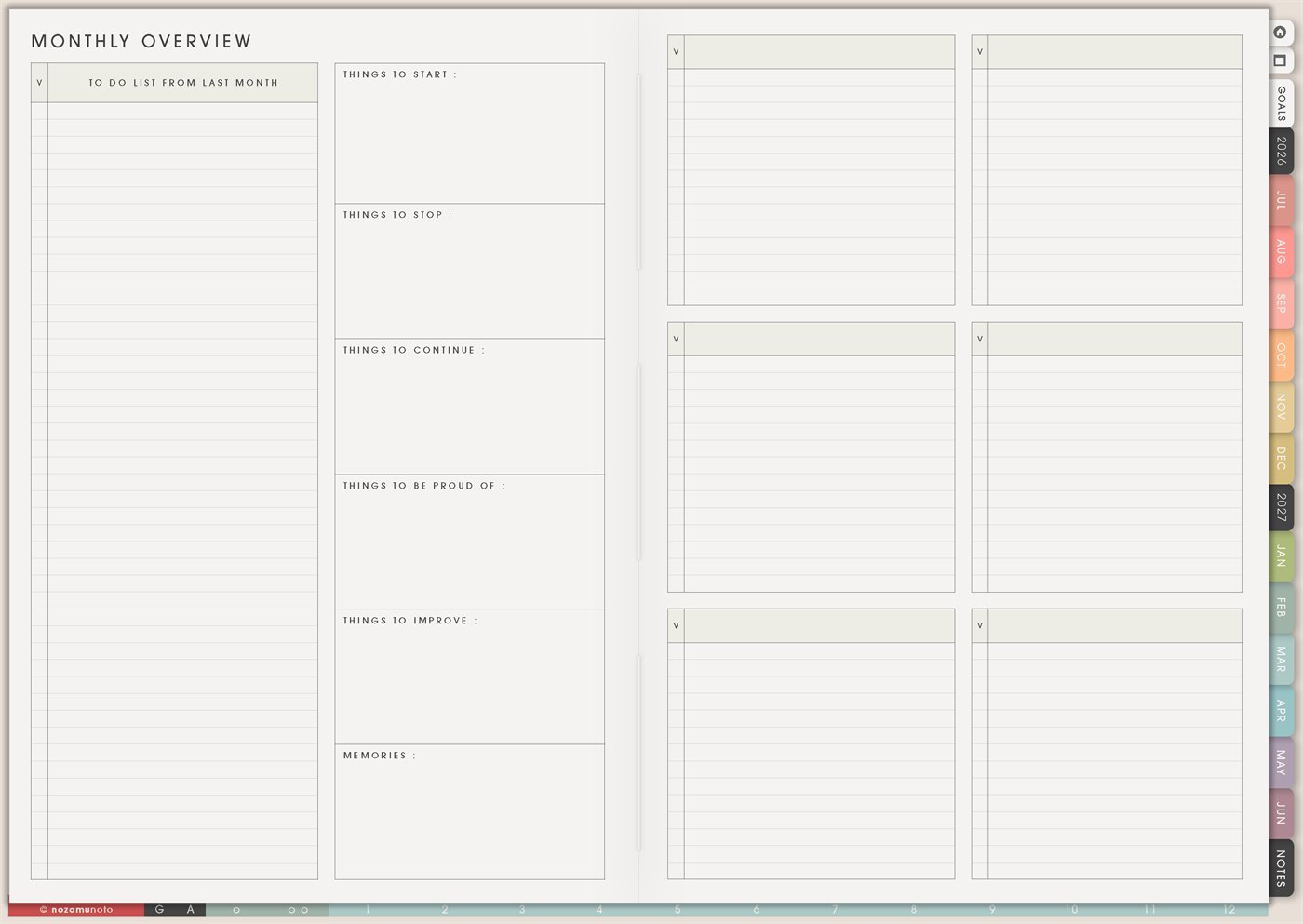
Use the Yume Techo Monthly Overview to review your month, choose goals, sort unfinished tasks, and plan what matters next.
The Yume Techo Monthly Overview page is a reusable monthly reflection and review page. It has space for tasks from last month, things to start, things to stop, things to continue, things to be proud of, things to improve, memories, and six flexible note boxes for the parts of the month that need more room.
This page is for closing one month and choosing what comes into the next one. It is not about judging the month. It is about noticing what happened, keeping what helped, releasing what no longer belongs, and making the next month lighter.
How to use the Monthly Overview
Use the Monthly Overview when you want to think about the month as a whole.
Good things to write here include:
- Main goals for the month.
- Important focus areas.
- What worked this month.
- What felt difficult.
- Tasks to carry forward.
- Tasks to delete or pause.
- Notes for next month.
Before moving unfinished tasks forward, ask:
- Is this still important?
- Does it need a real due date?
- Can it become a project instead of a daily task?
- Can I remove it for now?
The Monthly Overview is best for reflection and direction. Use the Monthly Grid for date-based plans.
How to get to this page
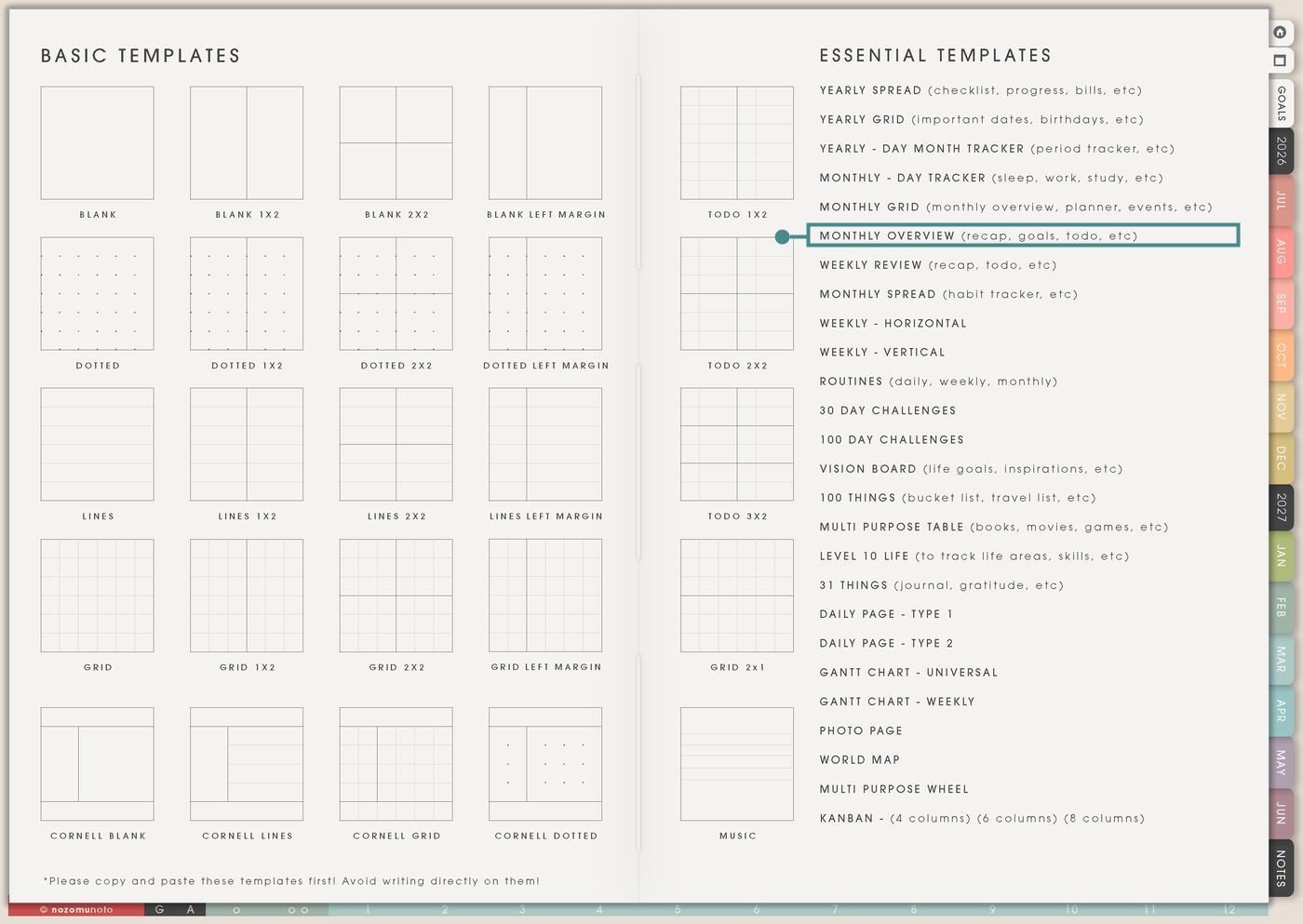
- Open the main Index page: use the planner Index if you need to return to the map.
- Tap the Template Pages icon: this opens the Template Index with reusable clean pages.
- Tap Monthly Overview: it is under Monthly Grid in the Essential Templates list.
- Copy the page before writing: this is a clean template master. Duplicate it first, then write on the copy.
Before you write: copy the clean Monthly Overview first
Monthly Overview is a template page. Keep the original clean, then make one copy for the month you are reviewing or setting up.
- Open Monthly Overview from Template Index.
- Duplicate or copy the page in your app. Use the page overview, thumbnail view, page manager, or page actions menu.
- Name the copy by month. Examples: August Review, September Overview, October Reflection, or June Monthly Review.
- Review before planning. Look at last month, then decide what deserves space in the next month.
- Keep the answers short. This page works best when it helps you decide, not when it becomes an essay.
Related guides: Yume Techo Monthly Grid for events, goals, projects, meals, and family planning, Yume Techo Weekly Review for carrying tasks forward and planning next week, and digital life planner for goals, routines, and direction.
Ways to use this page
1. Carry over tasks without dragging everything forward
The To Do List From Last Month section is for unfinished tasks, but not every unfinished task deserves to follow you. Use it to choose what is still real, useful, or urgent.
2. Start, stop, continue review
The start, stop, continue boxes are perfect for a small monthly review. Start means what you want to try. Stop means what is making life heavier. Continue means what already helped.
3. Monthly goals that fit real capacity
Use the page to choose goals after seeing what carried over from last month. This helps you avoid making a beautiful goal list on top of an already crowded month.
4. Proud-of list for small wins
The Things To Be Proud Of box matters. It gives the month proof that effort happened, even if the month was messy or unfinished.
5. Improve without turning it into self-criticism
Things To Improve should be practical, not mean. Write the situation, the friction, and one small adjustment for next month.
6. Memories that make the month feel real
The Memories section can hold ordinary life: good meals, small moments, family visits, funny notes, finished projects, cozy days, beautiful weather, sweet customer notes, or anything you want future-you to remember.
7. Work, shop, or project review
Use one copy for a business or work month. Review what shipped, what got stuck, what needs follow-up, what questions kept repeating, and what should be improved next month.
8. Family and home review
Use Monthly Overview for home life when the month had a lot of tiny moving pieces. Carry over appointments, school forms, repairs, grocery rhythms, cleaning loops, family plans, and home admin.
9. Student or study month review
Use the page to review assignments, exam prep, reading, study rhythm, class notes, and what study methods actually worked. This is especially useful before the next month gets busy.
10. Health, energy, and low-capacity planning
Use Monthly Overview to notice capacity. What gave energy? What drained it? Which routines were realistic? Which goals were too heavy for the month you actually had?
What I usually use it for and how I use it
Tips for using this template
- Carry forward only what still matters. Sort unfinished tasks into keep, shrink, delay, delete, and delegate. The new month should not inherit every old task automatically.
- Write actions you can see. Start “pack bag at night,” stop “phone in bed,” continue “Friday weekly review.” Tiny behavior beats a broad improvement wish.
- Write one proud note before improvements. Then limit improvements to one to three practical changes. The page is for learning, not punishment.
- Add three memory bullets. One moment, one person, and one tiny win are enough. They can be ordinary and still worth keeping.
- Label the six note boxes before writing. Useful labels are Work, Home, School, Health, Money, Family, Content, Questions, Lessons, or Next Month.
- Use the ten-minute version when life is full. Carry over three tasks, write one start, one stop, one continue, one proud note, and one memory.
- Copy first, write second. Keep the clean Monthly Overview as the reusable master. Write on a copy so next month starts clean.
Keep monthly review details safe
Monthly Overview can include unfinished tasks, money notes, work review, school review, health patterns, family plans, private memories, customer questions, client work, shop lessons, and personal reflections. Keep passwords, account numbers, private addresses, medical records, client details, exact school files, financial documents, and sensitive family information in a secure place outside the planner. In Yume Techo, use safe labels like bill follow-up, school form, appointment cue, client reply, shop lesson, family plan, or private note elsewhere.
Tips for using this page
- Choose the one part of this page that helps the current week instead of trying to fill everything at once.
- Move one small next action to Weekly or Daily so the page changes what happens next.
- Keep the page easy to return to by linking it from Index, favorites, bookmarks, or the related planner section.
Final thought
Monthly Overview is useful because it gives the month an honest ending and the next month a clearer beginning. Copy the clean template, carry forward only what still matters, write one honest start, stop, and continue, and keep a few memories too. I hope this page helps the past month become useful information instead of baggage!
Need exact app steps for copying pages?
If you need the exact buttons for duplicating, moving, or bookmarking this template in your app, use the Help Center app guide for your device.
Browse NozomuNoto products
Find the planner, notebook, e-reader file, or add-on that fits the way you actually plan.
About NozomuNoto
NozomuNoto creates Japanese-inspired digital planners, notebooks, stickers, and e-reader PDFs for people who want useful pages that still work in real life.
Yume Techo is built with dated yearly, monthly, weekly, daily, Life Planner, Planner Pages, and Template Pages so one planner can hold study, work, home, ADHD-friendly routines, lists, and creative projects without adding paper bulk.
New to digital planning? Start there, use the Help Center for setup help, or browse NozomuNoto products when you are ready to choose your planner.