

Browse help topics
Getting Started
- Does my NozomuNoto purchase include an app or an app subscription?
- New to digital planning? Start here!
- What is a digital notebook?
- What is a digital planner?
- What tools do I need to start digital planning?
- Which apps work with NozomuNoto planners?
- What does “hyperlinked PDF planner” mean?
- Paper planner vs digital planner
Need help choosing?
Need help after purchase?
Download & Import
Using your notebook/planner
- Can I use my NozomuNoto planner offline?
- How do I back up, export, or move my NozomuNoto planner to a new device?
- How to change or reuse template pages on planner landing pages
- Why stickers look blurry when enlarged
- What to check if a product does not work on your device
- How to use NozomuNoto index pages
- How to use NozomuNoto template pages
- How to change a digital planner cover
- How to install and use digital stickers
Product Tutorials
- How to use Shibui Noto V1 Landscape
- How to use the Ikigai Noto Hiragana and Katakana workbook
- How to use Yume Techo Landscape tutorial pages
- How to use Yume Techo Portrait tutorial pages
- How to use Shibui Techo Weeks tutorial pages
- How to use Shibui Techo Months tutorial pages
- How to use Yume Noto V1 Landscape tutorial pages
- How to use Yume Noto V1 Portrait tutorial pages
- How to use Yume Noto V2 Landscape tutorial pages
- How to use Yume Noto V2 Portrait tutorial pages
- How to use Yume Noto V3 Portrait tutorial pages
- How to use NozomuNoto Ultimate Digital Stickers
- How to use NozomuNoto Digital Covers
- Which NozomuNoto instruction or tutorial file should I open first?
Device & App
iOS / iPadOS
GoodNotes
Notability
Noteshelf
Noteful
StarNote
Flexcil
Kilonotes
Android
StarNote
Samsung Notes
Penly
Flexcil
Noteshelf
Xodo
E-reader Devices
Boox devices
reMarkable
Bigme
Supernote
How to use the Ikigai Noto Hiragana and Katakana workbook
Set up your Ikigai Noto Kana Workbook with digital or printable steps, then use the stroke models, tracing, family tests and answer keys.
On this page
Applies to: Ikigai Noto digital Kana Workbook and Ikigai Noto printable Kana Workbook. Digital steps use a PDF app. Printable steps use the paper-size file supplied with your purchase. File options and layouts may differ by version.
Start with the version you downloaded, then learn one kana family at a time. The workbook has hiragana and katakana examples, numbered stroke models, tracing, blank writing spaces, practice tests and answer keys.
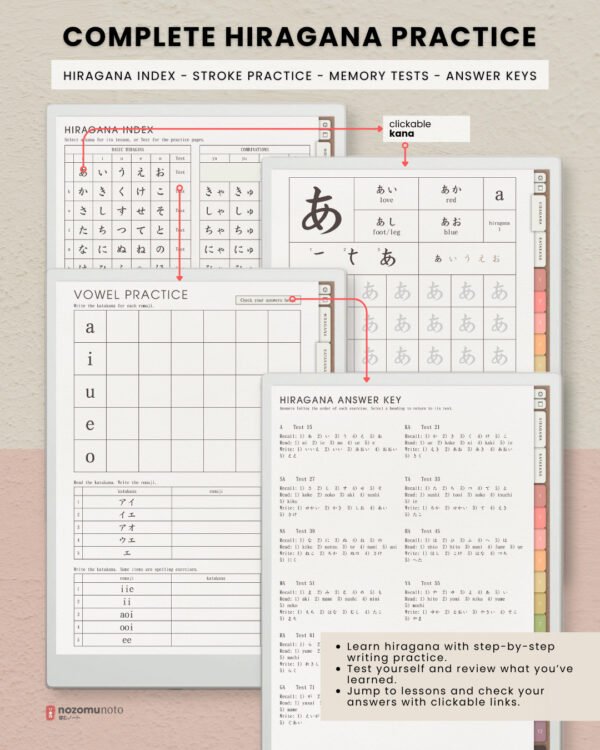
Using the digital workbook
- Save the workbook PDF. If your download is a ZIP, extract it first. Open or import the actual PDF in an app that can write on PDFs and follow their links.
- Try the navigation before writing. Open Index and try the Hiragana or Katakana tab, then choose a family lesson or test. If your app separates reading and writing, use its read, view or navigation mode for links, then switch to writing mode for practice.
- Keep the original download safe. If your app offers page duplication, make a copy for extra practice. Use the built-in Index for the original lesson pages and add an app bookmark for a copied page if that feature is available.
Using the printable workbook
If your download has more than one paper size, choose the filename that matches your paper:
- A4: Kana Workbook - Printable - A4.pdf
- A5: Kana Workbook - Printable - A5.pdf
- US Letter: Kana Workbook - Printable - US Letter.pdf
- Half Letter: Kana Workbook - Printable - Half Letter.pdf
Use the formats supplied with your purchased version. In print preview, match the paper size and check the page edges. If your print dialog offers Actual Size or 100%, use that for a test. Print one practice page before a larger batch, and check for clipping or unwanted scaling.
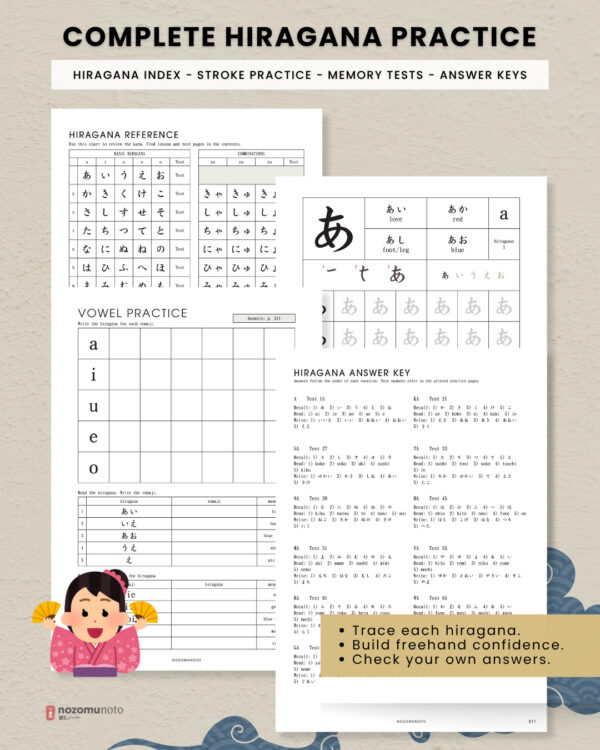
For paper, use the printed contents and page numbers to find the lesson, test and answer key.
A simple practice cycle
- Choose one family. Start with the hiragana vowels あ, い, う, え, お, or return to the family you need to review. Look at the large character, romaji and example words.
- Follow the numbered strokes. Each picture keeps the earlier strokes and adds the next one. Follow the workbook's writing guide rather than copying only the finished shape.
- Trace, then write. Trace the gray characters, then use the blank cells. Try writing the kana from memory before looking back.
- Try the family test. Answer before checking the key. Use the digital answer link where provided, or the printed answer-page reference. Review the missed characters, practice them again, then try them once more from memory.
Example words may include kana you haven't learned yet. Focus on the main character and revisit the words later. Read the workbook's sound guide and its note about katakana spelling exercises too.
Help with files or your app
Still need help?
Send your order number, product name, device, app, and a screenshot or short screen recording if the issue is visual.