

Browse help topics
Getting Started
Need help choosing?
Need help after purchase?
Download & Import
Using your notebook/planner
- How to change or reuse template pages on planner landing pages
- Why stickers look blurry when enlarged
- What to check if a product does not work on your device
- How to use NozomuNoto index pages
- How to use NozomuNoto template pages
- How to change a digital planner cover
- How to install and use digital stickers
Product Tutorials
- How to use Yume Techo Landscape tutorial pages
- How to use Yume Techo Portrait tutorial pages
- How to use Shibui Techo Weeks tutorial pages
- How to use Shibui Techo Months tutorial pages
- How to use Yume Noto V1 Landscape tutorial pages
- How to use Yume Noto V1 Portrait tutorial pages
- How to use Yume Noto V2 Landscape tutorial pages
- How to use Yume Noto V2 Portrait tutorial pages
- How to use Yume Noto V3 Portrait tutorial pages
- How to use NozomuNoto Ultimate Digital Stickers
- How to use NozomuNoto Digital Covers
- Which NozomuNoto instruction or tutorial file should I open first?
Device & App
iOS / iPadOS
GoodNotes
Notability
Noteshelf
Noteful
StarNote
Flexcil
Kilonotes
Android
StarNote
Samsung Notes
Penly
Flexcil
Noteshelf
Xodo
E-reader Devices
Boox devices
reMarkable
Bigme
Supernote
How to import a NozomuNoto PDF in Supernote
Import the PDF file into Supernote and keep the original download as a backup.
On this page
Reference links
Use these for current app or device help, downloads, updates, vendor help, and manual references.
Move the PDF into Supernote Documents
- Save the original NozomuNoto PDF on your computer, cloud storage, or phone first.
- Use USB, Supernote Cloud, Dropbox, Google Drive, or the Supernote Partner App to transfer the PDF.
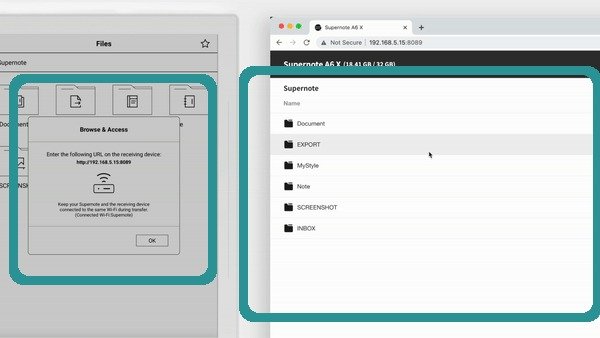
Supernote Wi-Fi TransferOfficial Supernote Wi-Fi Transfer walkthrough frame showing device transfer and browser file access. - Put the planner PDF in the Document folder or the file location your Supernote workflow uses for EPUB/PDF documents.
- Open the PDF from Supernote Documents and check the first page, index page, and one planner section.
- Keep the original PDF outside Supernote too, so you can transfer a clean copy again if an experiment goes wrong.
Still need help?
Send your order number, product name, device, app, and a screenshot or short screen recording if the issue is visual.