
Browse help topics
Getting Started
Need help choosing?
Need help after purchase?
Download & Import
Using your notebook/planner
- How to change or reuse template pages on planner landing pages
- Why stickers look blurry when enlarged
- What to check if a product does not work on your device
- How to use NozomuNoto index pages
- How to use NozomuNoto template pages
- How to change a digital planner cover
- How to install and use digital stickers
Product Tutorials
- How to use Yume Techo Landscape tutorial pages
- How to use Yume Techo Portrait tutorial pages
- How to use Shibui Techo Weeks tutorial pages
- How to use Shibui Techo Months tutorial pages
- How to use Yume Noto V1 Landscape tutorial pages
- How to use Yume Noto V1 Portrait tutorial pages
- How to use Yume Noto V2 Landscape tutorial pages
- How to use Yume Noto V2 Portrait tutorial pages
- How to use Yume Noto V3 Portrait tutorial pages
- How to use NozomuNoto Ultimate Digital Stickers
- How to use NozomuNoto Digital Covers
- Which NozomuNoto instruction or tutorial file should I open first?
Device & App
iOS / iPadOS
GoodNotes
Notability
Noteshelf
Noteful
StarNote
Flexcil
Kilonotes
Android
StarNote
Samsung Notes
Penly
Flexcil
Noteshelf
Xodo
E-reader Devices
Boox devices
reMarkable
Bigme
Supernote
How to use Shibui Techo Weeks tutorial pages
Learn how to start using Shibui Techo Weeks tutorial pages, including what to open first, how to plan one week, test links, and find app help.
On this page
- Start with this week
- Built-in tutorial pages and visual guide
- Tutorial Page 1/7 - Basic Navigation
- Tutorial Page 2/7 - Index Page
- Tutorial Page 3/7 - Template Page
- Tutorial Page 4/7 - Yearly Page
- Tutorial Page 5/7 - Monthly Page
- Tutorial Page 6/7 - Weekly Page
- Tutorial Page 7/7 - Daily Extra Page
- What Shibui Techo Weeks is best for
- Helpful setup links
- How to use Shibui Techo Weeks first
- Best uses for this product
- What the tutorial pages may not explain
- When the Shibui Techo Weeks setup gets tricky
- 1. The weekly page starts holding everything
- 2. You want daily planning sometimes
- 3. You forget where copied pages went
- 4. The planner becomes too decorated to use
- Where to go next
Use this guide when you want a lighter weekly planner setup. Shibui Techo Weeks is best when you want calendar structure, index pages, and reusable templates without the larger Yume Techo life-planner system.
Start with this week
- Save the original download as your clean backup.
- Import one working copy into your planner app.
- Open the main weekly page or Index page.
- Tap one link to test navigation.
- Choose the week you want to plan.
- Write only the real tasks, events, or notes you need this week.
- Learn the next feature only when you need it.
Built-in tutorial pages and visual guide
Use the images below as visual checkpoints. The extra notes explain what to do with the page after you understand what it shows.
Tutorial Page 1/7 - Basic Navigation
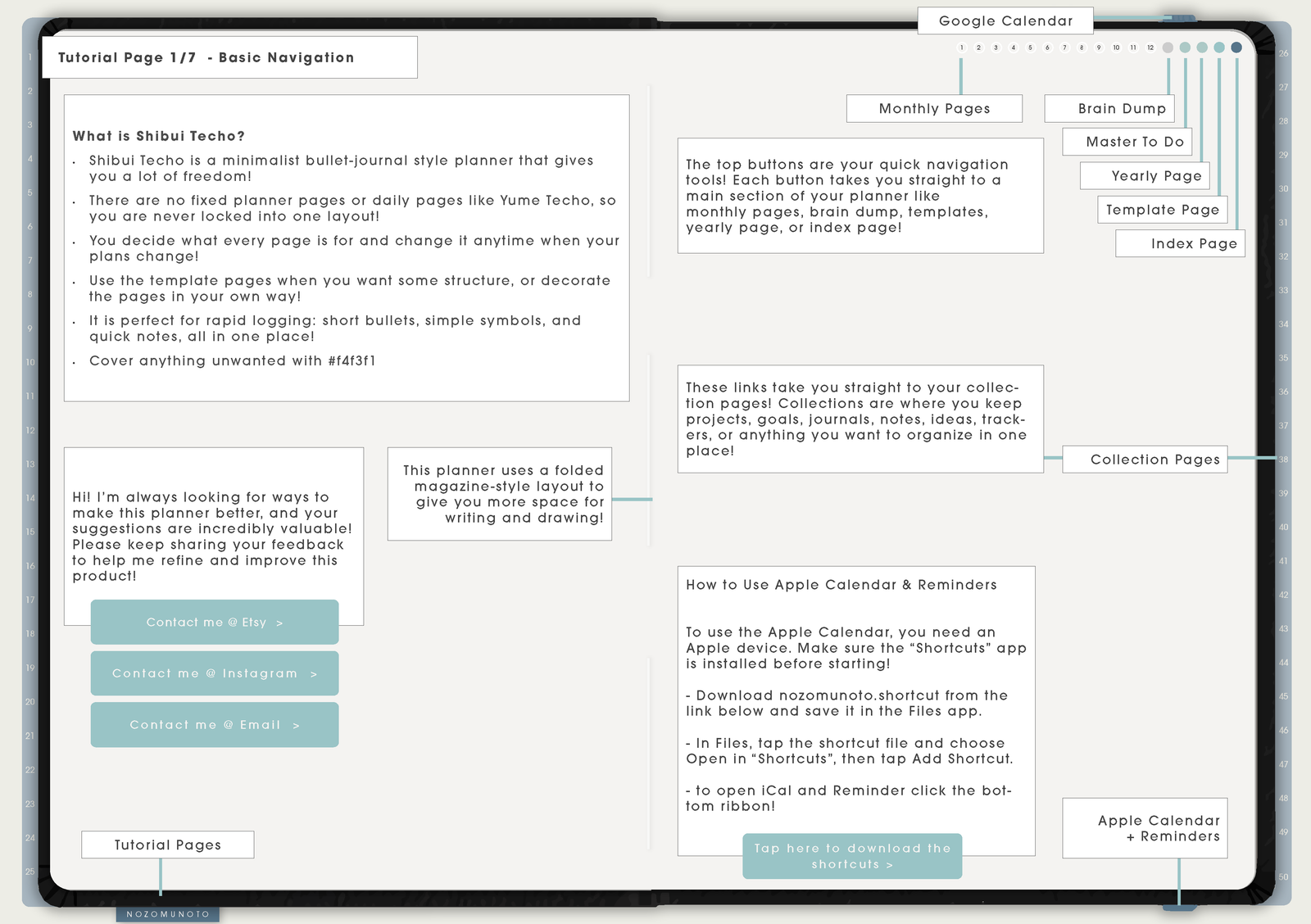
Start here to understand the planner shape. This page shows the main areas you will use most: Index, yearly view, weekly pages, templates, and product help links.
For daily use, keep Shibui simple: open Index, choose the week or template you need, then write only what belongs there.
Tutorial Page 2/7 - Index Page
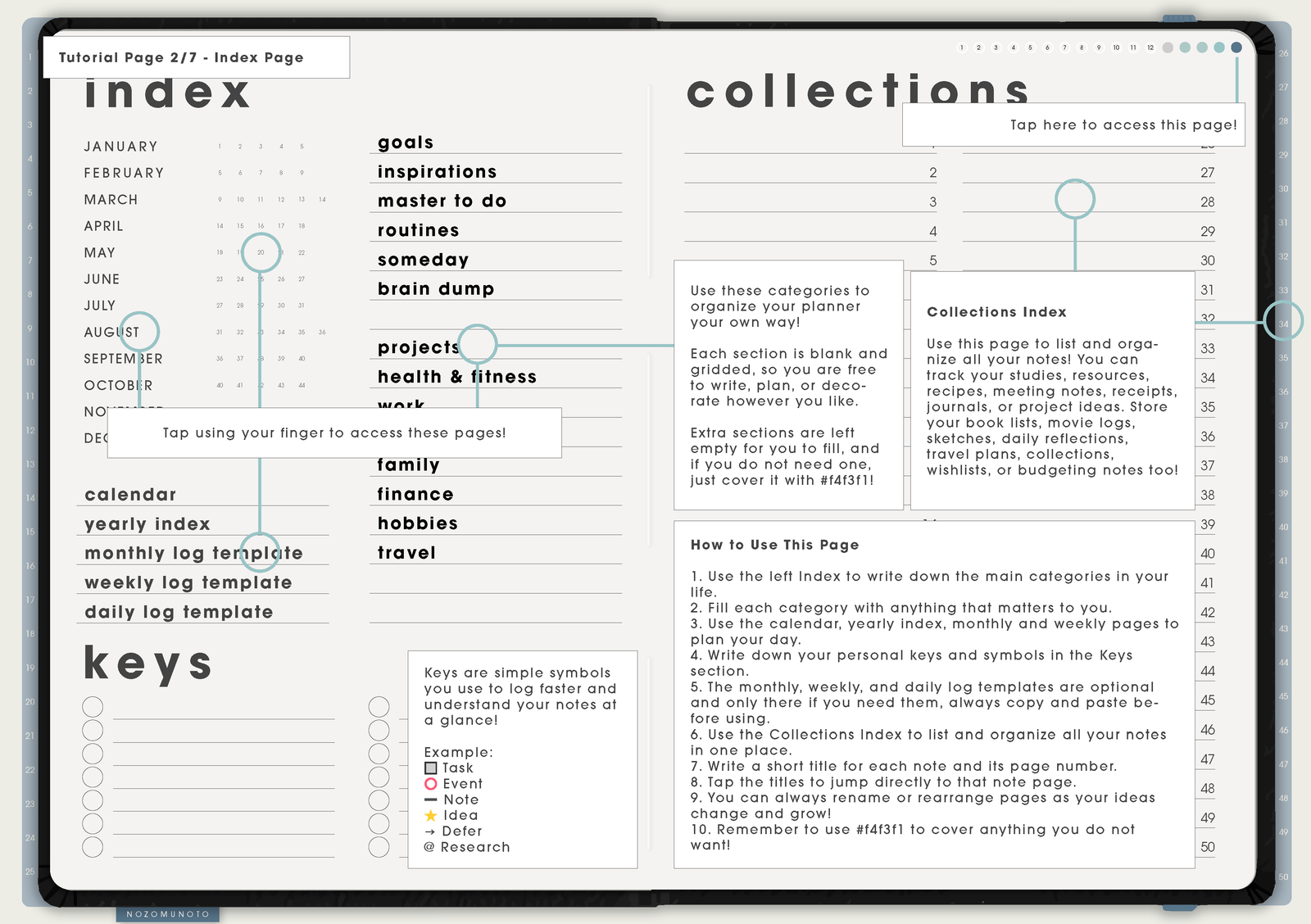
Use Index as the home base for Shibui Weeks. It keeps the planner simple because you can jump to yearly, monthly, weekly, template, and collection pages instead of scrolling through the whole PDF.
If you create copied template pages, use bookmarks, page thumbnails, or a small personal index so the custom pages stay easy to find.
Tutorial Page 3/7 - Template Page
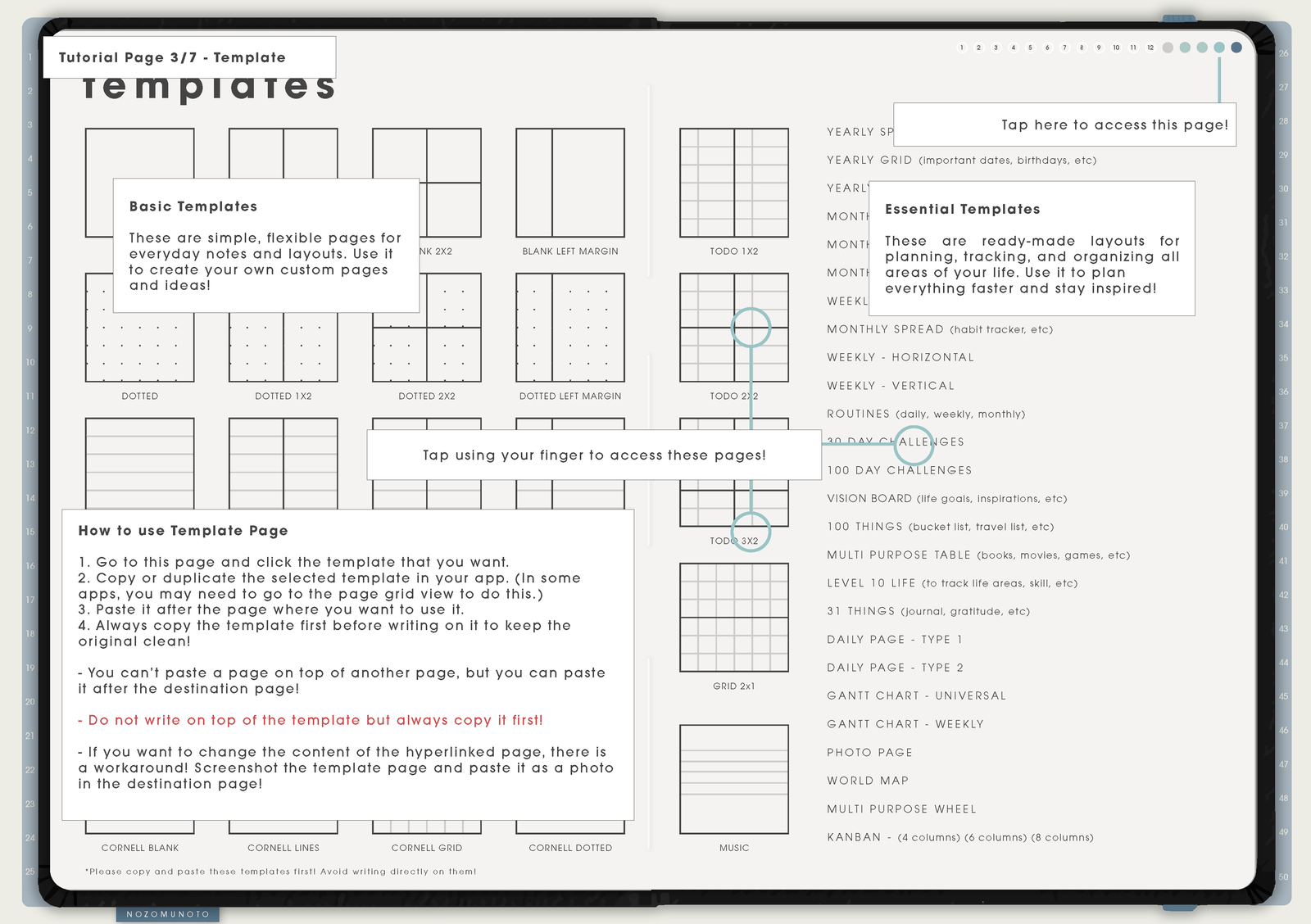
Template pages are clean masters. Duplicate or copy the template before writing on it, then move the copy near the week, month, or notes section where you want to use it.
Use templates for overflow: project lists, meal ideas, habit notes, content planning, study notes, checklists, and anything too detailed for the weekly spread.
Tutorial Page 4/7 - Yearly Page
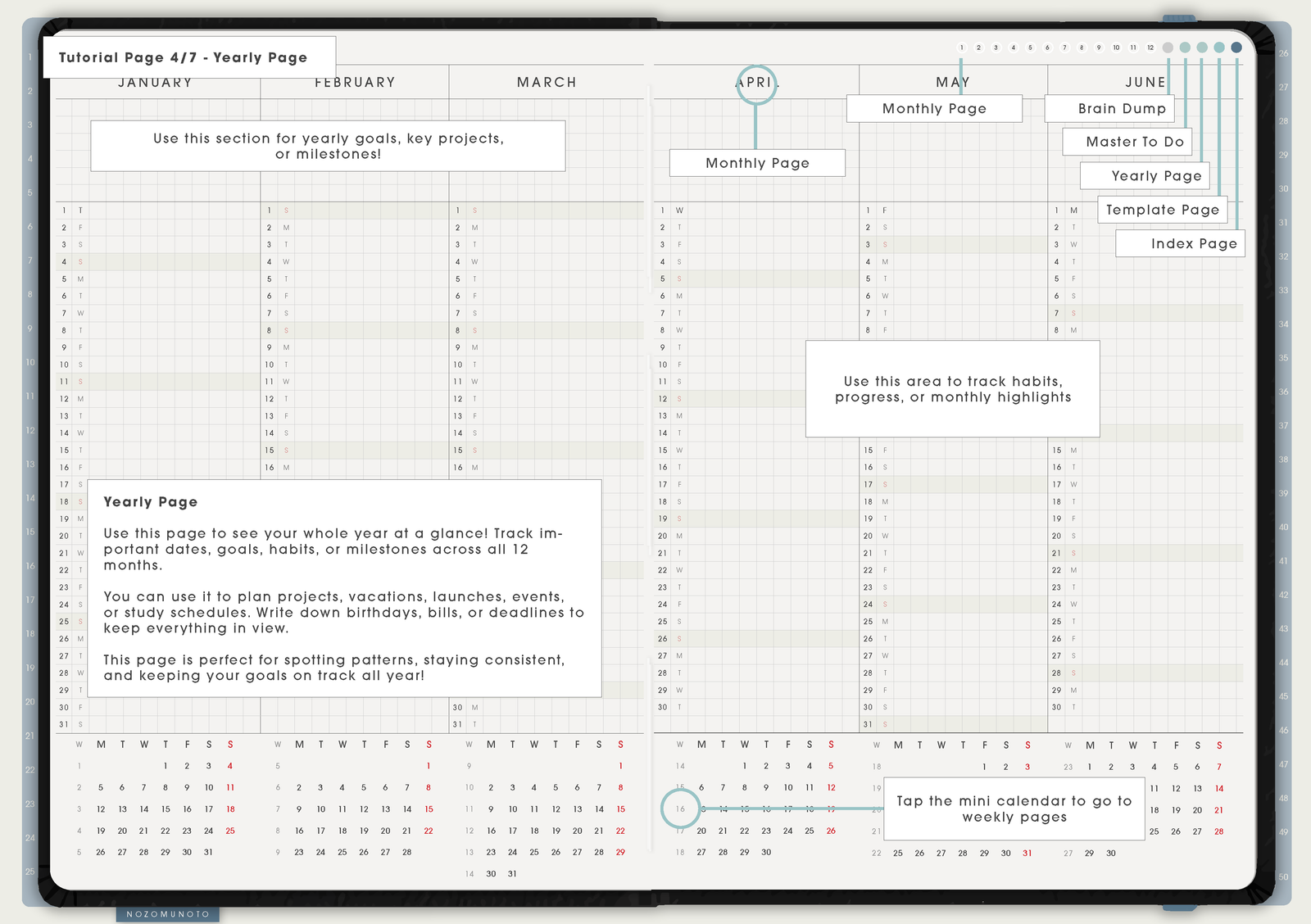
Use the yearly page for school terms, launches, trips, appointments, bills, birthdays, deadlines, renewals, holidays, and anything you need to see before choosing a week.
The yearly page is not for every small task. It is for dates and patterns that shape more than one week.
Tutorial Page 5/7 - Monthly Page
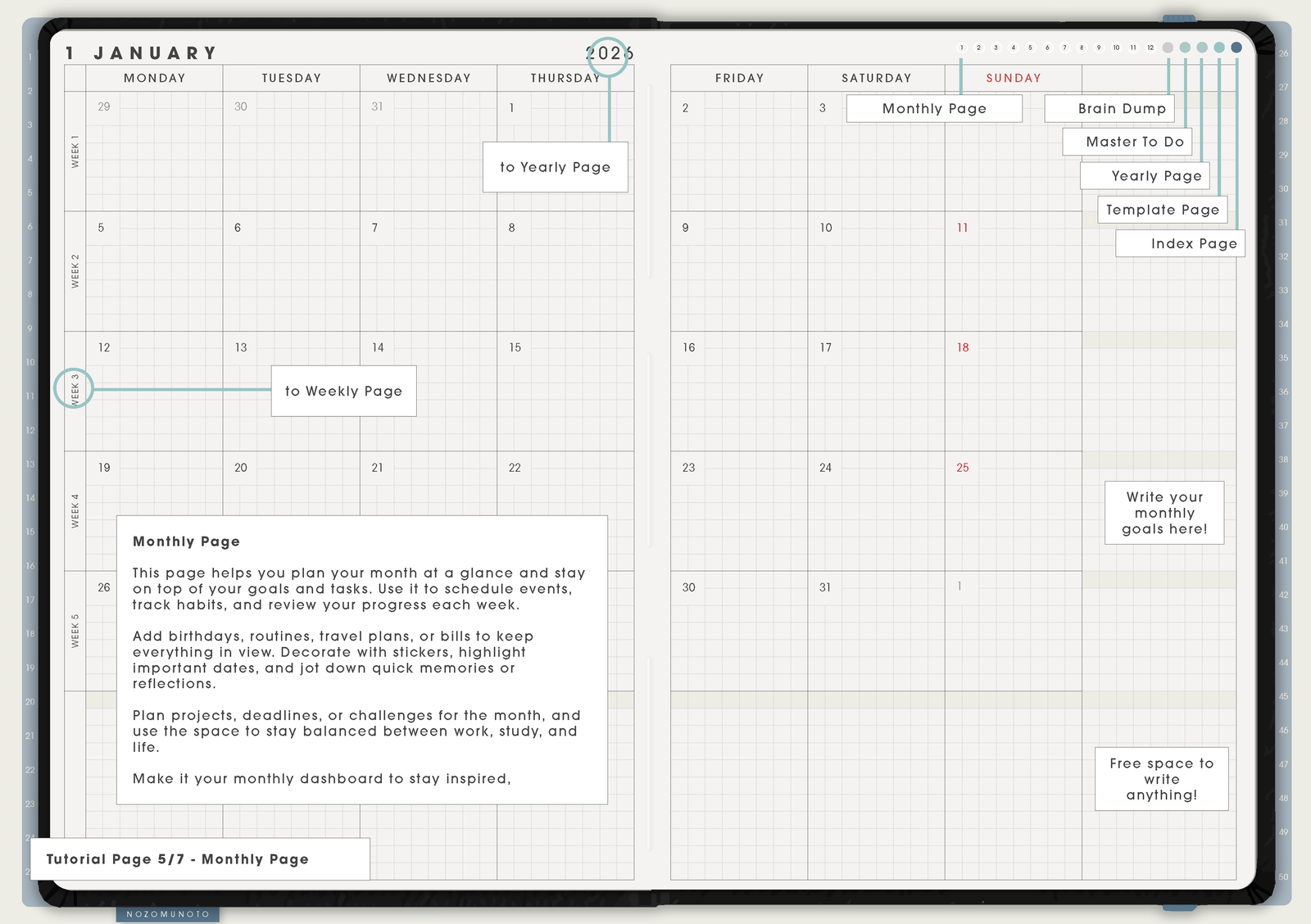
Use Monthly for fixed dates and the shape of the month: bills, appointments, birthdays, trips, school dates, deadlines, themes, launches, and reset days.
Keep monthly boxes short. When one date needs more detail, continue it on the matching Weekly page or a copied template page.
Tutorial Page 6/7 - Weekly Page
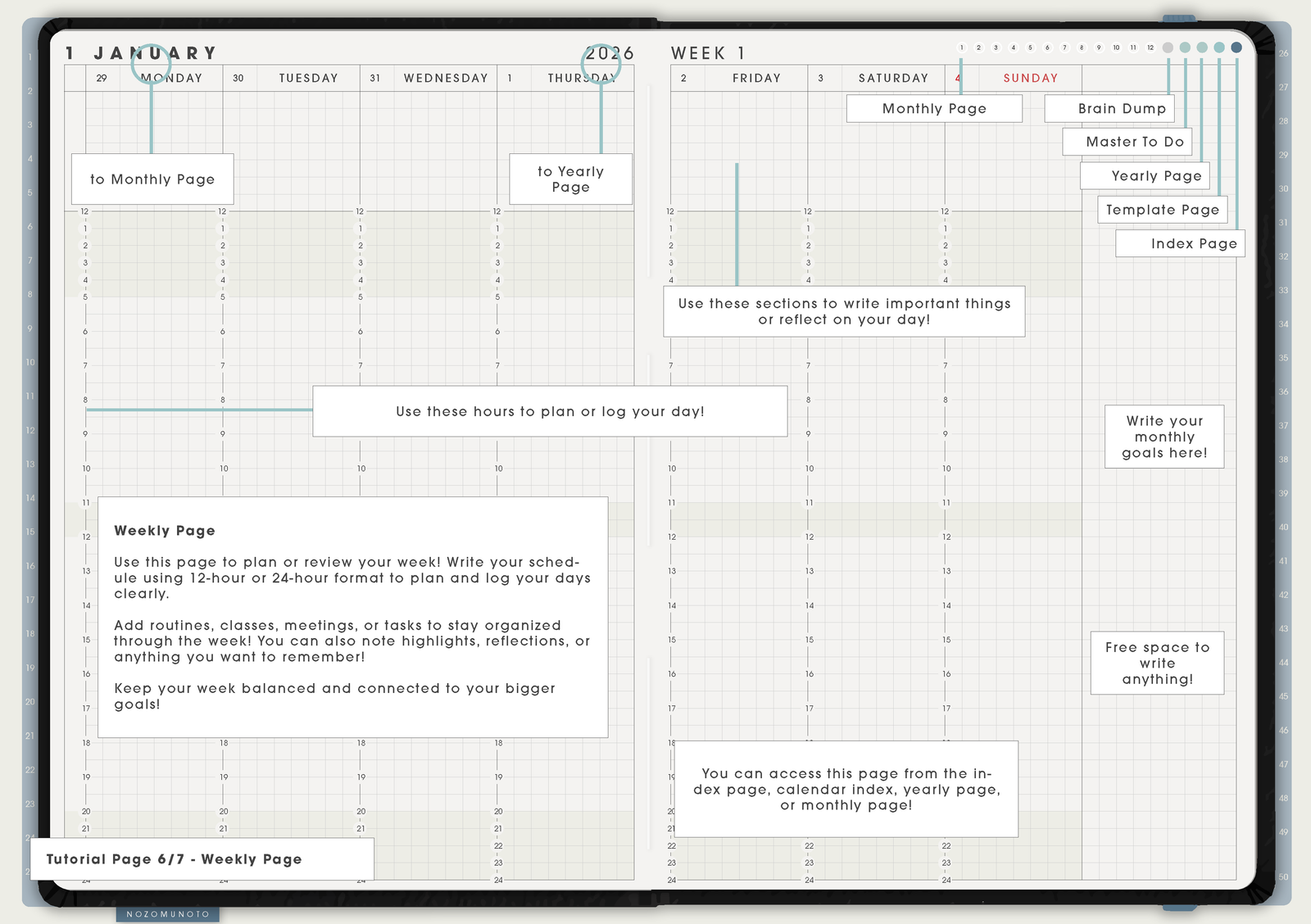
Weekly is the heart of Shibui Techo Weeks. Use it for appointments, class blocks, work shifts, errands, meals, weekly priorities, deadlines, follow-ups, and simple routines.
If a weekly page becomes crowded, keep the date and next action on Weekly, then move the detail to a copied template or notes page.
Tutorial Page 7/7 - Daily Extra Page
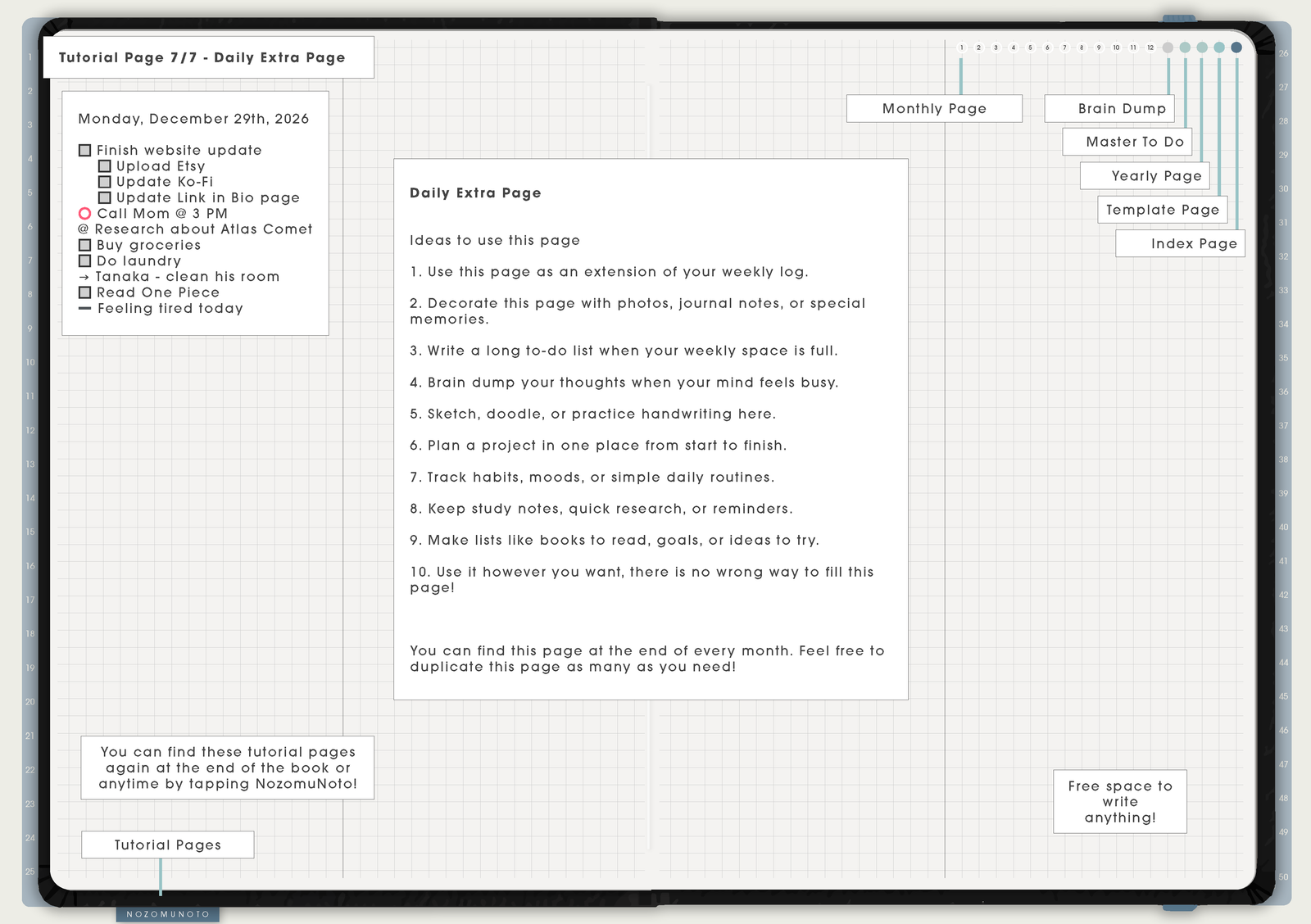
Use the Daily Extra page when one day needs more room: a busy appointment day, travel day, study day, event day, reset day, or deadline day.
A daily page is optional. Keep Shibui weekly-first, then use extra daily space only when the week needs more room.
What Shibui Techo Weeks is best for
Shibui Techo Weeks is a weekly-first planner. It is best when you want a simple rhythm: yearly view for big dates, weekly pages for the actual plan, and template pages for anything that needs more room.
Use it for work shifts, classes, errands, meal ideas, family reminders, appointments, content planning, assignment due dates, and weekly priorities. It is lighter than Yume Techo because it does not ask you to manage a large life-planner system every day.
Helpful setup links
- New to digital planning? Start here!
- What tools do I need to start digital planning?
- Which apps work with NozomuNoto planners?
- What does hyperlinked PDF planner mean?
- Difference between Shibui Techo and Yume Techo
- Paper planner vs digital planner
How to use Shibui Techo Weeks first
- Use Index as the starting page. It keeps the planner from becoming one long scroll.
- Use Yearly for big dates. Put holidays, school terms, launches, renewals, travel, and important deadlines where you can see the year.
- Use Monthly for the shape of the month. Add bills, appointments, birthdays, trips, deadlines, themes, and reset days before planning the week.
- Use Weekly as the main planning page. Add appointments, deadlines, routines, work blocks, class blocks, and tasks that belong to that week.
- Use Daily Extra only when one day needs more room. This keeps the planner weekly-first without losing space for a busy day.
- Use templates for overflow. Put projects, lists, meal plans, content plans, or habit notes on copied template pages instead of crowding the weekly spread.
- Review the week lightly. Move only what still matters. Shibui works best when it stays simple.
Best uses for this product
- Busy week planning: classes, work shifts, appointments, errands, meals, and deadlines.
- Monthly-to-weekly planning: keep big dates on Monthly, then choose what actually belongs in the current week.
- Simple bullet journal style: one weekly log, one notes area, and a few copied templates.
- Student planning: assignment due dates, exam weeks, reading blocks, tutoring sessions, and busy study days that need Daily Extra space.
- Family and home planning: school events, grocery notes, cleaning resets, bills, and appointment reminders.
- Work planning: meeting blocks, weekly priorities, follow-ups, project notes, and deadline-heavy days.
What the tutorial pages may not explain
- Weekly pages should stay focused. Use the weekly spread for the week, then use copied templates for projects or long notes.
- Monthly pages are for dates, not every detail. Use short labels on Monthly and continue the details on Weekly, Daily Extra, or a template copy.
- Templates are reusable masters. Write on a duplicated copy, not on the original template page.
- Index is a planning tool, not only a navigation page. Use it to decide where each type of information belongs.
- Keep the setup light. Shibui is strongest when it stays simple and flexible.
When the Shibui Techo Weeks setup gets tricky
1. The weekly page starts holding everything
What happens: tasks, notes, project details, meal plans, reminders, and habit tracking all get squeezed into one weekly spread.
What to do: keep Weekly for the week only. Move project notes, trackers, lists, and messy thinking to copied templates or notes pages.
2. You want daily planning sometimes
What happens: most weeks only need a weekly page, but one busy day needs more space.
What to do: copy a daily log or notes template for that day. A daily page is optional unless it helps.
3. You forget where copied pages went
What happens: copied templates become useful, then disappear into the PDF.
What to do: bookmark the active weekly page, the current notes page, and any copied template you will reuse this week.
4. The planner becomes too decorated to use
What happens: stickers, colors, and layouts become the project, so the plan itself gets delayed.
What to do: decorate after the plan is usable. Write appointments, deadlines, and must-do tasks first, then add stickers if they help you see the week faster.
Where to go next
Shibui Techo Weeks explains the product pages. For page ideas, use Tips & Ideas. For app buttons, imports, page copying, bookmarks, covers, stickers, or device problems, use the Help Center guide for your app.
Still need help?
Send your order number, product name, device, app, and a screenshot or short screen recording if the issue is visual.