

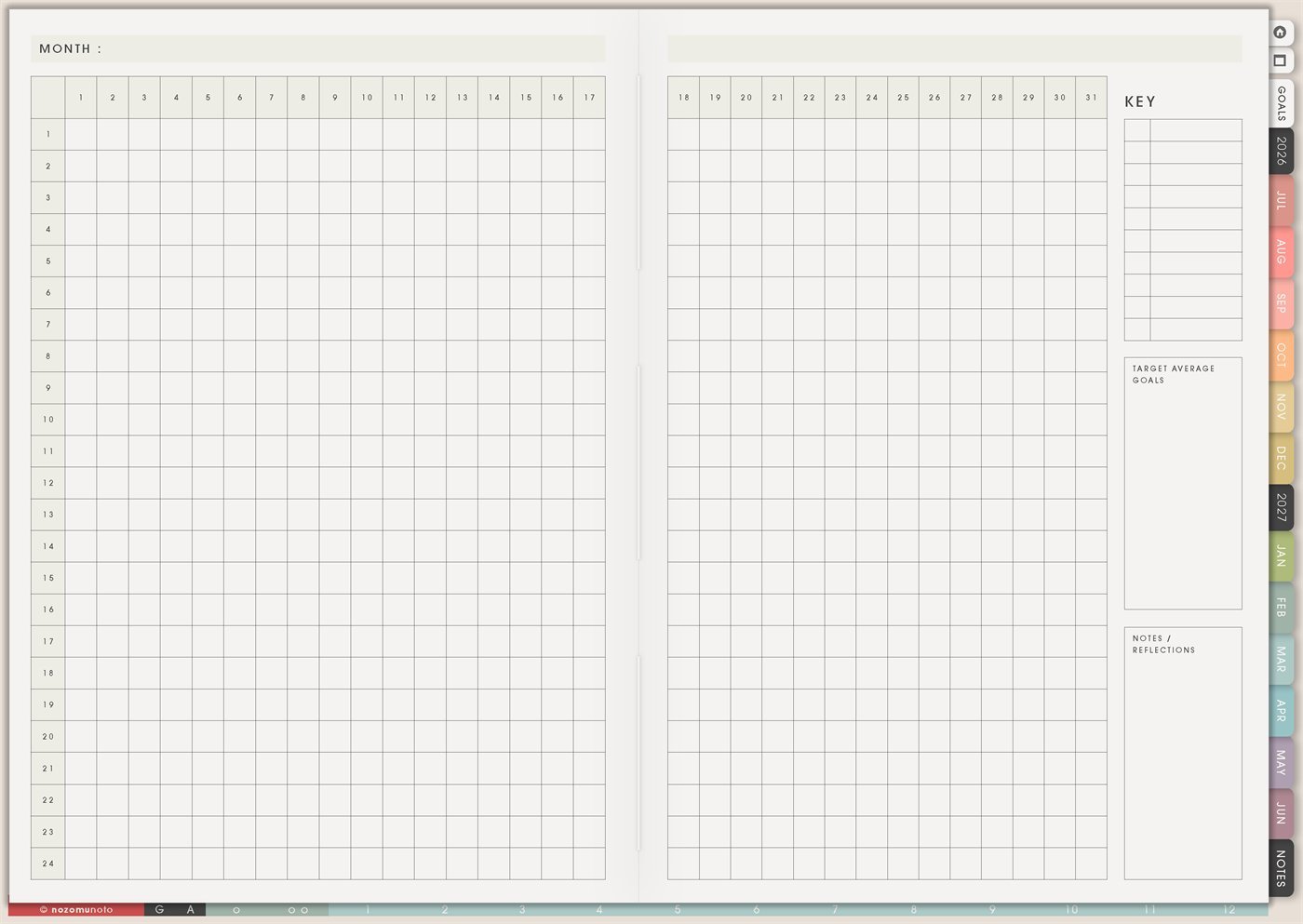
The Yume Techo Monthly – Day Tracker is a reusable one-month matrix for daily marks. Write the month at the top, use the numbered columns for days 1 to 31, use the rows for the things you want to notice, and keep the side boxes for your key, target or average goals, and notes/reflections.
This page is helpful when a whole-year tracker feels too big, but a normal to-do list is too scattered. It gives one clean month to test a routine, watch a pattern, count small actions, or understand what is actually happening in daily life.
How to get to this page
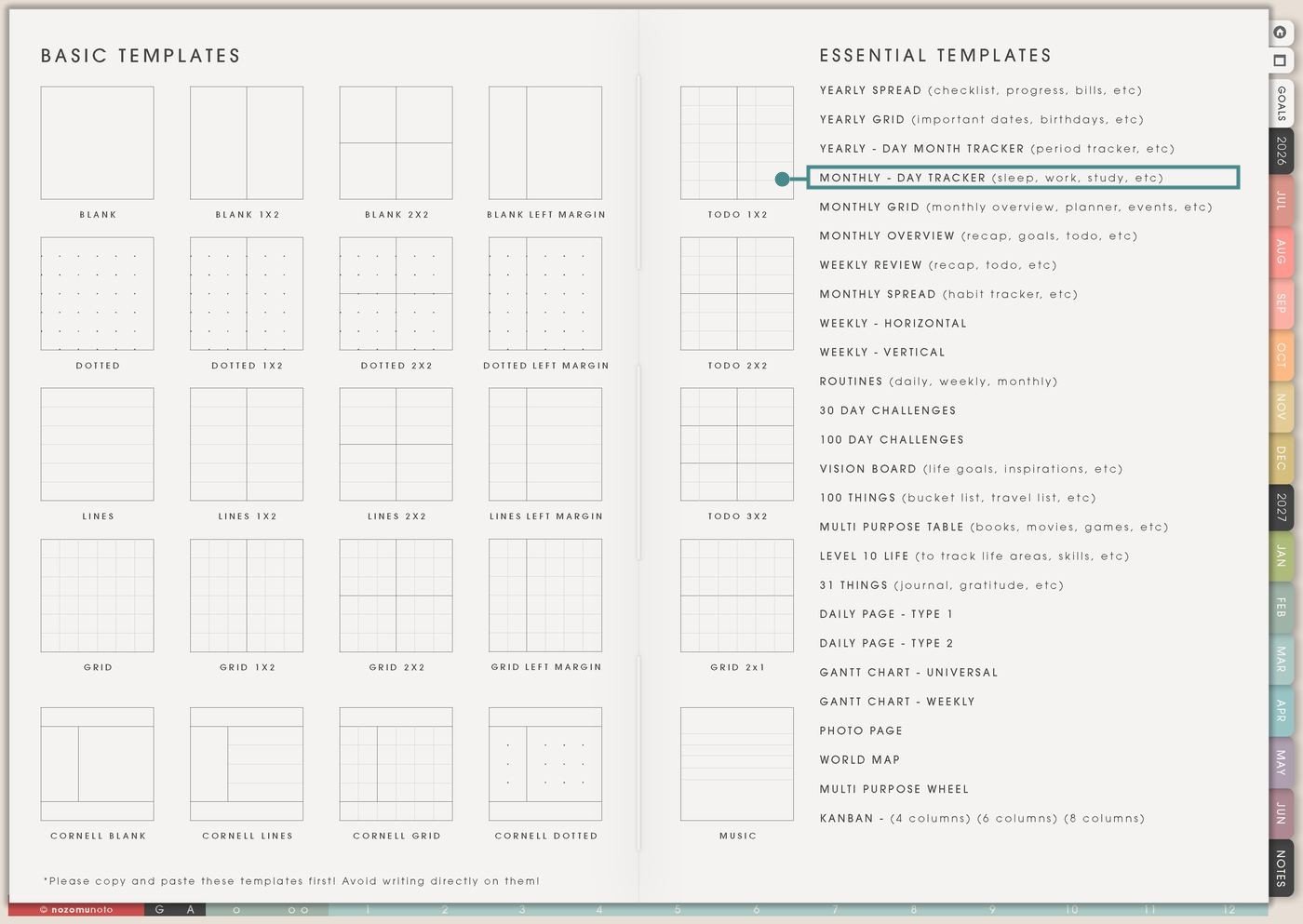
- Open the main Index page: use the planner Index if you need to return to the map.
- Tap the Template Pages icon: this opens the Template Index with reusable clean pages.
- Tap Monthly – Day Tracker: it is under Yearly – Day Month Tracker in the Essential Templates list.
- Copy the page before writing: this is a clean template master. Duplicate it first, then write on the copy.
Before you write: copy the clean Monthly – Day Tracker first
Monthly – Day Tracker is a template page, so keep the original clean. Make one copy for the month or experiment you want to track, then write on the copy.
- Open Monthly – Day Tracker from Template Index.
- Duplicate or copy the page in your app. Use the page overview, thumbnail view, page manager, or page actions menu.
- Name the copy clearly. Examples: August Routines, September Study Tracker, Migraine Month, 30-Day Reset, Work Focus, or Sleep Experiment.
- Choose the rows before choosing colors. Write only the rows you are willing to check for one month.
- Make the key tiny. Good marks are check, dot, star, X, number, short initial, or one color family.
- Review at the end of the month. Use Notes / Reflections to write what worked, what was too much, and what you want to try next.
Related Tips: Template Index ideas shows where the clean Monthly – Day Tracker lives, Yearly – Day Month Tracker ideas works when one pattern needs the whole year, Monthly Grid ideas is better for events and dates, and Routine page ideas for ADHD and low-energy days helps when the rows are routine checks.
Ways to use this page
1. Sleep, energy, and bedtime reset
Use the rows for bedtime, wake time, sleep quality, nap, caffeine after lunch, screen-free night, or a morning energy score. This is more flexible than a strict sleep log because you can choose the few signals that actually help you.
2. Work focus without planning every hour
Use the tracker for daily work rhythms when a full time-blocked schedule is not necessary. Track one deep work block, admin, email check, project progress, order packing, content work, meeting prep, or a shutdown routine.
3. Study, reading, and class rhythm
For school, use one row per class, subject, or study habit. This works well for short daily actions like reading, flashcards, practice questions, revision, lecture notes, assignment step, or exam review.
4. Symptoms, mood, medication, or body care
Use this page to notice daily body patterns in a simple way. Keep the wording practical: medicine, vitamins, migraine, pain, cramps, mood, water, movement, therapy homework, meal, rest, or energy.
5. ADHD-friendly return-to-planner habit
Use one row for “opened planner” and another for “picked one next action.” This is great when the goal is not a perfect planner, but returning to the planner more often.
6. Home, chores, and family reset
Use rows for tiny home loops: dishes, laundry, trash, quick floor reset, school bag, medicine, groceries, dinner plan, pet care, paperwork, or ten-minute tidy. Keep each row small enough that it can happen on a normal tired day.
7. Money awareness and no-spend month
Use the tracker for a simple money month: no-spend days, bill paid, budget check, impulse spending, business expense logged, savings transfer, refund follow-up, or receipt saved.
8. 7-day, 14-day, or 30-day experiments
This page is perfect for short experiments because the ending is visible. Try a small routine for one month, then decide from evidence instead of from the fresh-start feeling.
9. Creative practice or content rhythm
Use rows for drawing, writing, music, photo editing, filming, caption draft, Pinterest pin, blog outline, product photo, listing update, or email idea. Creative work often moves through tiny repeated steps, and this page makes those steps visible.
10. Low-energy month helpers
Use the tracker during a hard month to lower the standard and keep only the actions that help you stay okay. The rows can be body care, medicine, food, sleep, one tiny task, one message, and one reset.
What I usually use it for and how I use it
Tips for using this template
- Start with five to eight rows. Choose the rows that answer one question for this month, like “what helps my energy?” or “what keeps work moving?” Add more only after a week of real use.
- Use a neutral restart mark. A small
Rcan mean restarted. A blank space can simply mean skipped, unknown, rest, or life happened. - Make the key fast to remember. Use one mark for done, one mark for partial, and one mark for skipped or rest. If a row needs a number, use a simple 1-3 scale.
- Keep it as a tracker, not a schedule. Put exact tasks, times, links, and notes on Monthly, Weekly, Daily, or Notes pages. This page answers “did this pattern happen?”
- Use Notes / Reflections at month end. Write three short lines: what helped, what made it harder, and what to try next. Review the pattern, not every box.
- Write flexible targets. Use ideal, good-enough, and recovery levels. For example: ideal 20 walks, good-enough 10 walks, recovery 4 stretches or rest marks.
- Copy first, write second. Keep the clean Monthly – Day Tracker as the reusable master. Write on a copy so next month starts clean.
Keep monthly tracker details safe
Monthly – Day Tracker can include health notes, medicine, symptoms, mood, money behavior, work habits, study patterns, family care, school routines, client work, content planning, private habits, and personal reflections. Keep medical records, account numbers, passwords, private addresses, payment details, exact client information, school files, and sensitive family details in a secure place outside the planner. In Yume Techo, use short labels that are safe to see at a glance, like medicine, walk, budget check, planner open, study, rest, one task, or appointment cue.
Tips for using this page
- Choose the one part of this page that helps the current week instead of trying to fill everything at once.
- Move one small next action to Weekly or Daily so the page changes what happens next.
- Keep the page easy to return to by linking it from Index, favorites, bookmarks, or the related planner section.
Final thought
Monthly – Day Tracker is best when it gives one month a simple place to show the truth. Copy the clean template, choose a small set of rows, mark each day quickly, and use the reflection box to decide what actually helped. I hope this page helps the next month feel easier because the pattern is finally visible!
Need exact app steps for copying pages?
If you need the exact buttons for duplicating, moving, or bookmarking this template in your app, use the Help Center app guide for your device.