
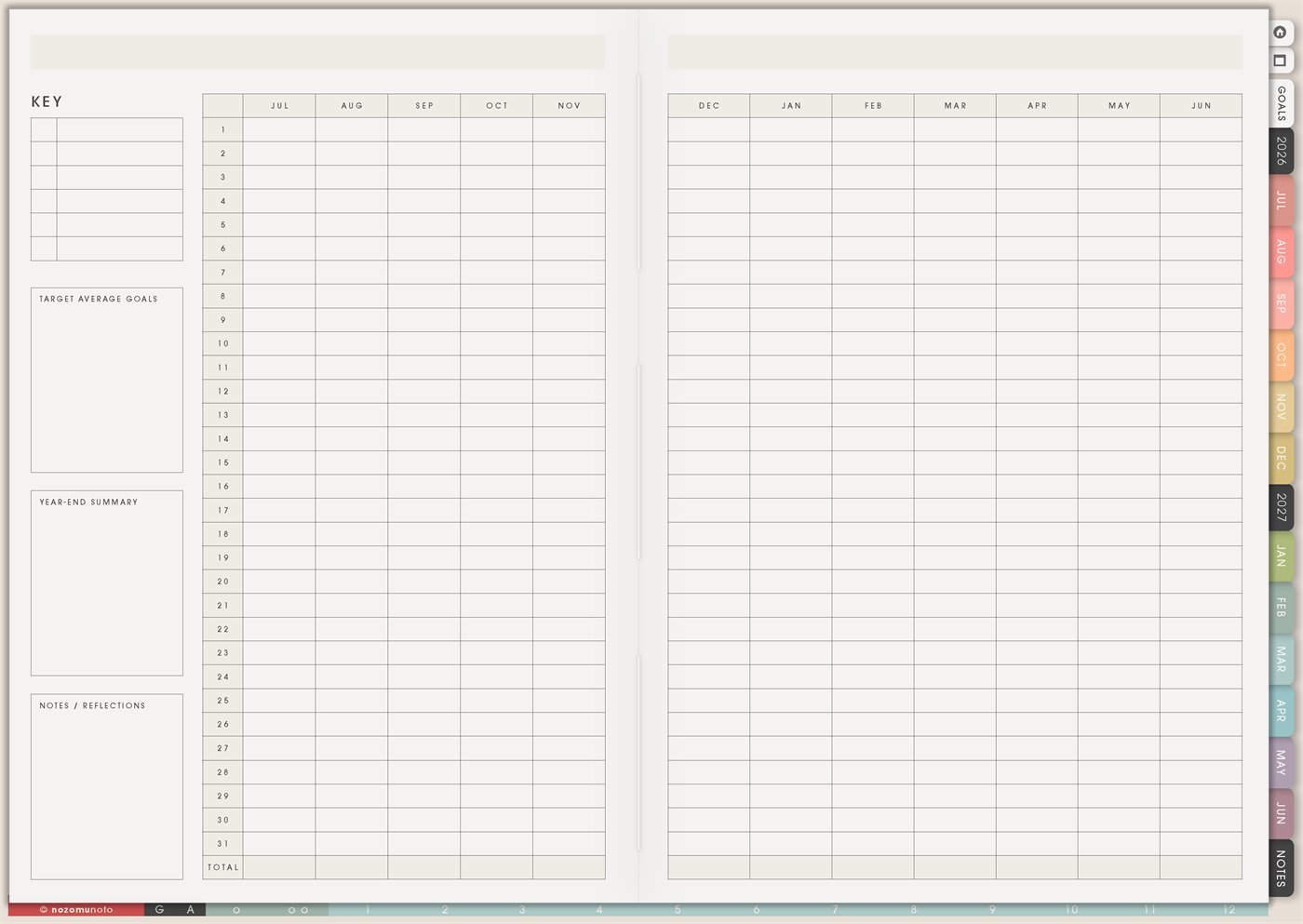
The Yume Techo Yearly – Day Month Tracker is a reusable template for tracking one daily pattern across the whole academic year. The days run down the side from 1 to 31, the months run across the top, and the side boxes give you space for a key, target or average goals, year-end summary, and notes/reflections.
This page is best for patterns that are too long for one monthly tracker: sleep, health rhythms, symptoms, study practice, reading, movement, money behavior, or planner-open days. Instead of judging one messy week, the tracker lets a longer pattern appear.
How to get to this page
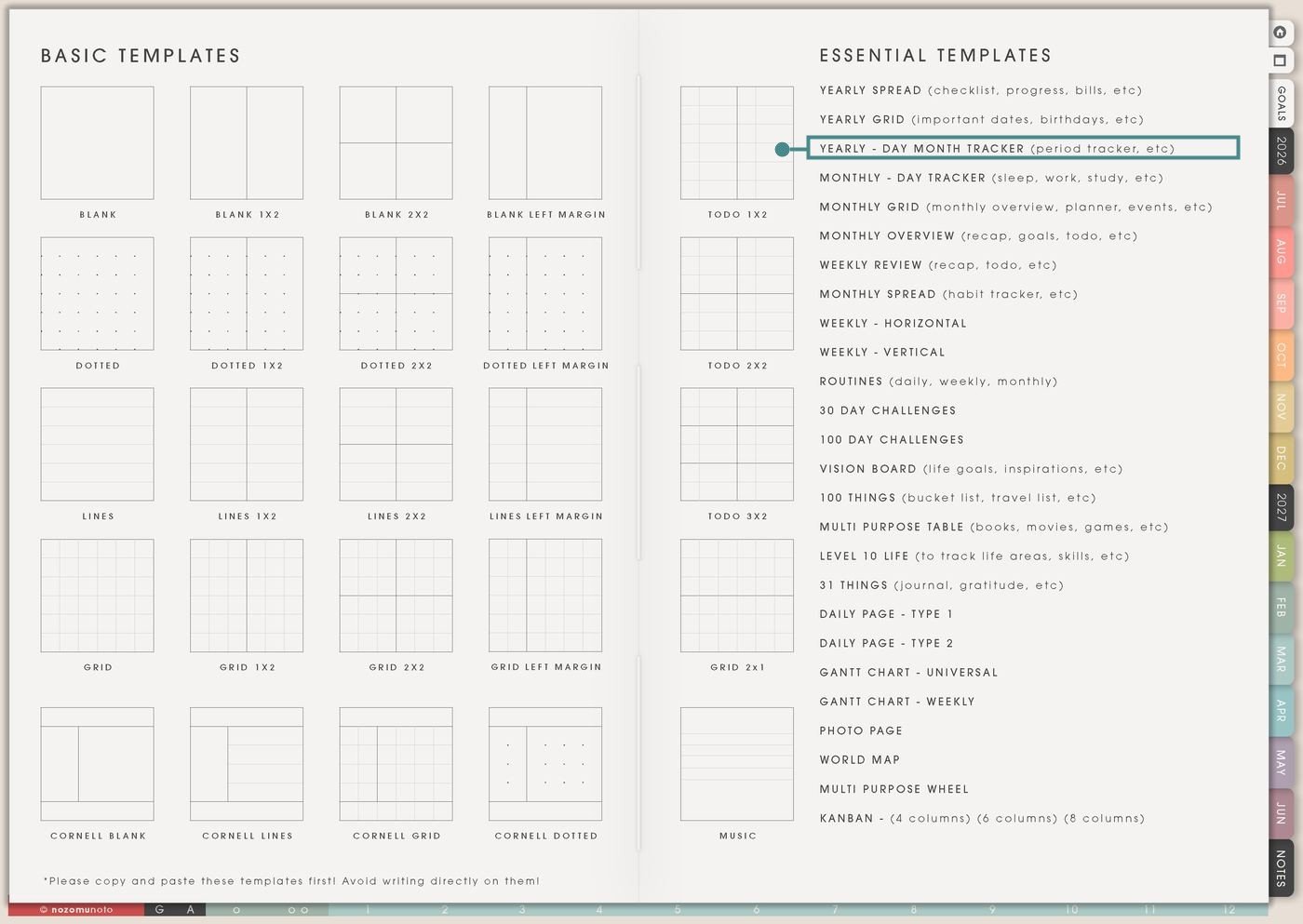
- Open the main Index page: use the planner Index if you need to return to the map.
- Tap the Template Pages icon: this opens the Template Index with reusable clean pages.
- Tap Yearly – Day Month Tracker: it is under Yearly Grid in the Essential Templates list.
- Copy the page before writing: this is a clean template master. Duplicate it first, then write on the copy.
Before you write: copy the clean tracker first
This tracker works best when each copy has one clear question. If sleep, mood, spending, workouts, and study all live on the same copy, the marks become crowded and the page stops answering anything clearly.
- Open Yearly – Day Month Tracker from Template Index.
- Duplicate or copy the page in your app. Use the page overview, thumbnail view, page manager, or page actions menu.
- Name the copy by the pattern. Examples: Sleep Pattern, Cycle Notes, Planner Open Days, Reading Practice, Migraine Log, Study Sessions, or Low-Energy Routine.
- Write a tiny key first. Choose marks you can understand later: check, dot, color, number, initial, or short word.
- Then track only that one pattern. If a second pattern matters, make a second copy.
Related Tips: Template Index ideas shows where the clean tracker lives, Yearly Grid ideas is better for date-only reminders, Monthly – Day Tracker ideas works for one-month experiments, and Routine page ideas for ADHD and low-energy days helps when the tracker is checking a repeated routine.
Ways to use this page
1. Sleep and energy patterns
I like this page for sleep because one bad week can feel huge, but a full-year tracker shows seasons. The key can stay simple: good sleep, okay sleep, poor sleep, nap, late night, early morning, or high-energy day.
2. Cycle, period, and body pattern tracking
This page can hold simple cycle or period notes because the days and months line up clearly. Short marks work best for flow, cramps, headache, energy, mood, or any body rhythm that is easier to understand across time.
3. Mood and emotional weather
For mood tracking, one small mark per day is enough. A short scale is easier to keep on tired days than a full journal entry.
4. Symptoms, migraines, pain, or flare patterns
I keep health marks very small so the tracker is possible on rough days. The purpose is timing and frequency, not a full medical record.
5. Planner-open days and reset habits
If staying with a planner is hard, track only whether you opened it. This makes the page encouraging because it counts returns, not perfect planning.
6. Workout, walking, stretching, or movement
Use the tracker for movement patterns that you want to see over a long season. The key can include full workout, walk, stretch, rest, sick, travel, or recovery.
7. Study, reading, or creative practice
This page fits practices where consistency matters more than exact scheduling: reading, language study, drawing, writing, music, flashcards, Bible study, or exam review.
8. Spending, no-spend, or money behavior
I keep money marks simple here: no-spend days, impulse spending, savings transfer days, bill-paid days, or business expense logging.
9. Routines and habit experiments
This tracker is useful for a routine you are testing across the year, especially if the routine may change with seasons, school, work, health, or family life.
10. Seasonal patterns and yearly reflection
Use the tracker to discover seasonality: busy months, low-energy months, high-focus months, travel months, migraine seasons, spending seasons, or months when planning feels easier.
What I usually use it for and how I use it
Tips for using this template
- Give each copy one question. One copy can ask, “How often did I open my planner?” Another copy can ask, “When did migraines appear?” One question makes the year-end answer easier to see.
- Keep the key tiny. Three to five marks are enough at the start. A plain key that gets used is better than a beautiful key that takes too much energy to remember.
- Let blank days be data. A blank day can simply mean skipped, unknown, or rest. Restart from today and let the pattern include real life.
- Add one monthly note. At the end of the month, write one sentence: what repeated, what helped, what made it harder, and what is worth trying next month.
- Make targets flexible. Use a normal target, a minimum target, and a recovery plan. For example: normal 12 walks, minimum 4 walks, recovery means stretch or rest marks still count as body care.
- Copy first, write second. The clean tracker is the reusable master. Write on a copy so the original stays ready for another pattern or another year.
Keep personal tracker details safe
Yearly – Day Month Tracker can include cycle notes, symptoms, migraines, mood, money behavior, work patterns, school patterns, family care, medical appointments, private routines, and personal reflection. Keep full medical records, clinic papers, account numbers, exact payment details, passwords, private addresses, client details, school files, and sensitive family information in a secure place outside the planner. In Yume Techo, use short labels that are safe to see at a glance, like migraine, rest, late night, bill paid, study, walk, or appointment cue.
Tips for using this page
- Choose the one part of this page that helps the current week instead of trying to fill everything at once.
- Move one small next action to Weekly or Daily so the page changes what happens next.
- Keep the page easy to return to by linking it from Index, favorites, bookmarks, or the related planner section.
Final thought
Yearly – Day Month Tracker is strongest when it asks one honest question for the whole year. Copy the clean template, choose one pattern, keep the key tiny, and let the page show what actually repeats over time. I hope this page helps the year feel less mysterious and gives you useful clues without making another heavy project!
Need exact app steps for copying pages?
If you need the exact buttons for duplicating, moving, or bookmarking this template in your app, use the Help Center app guide for your device.