

Reference links
Use these for current app or device help, downloads, updates, vendor support, and manual references.
Move the PDF into Supernote Documents
- Save the original NozomuNoto PDF on your computer, cloud storage, or phone first.
- Use USB, Supernote Cloud, Dropbox, Google Drive, or the Supernote Partner App to transfer the PDF.
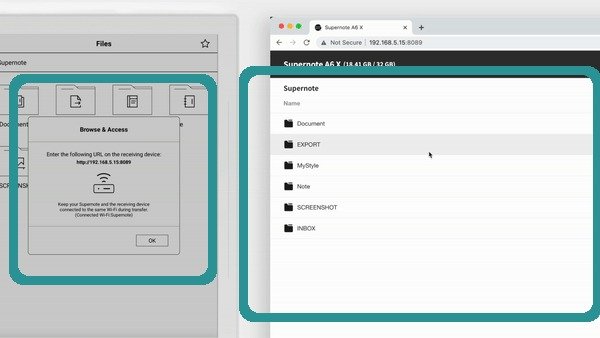
Supernote Wi-Fi TransferOfficial Supernote Wi-Fi Transfer walkthrough frame showing device transfer and browser file access. - Put the planner PDF in the Document folder or the file location your Supernote workflow uses for EPUB/PDF documents.
- Open the PDF from Supernote Documents and check the first page, index page, and one planner section.
- Keep the original PDF outside Supernote too, so you can transfer a clean copy again if an experiment goes wrong.